Showing posts with label Bing. Show all posts

How To Add Enhanced Sitelinks To Bing Ads?


Bing sitelinks


Bing Ads is the Bing equivalent of Google AdWords, where marketers and advertisers aim to capture the attention of potential customers searching for products or services online. We reported that Bing has just rolled out enhanced sitelinks worldwide for Bing Ads users. These enhanced sitelinks let advertisers add specialized links to their website within the ads, thereby creating a bigger and bolder advertisement to capture more user attention.


Today, we'll talk about how you can add enhanced sitelinks for your site to appear in ads.


What are Enhanced sitelinks?


Enhanced Sitelinks is a new format of Sitelink Extensions that allows you to add up to two lines of customizable, descriptive text to your Sitelink Extension. The result is a larger, more relevant and descriptive ad, and a more captivating ad format by which to attract your target audience.


Here's an example;
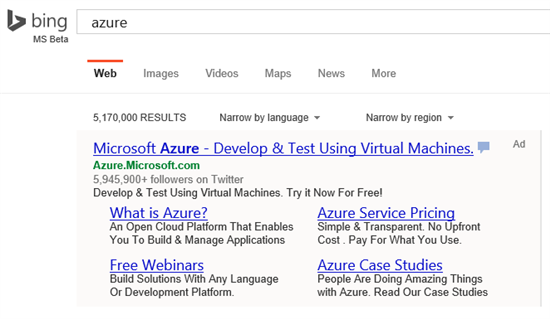


Enhanced Sitelinks example


Bing claims that after the introduction of this feature, advertisers in the U.S. have seen an average rise in click-through rate by 27%, going as high as 68% for some. This is a phenomenal statistic, and gives advertisers all the more reason to add enhanced sitelinks.


How to add Enhanced Sitelinks?


  • From your Bing Ads dashboard, go to the Ad Extensions tab and choose Sitelink Extensions
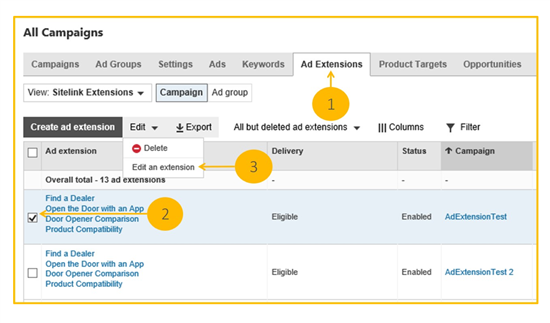


Bing Ads dashboard


  • Select the sitelink extension you want to add Enhanced Sitelinks to by checking the box on the left-hand side of your screen

  • Click on Edit an extension from the Edit drop-down menu

  • Click on the sitelink(s) you want to add a description to, and then write in your description(s)


  • You can also choose the Device preference by checking the Mobile box.  Bing Ads will give preference to those Sitelinks in mobile devices. Note that Enhanced Sitelinks is currently not supported in mobile devices.  You can select the Mobile preference without entering Sitelink descriptions

  • Click Save and repeat for other Sitelinks


Only high-quality ads serving in the top position in the ad block above the algo results will trigger Enhanced Sitelinks. Therefore, make sure you focus your efforts on high performing campaigns such as your brand term campaigns first.


If you have problems or questions regarding the addition of enhanced sitelinks in your ads, shoot us a question in the comments section below!

Now You Can Search For Information Within Microsoft Office!


Insights for Office


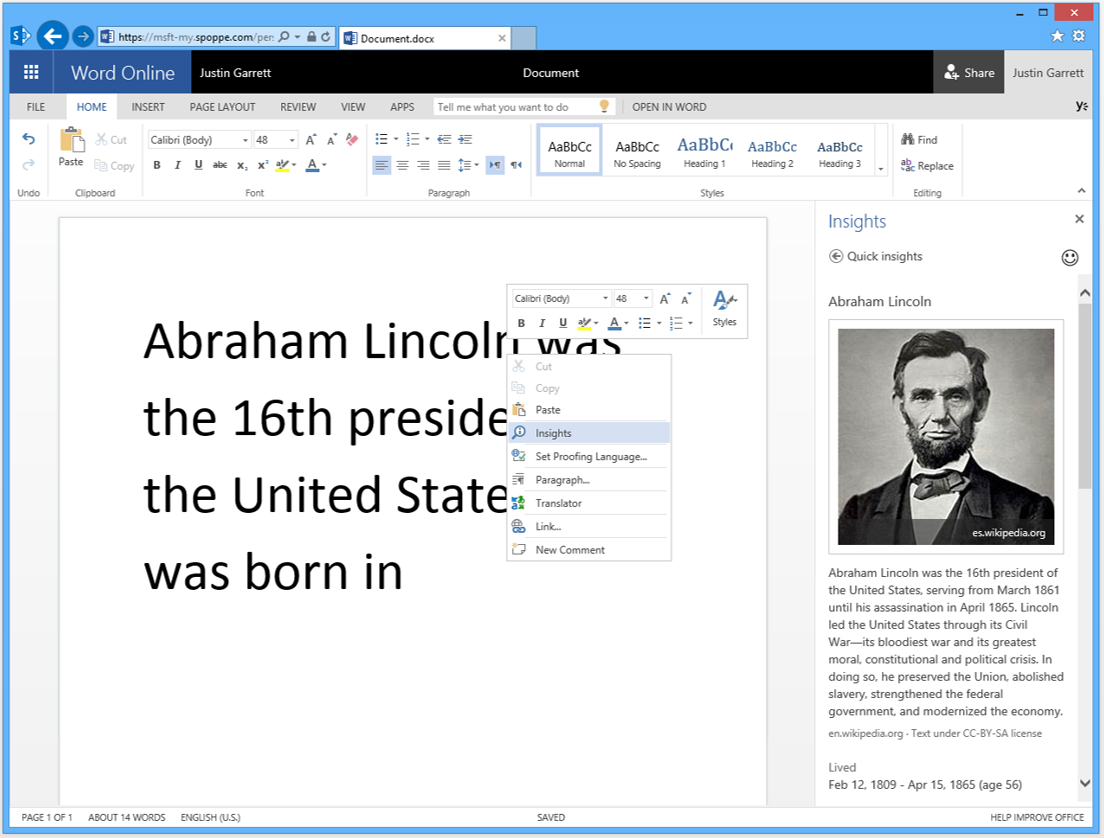
When it come to word-processing capabilities, nothing beats Microsoft's Word, not even Google Docs. The web version - Office Word Online - has just become more powerful with a new feature developed by the Bing and Office teams. Insights for Office is a more powerful way to search for information you need while working inside Office online. It is the perfect companion for Bloggers, authors, and content creators who make frequent use of online information to craft their content.


Microsoft has been upping its productivity game by developing solutions that provide usability to users. XBOX voice search, personal search with Cortana on Windows Phone, Bing Image Search in Sway Preview, and now Insights for Office are just a few examples.


Insights for Office


It is more than just a search bar for office. Imagine you're writing a piece on a famous personality, but don't actually know their bio details. Ordinarily, you'd have to open a browser, search for the person, and then load some particular website. Not a very streamlined work process.


One of the biggest constraints in web search is, the query is limited to a few keywords. Users don't type more than a few keyword, which in many cases can lead to inaccurate guessing on the search engine's part, since it does't know much about the user's intent.


The contents of a Word document, however, can provide a bigger picture for understanding the context behind a search.


That’s where Insights for Office is different. It can use the words from your entire document (or also those you select) to pinpoint exactly what you are looking for. With the help of this context, Bing is able to rank the most relevant result at the top. The results are also prioritized by relevance, including Snapshot, Wikipedia, Bing Image Search, and related web content to help find what you need.


Abraham Lincoln


An example is the word “Amazon” where research intent may conflict with commercial intent – search engines are typically more likely to rank {Amazon the online shopping company}, which is more popular on the web, as opposed to results like {Amazon river} or {Amazon jungle}. But if the document contains related context about the Amazon River, then clearly Amazon the company is not the right result regardless of its overall web signal.


Pretty neat, right? This feature will be available in Office Online in English to all markets in the next few days. You can try it for free here.

Now Make Hotel Reservations With Bing!


Bing


In a fresh bid to add more value to the search engine, Bing has added a new feature for making hotel reservation on Bing.com, along with some other nifty mobile features. So now when you're travelling, Bing can be your travel companion, and getting a place to stay should be one thing you can quickly check off your to-do list. Let's take a look at what Bing has been up to.


Hotel reservations


Bing, in partnership with TripAdvisor, has brought hotel booking to Bing.com for people in 22 countries.


Start by searching for a hotel on Bing. In this case, let’s take a look at the Westin Melbourne. On the Snapshot region of the search page, you’ll see more information about the hotel, as well as the ability to select your dates and get rates on TripAdvisor.


Hotel booking is available for people in the United States (in English and Spanish), Great Britain, Canada (in French and English), Australia, Japan, France, Germany, Mexico, Brazil, Spain, Italy, India, Russia, Austria, the Netherlands, Belgium, Turkey, Switzerland, Norway, Poland, Sweden, and Hong Kong.


Mobile features


Bing has also released a slew of improvements to the way that mobile search results show up. This is the first in a set of mobile optimizations you’ll be seeing over the next few weeks. Here’s some of what you can expect to see, along with the old experience for comparison:


Extra facts


Sitelinks


File types


What do you think of these new improvements to the Bing search engine? What would you say is the one biggest problem with Bing that if resolved, could move you to use the search engine more often? Leave your interesting responses in the comments section below!