Showing posts with label Marketing. Show all posts

5 Ways to Improve Your Online Shop

5 ways to Optimize your online shopMost online retailers spend time updating their marketing tactics and developing new advertising campaigns, but no amount of marketing can help when your website isn’t optimized to create the best possible user experience. If your online store could use a boost in efficiency and appeal, give it a makeover with these tactics. I am sharing today 5 smart tips that will help you better optimize your online eCommerce site to turn every visitor into a returning customer

Design for Simplicity

Visitors should know the focus of your site within seconds of arriving at the homepage. Get rid of unnecessary text and design the layout around your main product or service. Avoid overwhelming visitors with too many choices. Use a large header image or a series of scrolling images to showcase current promotions and popular offerings.
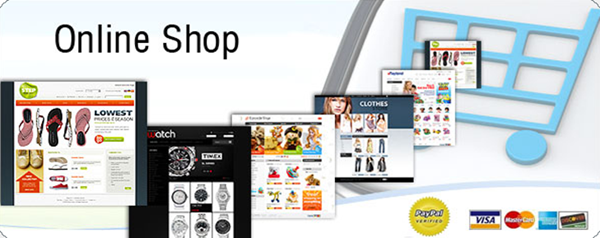
design for simplicity

Category navigation should be simple and intuitive and require as few clicks as possible. Place a search box in a prominent place on every page to give customers the option of going directly to the products they’re looking for. Product descriptions should provide all necessary information in just a few descriptive sentences, offering only what the customer needs to know before they make a purchase. Make sure that “add to cart” buttons are visible both on product pages and in search results.

Provide Useful Filters

When customers perform a search on your site, the results can be overwhelming if there’s not a way to narrow down the results. Create sidebar filters with options such as category, brand, price and color to help people find exactly what they want. Place “breadcrumb” links at the top of every page so that customers can easily click back to a previous category when browsing or searching.

web search filters for online shopping

Your goal should make it as simple as possible for visitors to find the products that they came to your site to buy. The modern consumer doesn’t want to spend time sifting through page after page of results looking for one specific item. If that’s the only option that you offer, customers will leave without making purchases.

Make It Personal

Every search gives you the opportunity to customize the shopping experience for your visitors. You can use what people are searching for to track trends and see which products are getting the most attention. This same information can be applied to individual customers in the form of tailored product recommendations. Many sites display products similar to those that customers are viewing to give them an idea of what others with comparable interests are searching for and buying.

Customers also like being able to adjust settings in their accounts to receive personalized product recommendations either while they shop or via email. This directs them right to products they find useful or entertaining and can serve to increase sales by prompting them to make purchases they might not have considered before.

Step Up Style with Flipbooks

If you want to give your product catalog a little extra flair, consider designing a flipbook and embedding it in your site. Like a paper catalog, flipbooks include images and descriptions of products that users can browse at their leisure. However, flipbooks can feature links, audio and video along with static images to provide a much more dynamic experience.
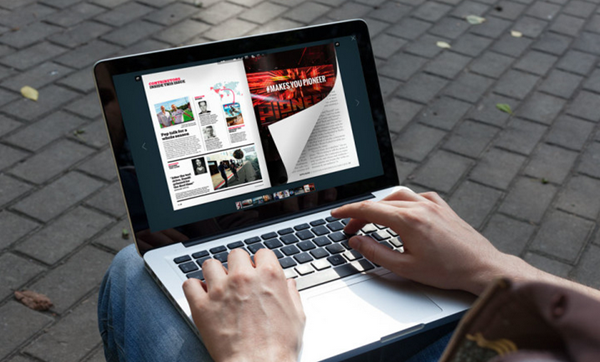
designing a flipbook

The popularity of tablets means that the majority of your customers will look at your flipbook on a device other than a computer. This means that features of your website such as cart access and checkout buttons won’t be visible and could detract from your ability to make sales. However, many flipbook creation services allow you to embed these features directly into the catalog to let customers shop for products and make purchases without having to navigate to your main site.

An online PDF to Flipbook Converter is a great way to expand your reach beyond the scope of your website. Include social sharing links both on the page where the flipbook is featured and within the flipbook itself to encourage customers to share their favorite products with friends.

Streamline Your Checkout

streamline your checkoutEven customers that arrive on your site ready to make a purchase can get to the checkout and decide to abandon the process. This usually happens when the checkout is too long, too complicated or requires the input of too much information. If possible, pare your checkout process down to a single page. If you can’t use a one-page checkout, make sure that every page has a list of the steps at the top and that the current step is highlighted so that customers can see where they are in the process. This makes multi-step checkouts seem less arduous and encourages customers to proceed from one step to the next.

Another way to simplify checkout is to offer a guest option for those who don’t want to create a full account. This cuts down on the amount of clicks necessary to complete a purchase and decreases the likelihood that customers in a hurry will abandon their carts.

Need Help?

If you need more help and assistance in better optimizing your online shops, feel free to leave your comments below and we would love to share our experience with you. Do let us know how did you find these tactics and how far you think such minor changes could bring a drastic change in your business. Would love to hear from you guys. :)

Designing a Successful Facebook Offer for your Brand


Previously, we have talked about a new feature released by Facebook recently called Facebook Offers. This feature lets you promote your brand by offering people rewards for visiting your website or your brand's physical location. Simple creating an offer, however, is just a start. To make it work, you have to utilize the maximum potential of your audience by designing a successful offer, and keeping the basic Facebook marketing tips in mind. And since you're spending money on creating offers, you have to be extra careful, as a slight mistake might result in a loss for your business. Here, we'll discuss some tips for designing a successful Facebook Offer.


Offers can be a game-changer, but only if placed correctly. Every business has different type of customers. So it's always a good idea to experiment with what offers work best for your customers. If they do not understand your offer, or if they think it's a scam, they might unlike your page. So to keep things smooth, here are a few tips you should keep in mind.


Make it easy to understand


The most important part about an offer is its simplicity. If it's easy to understand, then a lot of people will do it, just for the sake of participating. But if the process is complicated, and makes users go through an unusual activity (such as signing up for something), then that will substantially reduce the number of people who participate. So make the process simple, and explain your Terms of Service in simple words as best as you can.


Discount offers


Make your discounts substantial. No one is gonna bother if you're giving 5 or 10% off on a t-shirt. Generally, discounts become notable and intriguing at 20%. You can also offer free items, as in 'Buy one, get one free'. But at the same time, make your discount believable. If I see an offer on my Facebook home saying 'Click here and get a free iPhone 5', I'll probably flag that story as scam. Make no mistake, business do hand out such lavish gifts. But you've gotta have some reputation before you make such a bold step. For example, everyone seemed to believe in it when Redmondpie decided to give away two free copies of the latest Windows 8.


Discount offers


Use a good image


Most of the time, products sell better if other people see a customer using it. So it'd be a good idea to use an image that shows your product in action, rather than just a logo image or an image with just your product on it.


Pay attention to your headline


Your headline is one of the most important things. Make it engaging, and yet keep it natural. Caption it as if you're talking in the real world, and as naturally as possible. Don't excessively capitalize, and don't use extravagant words. Keep it simple, and easily understandable, while at the same time making the purpose crystal clear.


Expiration date


Set up a reasonable expiration date. Don't make it end so soon that most people would miss it. And don't set it too far away, or it'll lose a sense of urgency. It depends from offer to offer, but around a week or two sounds realistic.


Promote!


Spread the word! Share your offer with the world. Re-share your offer as much as possible, and encourage others to do so too. Share on other social networks such as Pinterest as well, so maximum number of people might access it. Usually, word-of-mouth-marketing works like a charm in such situations.


Promote


Those were of the basic tips you should keep in mind while creating a Facebook offer. Such offers can mean a lot to your business, but only if done correctly. Hope you understand these points. See you soon in the next post. Peace :)

How To Add Barcode and Redemption Code For Facebook Offers?


Yesterday, we talked about a latest marketing and advertising feature introduced by Facebook called Facebook Offers. Facebook Offers let you promote your brand or products by giving out rewards to people who visit your website or your brand's physical location (office, store etc). These rewards can be anything, from an ebook to a small gift hamper to an entry into a lucky draw for a larger prize. It is the next step in Facebook marketing, and you can be one of the first ones to make use of this feature. We have already talked about what Facebook Offers. Today, we'll talk about the different types of offers, and how to add Redeem codes or Barcodes for people to be able to redeem your offers.


Types of offers


There are three basic types of offers.


  • In Store Only - Can only be redeemed by visiting your brand's physical location (store, shop, office etc)

  • Online Only - Can only be redeemed by visiting your website

  • In Store and online - Can be redeemed both ways


For Online redemption, you will need a redeem code, which can't be used In Store Only. Similarly, barcode can only be used for In Store, and not online.


Adding a barcode to your offer


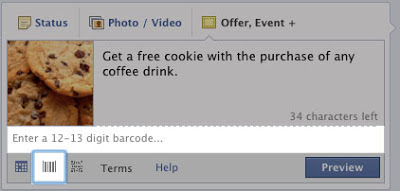
Barcodes can be added when you create an In Store offer. They can be scanned easily, and then used to redeem your promotion or discount offers. To add a barcode, click on the barcode icon () once you've entered a headline for your offer.


Barcodes


Add a barcode here. You can enter a 12-digit Universal Product Code (UPC-A) barcode, or a 13-digit EAB barcode (click here for the Wikipedia article on barcodes). Make sure you format the number properly. Preview the barcode to see how it looks, and make sure it is readable. Most smartphones nowadays can scan barcodes through the use of an app if they have a camera with focus. People will be able to scan this barcodes right from their smartphones.


Adding an online redemption code


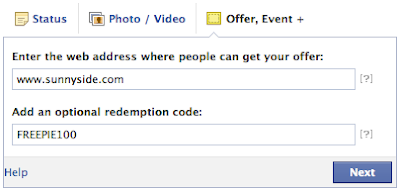
Adding an online redemption code is easy, If you want people to enter a code on your website to receive a discount, then choose an Online option. Create your offer as discussed in the previous post.


Redemption Code


Enter the web address where people can get your offer, and add a redemption code (max 50 characters). Click Next, and you're done.


How does it work?


When someone claims your offer, they get an email with detailed instructions on how to redeem the offer, along with barcodes and/or redemption codes. They will also get your terms and conditions with the expiration date included.


(Please note that these barcodes and redeem codes aren't designed to prevent people from redeeming your offer multiple times)


Have any questions in mind? feel free to ask. We'll be obliged to help :)

Facebook Offers: How to Create an Offer for your Fan Page?


Facebook Offers


Facebook has just recently launched a new feature for brand pages: Page offers. Page offers are basically rewards for your audience or customers who can claim them by visiting your store or online website, and also share with their friends. Not only does this engage your current customers or audience on a new level, it also extends the reach of your service or brand. Offers require a budget to run, but could worth be the investment your brand has been in need of. So let's take a look at how you can create offers, and what you can do with them.


There are basically three types of offers. In Store Only, Online Only, and In Store and Online. In Store Only can only be redeemed by customers visiting your brand's physical location. Online Only can only be redeemed by visiting your website, and In Store and Online can be redeemed in both places.


Getting started


Go to your Facebook page, and look at the sharing tool (from where you publish new posts). Click on  Offer, Event +, and then click on Offer. You will now get to choose from among the three types of offers we just discussed. For online offers, you can set a redeem code, and for In Store offers, you can set a bar code. We will be talking in detail about the bar codes and redeem codes in our next post.


Now its time to fill out the details. Think of a strong headline for your offer, such as "Buy one get one free" (or something of the sort). Also upload a photo for your offer. And select a limit for the number of offers. You can either restrict it to a limit, or make it unlimited.


Next come the Terms and Conditions. Every offer has its terms and conditions, right? You can set your own by clicking on Terms, and typing them out. You can also set an expiration date by clicking on Today and clicking on a future date.


Now you're almost done. Just click on Preview, and see if it looks all right. If so, then move on to the next step.


Cost and budget?


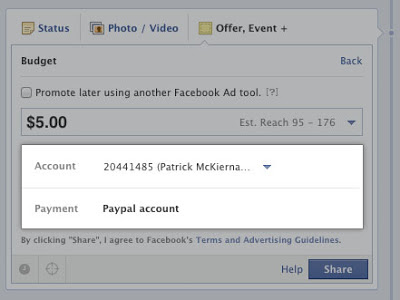
Running offers require a budget. Generally, the more you pay, the more reach you have, and the more people can access your offer. While creating an offer and adding a budget, you can click on More Options to see what payment methods and advertising account you are using.


More Budget Options


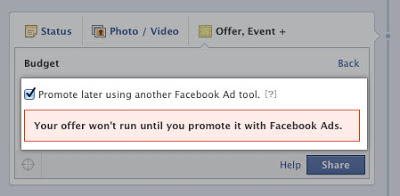
While creating an offer, you can choose from among some suggested budgets, or set a custom budget from the Ads Manager by checking the option Promote Later Using Another Facebook Ad Tool.


As mentioned, your reach will depend on your budget. This is the number of people who see your offers in their news-feed. More budget means more people will be able to see it. You can see your reach automatically when setting a budget.


How does it work?


Well, offers are pretty simple. People get rewards for visiting your website, or your brand's physical location. When someone claims your offer, they get an email with detailed instructions on how to redeem the reward. The email will also include a Redeem code or a Barcode, and the Terms and Conditions of that offer along with its expiration date.


What products can be promoted


As far as Facebook is concerned, you can post offers for promotions of any products. But be mindful of the law in your area, and whether you are legally allowed to promote them. Keeping that in mind, you can promote anything, even alcoholic products and pharmaceutical drugs etc.


Any problems?


Are you having any problems with creating offers? There's one thing you should know. You can't post an offer if your page has less than 400 likes. And if you change your mind, or if there's a problem with your offer, and you want to stop it, you can simply do that by deleting the offer post from your Page's timeline! Simple!


If you have more questions, feel free to ask. We'll be covering bar codes and redeem codes in the next post, so stay tuned. Also, make your comments below and tell us what you thing of this latest Facebook Marketing feature? Peace :)

Top 5 Free Online Meme Generators


Y U No Make Meme?

It's a fun weekend, this, and we have been sharing some useful and fun tools while at it! So here's our chance to go a little bit further! We know you all use Facebook, and must have seen those rage comics and fun memes circulating around faster than wildfire. Funny, comic images on Facebook, in simple words. The word 'meme' comes from a Greek word meaning to copy something. A meme is usually viral, and spreads around from person to person, much like a virus. On social media, these fun memes are much like viral videos, only, much more viral, because they're easier to watch, and people like them.


So you've got an idea for a funny comic or meme? Here' we will share the top 5 sites where you can create your very own memes and trolls for free, share them on social media and see them go viral all over the world!


The more observant among you might be wondering, why has this post been filed under marketing? Well, don't think it's a mistake. Indeed, images are a great help when you're marketing your brand. They spread faster than anything else. When someone likes an image on Facebook, it appears on his friends' news feed, hence giving your image more exposure. And images are easily scan-able, especially comics, which the people like, and pause on particularly. Hence, it's a great marketing strategy to upload memes that are fun, and related to the products/service you deal with.


Top 5 online Meme Generators


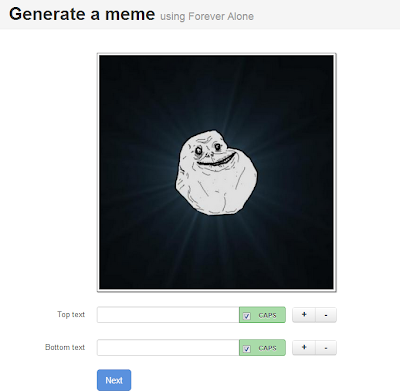
All these meme generators work much like each other. You pick a basic meme, add a caption or words, create meme, and then share it on social media. Some will give you the option to download the image. But it's easier to just share the memes right away. So here goes our list of the top 5 meme generators you can use for free.


1. Meme Generator


Create all sorts of memes, or create your own custom character using this advanced Meme Generator.


2. Rage Generator


A tool dedicated to making rage comics that involve a short story line


3. DIYLOL


Another great tool for generating any meme, just like Meme Generator


4. Quick Meme Generator


5. Meme Crunch


Meme Crunch


There you are, with a list of top 5 meme generators. They minimize the image editing tasks for you, leaving you free to use your creativity and create some great memes to share with the world online. We did our part, now it's your turn to tell us about any good meme generators, and also, which do you think are the best? Troll away! Cheers :)