Showing posts with label blogger adsense. Show all posts

Google Adsense In-Feed & In-Article Ads Update - Boost Adsense Earnings

Google Adsense is frequently improving and letting publishers use their new ad types. Recently Google Adsense updated "Matched Content" New Adsense Ad Unit which is like a related post widget and is really useful because it not only makes you money but also increase your page views.
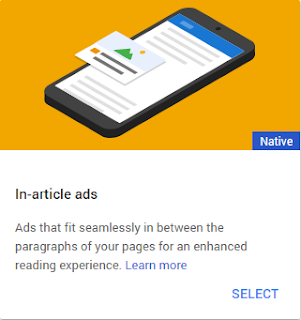
Now Google Adsense have updated in-feed and in-article ad types which are also good and will improve your earnings. First let me tell you something about In-Article adsense ad unit.
in-article-adsense-ad-blogger

Google Adsense In-Article Ads:

These are actually native ads and they are specially for articles as indicated by their name. This ad type is good for those blogs and website which have articles about something and because of their great look these ads will improve earnings. Here is a demo of Google Adsense in-article ad.

google-adsense-in-article-ad

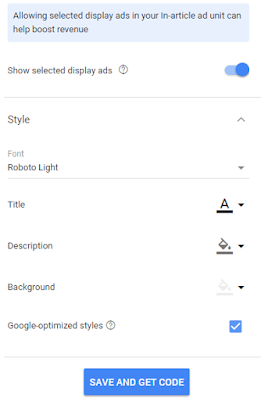
In-article ad is a responsive type of ad so you can't decide its width, it will adjust itself on its own. There are many options to customize ad look. You can see these options at the time of adding this ad.

Also you have option to "Show selected display ads" in the Global options section in your adsense account which allows you to to show selected display ads which can help you boost your earnings. Google decides which ads will be best for your blog or website. Here is a screenshot of customization options:
how-to-customize-in-article-adsense-ad

Adding this add is simple and exactly same as "Matched Content" New Adsense Ad Unit. To add Google adsense in-article ad in your blog's post go to your blog edit a post, switch the editor to HTML and paste the ad code where you would like the ad to show.

 Read More:  How To Put Ads Inside Posts In Blogger 


Google Adsense In-Feed Ads:

This is I guess best ad unit for smart phone and tablets devices. And it is a good ad unit to get more clicks on ads from mobile traffic. Comparing with In-article ad unit In-feed ad unit has four different types and it comes with more customization options. Take a look:

1. Image Above In-Feed Ad:


2. Image On Side In-Feed Ad:

image-on-side-in-feed-ad-unit-blogger

3. Title Above In-Feed Ad:

title-above-in-feed-ad-unit-blogger

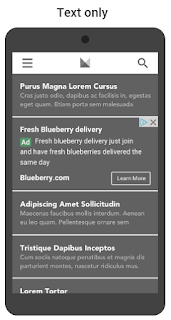
4. Text Only In-Feed Ad:

text-only-in-feed-ad-unit-blogger

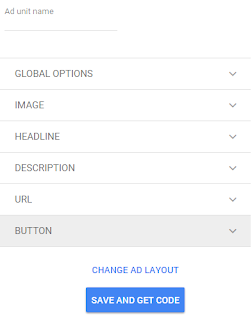
All these ad units comes with same customization option which are shown in below image.
in-feed-google-adsense-ad-cusomize-options

You can add these ads in your posts as well as in the layout above or below your post. I recommend adding in between posts to get more clicks.


 Read More:  How To Put Ads Inside Posts In Blogger 

 Read More:  How To Show Ads Below/Above Post Footer And Header In Blogger 

I hope you found this post helpful, read more from below for Google adsense tutorials.

Thanks for visiting 101Helper. Share this post with others!

Search keywords: Google adsense in-feed & in-article ads, increase,boost adsense earnings,get more clicks on adsense ads,ad units for mobile site,make money online blogging,101helper

"Matched Content" New Adsense Ad Unit - Boost Your Earnings


This is my another post about Google Adsense and I am happy to announce that Google Adsense has a new ad unit that is "Matched Content" ad unit and it is a great opportunity for Adsense publishers to boost their Adsense earnings plus it has some more great features that will surely impress you and you will start using this ad unit.

Here is a screenshot of this ad unit:

matched content adsense new ad unit blogger

You can see that it looks similar to Related Posts Widget and thats the special thing about this ad unit that you can not only recommend your posts but also show adsense in between them and these ads are native so Google finds most similar posts of advertisers and show them in your ad unit and people click these ads because these ads are native and they are of their interest.

So you can say that this ad unit is simply amazing and best way to boost your Adsense earnings as well as increasing page views. Also after adding this ad unit you can remove your related post widget because it works as related post widget and ad server.

Before showing you how to install this ad unit let me tell you that this ad unit is not available for every Google Adsense user, to know are you eligible for this ad unit go to your Adsense account and create a new ad unit, if matched content ad unit option is there then it means you can use this ad unit.

Eligibility to use Matched content

Depending upon your site traffic your site may fall in one of the following categories.

1. Not eligible - Your site doesn't have a minimum requirements for traffic volume and number of unique pages.

2. Eligible but can't show ads yet - Your site have a minimum requirements for traffic volume and number of unique pages but still needs improvement.

3. Eligible and can show ads - Your site have our minimum requirements for traffic volume and number of unique pages, and it can show ads.

Step to check if your site is eligible for Matched content:

1. Go to Google Adsense and login to your account.

2. Go to settings > my sites > Matched content

Or

2. Go to my ads > create ad unit > Matched content ad unit.

Read more about Match content feature at Adsense Help Center


How to Install "MATCHED CONTENT" Ad Unit In Blogger Blog ?

1. Go to Google Adsense and login to your account.

2. In the right side bar click on My ads and create a + New ad unit.

how-to-add-matched-content-adsense-ad-unit-in-blogger

3. Select Matched content ad unit.

how-to-add-matched-content-adsense-ad-unit-in-blogger-blog

4. Customize your ad unit, you can change style of ad unit and also change size of ad unit. There is a preview available!

how-to-customize-adsense-matched-content-ad-unit

5. Copy your ad code:


6. Place it where you would like to show your matched content ad unit.


Tips for placement:

1. Place your matched content unit below your articles.

2. Place your matched content unit in sidebar.


How To Install Ads In Sidebar ?

How To Show Ads Below/Above Post Footer And Header In Blogger ?

How To Show Ads In Mobile View In Blogger ?

I hope you found this post helpful. If you have any question ask me in comments. Thanks for visiting 101Helper.

Search tags: adsense matched content ads blogger,wordpress,website, how to get matched content ads in google adsense account, how to get eligibility for Google matched content ad unit, earn money from adsense tutorials 101helper.

How To Add Overlay / Interstitial Adsense Ads in Blogger Mobile Site

how-to-add-overlay-interstitial-ads-in-blogger-mobile-site

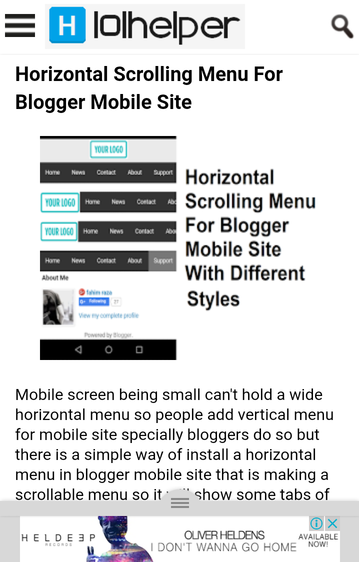
Adsense being compatible with mobile sites lets you to add ads in mobile site and its really important to add Adsense ad units in mobile because it increases your earnings effectively and massively. So to increase your Adsense earnings you need to install special ad units which will fit mobile screens and help you to get more clicks and increase CPC earnings. You can see a demo of floating Adsense ad unit in below image.

how-to-add-floating-adsense-ad-in-blogger-mobile-site

This Adsense ad unit can be hidden by tapping and pushing it below and its best for those Adsense user who have more mobile traffic.

So in this post I am going to show you how to install Floating Adsense Ad unit in blogger mobile site.

Ad Types And Description.

1. Anchor/overlay ads:

overlay-ad-adsense

Description By Adsense:

  • Shown by AdSense at optimal times to help increase revenue and provide a good user experience

  • Don't count as advertisements as part of our valuable inventory policy

  • Only show on high-end mobile devices

2. Vignette/Interstitial ads:

pop-up-adsense-ad

Description By Adsense:

  • Shown by AdSense at optimal times to help increase revenue and provide a good user experience

  • Don't count as advertisements as part of our valuable inventory policy

  • Only show on high-end mobile devices

  • Limited in number to maintain a good user experience


How To Add Floating / Hover Adsense Ad in Blogger Mobile Site?

Step 1: Go to Adsense and Login.

Step 2: Click on My Ads and choose Page-Level ads.


Step 3: Enable both Anchor/overlay ads and Vignette ads.


how-to-add-adsense-ads-in-blogger-mobile-site

Step 4: Get your ad code.

how-to-add-ads-in-blogger-mobile-site

Step 5: Go to layout and click on add a gadget.

Step 6: Choose Html/Javascript and paste your ad code.

Step 7: Save the gadget and read How To Show Ads In Mobile View In Blogger for further steps.

I hope this post helped you, if you have any problem regarding this post, leave a comment or contact me.

Thanks for visiting 101Helper.

Search Keywords: How To Add Floating / Interstitial Adsense Ad in Blogger Mobile Site, how to enable anchor ads in blogger mobile, Google adsense interstitial ad,anchor ad,floating adsense ad mobile site,push ads in blogger mobile.

How To Increase Google Adsense Earnings - Boost Adsense Revenue

timprove-google-adsense-earnings-money-101helper

Google Adsense is a strict ad network thats why its approval, making money with it, maintaining it is not easy. You need to keep focus on wrong clicks, right clicks, traffic, code placement and modifications and also you need to check that your ad code should not be on other sites. You should use your Adsense account with very care otherwise you will get banned. So to increase your adsense earnings you need to work in such limits that your earnings are increased without getting banned. So in this post I will tell you how to increase adsense earnings without getting banned.

1. Adsense For Search:

adsense-ads-search-increase-earnings

Install Google custom search box in your blog and enable adsense ads in your search results. Now when someone will make any query using your search box he is going to see ads along with search results and there are 100% chances that people will click your ads because these ads are relevant to made query.

How to setup google custom search box in two pages in blogger ?

2. Youtube Ads:


youtube-adsense-ads-101helper

If you have youtube videos, enable ads for your videos. Each of your video will show a skipable ad on every view and there are very positive chances that you will get clicks on these ads. Other ads are also show on the videos.

3. Ads In Posts:


Enable ads between your posts and add ads in between posts which are popular. How to add ads between posts in blogger

4. Text Ad Units


If your content is readable and you have many readers then use text ad units in between posts. For instance if you have a blog about song lyrics or any stories  or education and people read your posts from top to bottom then text ads will be best for you because Google will show relevant ad text and people will click your ads.

5. Number Of Ads Per Page:


So far Google allowed only 3 ad unites per page but now Google allows unlimited ad units per page so you can place as many ad units as you want but don't use ads in such positions where people click your ads mistakenly.

6. Ad Positions On Page:


Place your ad units in positions where all the visitors are able to see your ads even if they don't scroll. For example a big Leaderboard below header.

7. Ad Sizes:


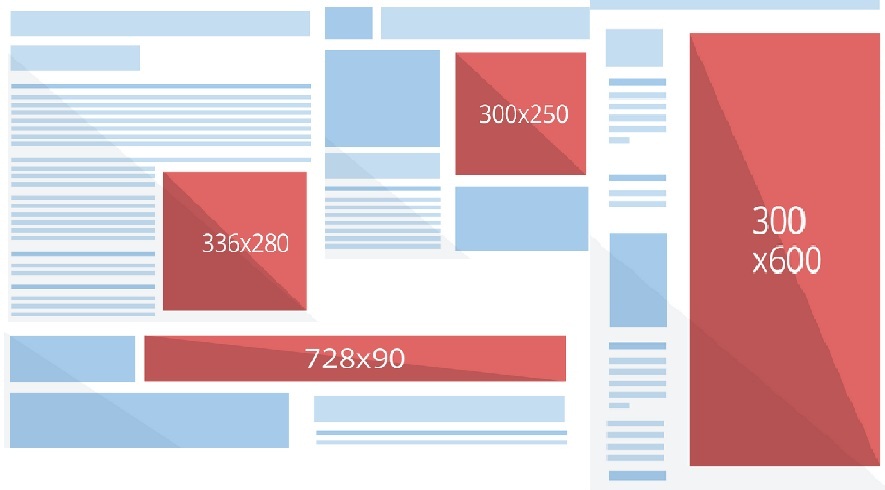
Google says that wider and bigger ads perform better. The sizes found to be most effective by Google are:

160 X 600 wide Skyscraper
336 X 280 Large rectangle
300 X 250 Small square
728 X 90 Leaderboard

best-performing-ad-sizes-google

8. Ads Theme:


Google has many ads themes, choose a theme that match your site style.

adsense-ads-style-google-revenue

9. Adsense for Mobile:


If your mobile site is getting at least 200 views weekly then you must enable Google Adsense ads for mobile site. It will boost your revenue because Google ads in mobile show relevant mobile apps and people download these apps so you get paid for that.

AdSense-Page-level-ads

I hope above tips will be helpful, if you have any suggestion do share it with me in comments. Thanks for visiting 101Helper.

Search tags: increase adsense earnings, Ways to Increase Your AdSense Earnings, boost adsence revenue, get clicks on adsense ads tips, How to Increase AdSense Earnings, make money online with google, make money with adsense


How To Get Approved Adsense Account With Blogger

how to get approved google adsense with blogger

I have shared many ad networks for publishers along with whole method of how to sign up, implementation of ads and boosting earnings but today I am going to share something most amazing and searched by bloggers and other publishers, its Google Adsense. It doesn't need any intro everyone is aware of Google Adsense. The thing which is most liked by publishers is high rates and best services which makes Adsense on top of all ad networks and thats why all bloggers and other publishers wish to have approved adsense account to earn good money. But as its the best ad network it is strict too because it provides better services to its advertisers. It doesn't tolerate any violence against its policies in order to provide best services to both advertisers and publishers.

That's the reason why it strictly analysis sites to be approved. Especially in countries like India and China Adsense is very strict because many spammers get approved accounts by certain tricks and sell them for fast earnings. So its harder to get approved adsense account.

However with blogger it is a little bit easier to get an approved adsense account. Though it is called hosted adsense account but still its good if used with care(no policy violations). So in this post I am going to give u some tips to get an approved adsense account.

1. Blog/Website Traffic:


The first thing you need to focus is traffic. How much your daily traffic is? where it comes from? these are the things which matter in case of traffic. Every ad network pay good when you have good traffic but adsense pay much higher rates even your traffic is not too huge but organic. So you need to focus on traffic of your blog.

Steps to improve blog traffic:

Search Engine Optimization:

Improve your traffic by optimizing your blog for search engines to get real unique views.
  1. Add meta tags to your blog
  2. Enable search description for every post
  3. Use best keywords that match your content
  4. Optimize blog title
  5. Use webmaster tools - BING, GOOGLE, YANDEX.
Social Sources For Traffic:

Get your site shared on social networks for example in facebook groups, Google communities, Twitter, reddit, stumbleupon.

Guest blogging:

Write posts in other blogs and get backlink from them. It will drive some traffic to your site and give u backlinks too.

2. Search Ranking And Social Profiles.


Improve your search rankings and create social profiles and share every post of you on your social profiles. To improve search engines rank built quality backlinks and focus on seo.

3. Content:


Google like text posts more then just images. It doesn't mean that you start writing long and long posts that once read by a person would never come back to your site, he will search for short, meaningful posts. Too long post are not liked by people so write a great content and meaningful content no matter its not long. Google emphasizes more on meaningful content rather than on long content, here is the statement that google always use:

"Write a content that is meaningful so that people have a reason to visit your site"

So above statement clears that your content shouldn't be long but meaningful so that it could be good enough to bring visitors to your blog.

One more question that many Adsense appliers ask is how many posts should I write to get my Adsense account approved and the answer is simple, you don't need to write 200 or 500 post and all should be long stories, absolutely not. You can get your Adsense account approved even with 50-80 posts but your posts should be meaningful enough to receive traffic. So its all about traffic!

Content that is prohibited by Google:

1. Pornography/Adult content.
2. Illegal content e.g drugs.
3. Hacking content.
4. Violent content.
5. Copied content from other sites.


4. Site/Blog design:


1. Loading speed:

Make your site load fast because it is a part of user experience. If user experience is not good you can't get Adsense approved!


2. Navigation:

It is also recommended to have a good navigation so that visitor could easily find what he's looking for. A floating menu and search box would be a good choice!

3. User experience:

Keep focus on user experience, your site design shouldn't disturb the visitor. For example any pop-up that pops up again and again or alot of slideouts asking for email subscriptions.

Mobile site should also be free of such things which affects user experience specially pop-ups. If your mobile site have pop-ups remove them as soon as possible otherwise Google is going to penalize your site.

Beware of Google's mobile site pop-up penalty

5. Third party ads:


You don't need to remove all your third party ads and lose whatever you have earned. Though you need to remove all the ads when you are applying for adsense and once approved you can install the ads back but these ads should be compatible with Adsense!

Pop-up ads should be removed before applying to Adsense and you can't install them after approval otherwise your Adsense account will get banned because Google hates pop up ads.

6. Comply With Google AdSense Policies:


Your site should comply with Google Adsense policies. According to Google Adsense policies:

1. Your content should be legal(no pornography, no violent content, no gambling content etc).

2. Your site should not violate any copyright policies(copy paste content).

3. Traffic sources of your site should not include PTC sites, Fake traffic from any software or traffic exchange sites, Traffic from unsolicited mass emails.

Read more at https://support.google.com/adsense/answer/48182?hl=en

7. Important Pages:

Your blog should have pages like contact pages, privacy policy, disclaimer, about, sitemap.

Conclusion

With all the above things you will get your adsense account approved. In case of failure don't lose hope try again after some time but keep in mind that without good traffic e.g minimum 400 views per day you can't get adsense approved and if you get adsense approved with low traffic by some trick then it will not be good because you won't get aby benefit of it because you would not have any real traffic and thats why you will not earn good.

Also an adsense account got approved with tricks will be more prone get banned. So avoid these things!

Search Tags: get adsense account approved blogger,blogspot,make earn money with adsense, adsense,make money with adsense,increase adsense earnings,more clicks on ads