Showing posts with label Video. Show all posts

Google Strict Penalty on Sites that Sell Links To Pass PageRank


Note: This post is recommended to all readers and must be read word by word for your own benefit.


Were you fortunate enough to achieve a PageRank 3, 4 or higher? If yes then you might be receiving several emails in your inbox from link building companies that wish to pay you up to $100-$200 for a link on your blog post. I am sure its excites you greatly when you find such a great opportunity to make some free bucks. But wait! Google's web spam Head Matt Cutts has just announced on Webmaster Central blog last Friday that a strict action will be taken against websites and blogs that sell links for the sole purpose of manipulating Search engine ranking and passing PageRank juice.


About Google's penalty on selling links


Ever since 2003, when the practise was relatively less rampant, Google has been warning against selling links in its quality guidelines. Now you have to realize, that the whole reason Google controls more than 65% of the search game is that the results returned are fairly accurate. End users want accuracy. And if they don't get it, they'll have no problem migrating to another search engine. So it is only fair that Google doesn't want you to sell links, because doing so would put Google's business in jeopardy.

Google Penalty


When you sell links to pass PageRank, you can hurt the accuracy of search results. False popularity from links that are not based on merit hurt the integrity of search results. Also, gaining an unfair advantage is uncalled for, especially when there are so many other hard workers toiling for their websites. Hence, Google reserves the right to protect its index by 'banishing', or penalizing websites that violate its terms and conditions. This, in fact, isn't a Google related problem. Every major search engine would want to get rid of this practise for the best of its interest.


Does this effect the PR process?


A very frequent question asked in this regard is, whether or not this practise effects the PR of some websites? Well, the answer is, yes it does. If you saw a website getting a low PR, even if it had good content, then more often than not, such websites are selling links, which is not easily observable to the casual observer. But search algorithms can decide within seconds when a link is paid. And hence, such sites get rewarded accordingly.


So, what should you do in such cases?


So what should you do about these paid links? There's a very simple solution. Links like these need to be pointed out via a rel="nofollow" tag. This tag tells the search engines not to follow this link. Usually, link buyers won't buy nofollow links. If they don't, then there's not much you can do about it, unless you want to give them a link, and end up getting penalized in the process.



What to do about paid links?


But what to do if you get penalized? Luckily, Google gives you some wriggle space to get yourself out of sticky situations like this. You can file a reconsideration request to Google. But first, make sure you meet all of Google's quality guidelines, and remove all paid links before applying. Check out more by following the link below, where we have discussed this topic in great length.


How about paid ads?


Google is not against paid advertisments. You can totally use this method of linking to get targeted traffic. In fact, Google itself supports the practise, and even approves of other non-Google advertising programs. All it asks for is that you disclose such links to search engines.


Now bear in mind that Google is not trying to tell people how to run their website, nor are they cracking down on forms of advertisments. Just so long as you follow their quality guidelines, you will be fine, and will stay safe in Google's index.


So do you know any site that you think might be selling or buying links? You can prevent them from getting an unfair advantage by reporting paid links here. You can also find more information on paid links by following this link to Matt Cutt's website, where he answers more frequently asked questions. And as always, you cn ask us too. Cheers :)


Google Explains How To Use Search Queries in Webmaster Tools


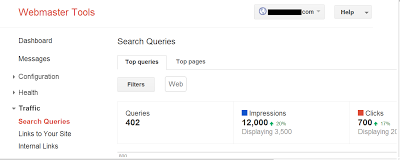
Search Queries


Google Webmaster Tools is a great friend to bloggers and webmasters. It hosts a great many features, and provides a lot of help to both beginner, as well as advanced users. For example, the URL parameter customization tool helps optimize your URLs, you can use Google Webmaster Tools to get advanced index reporting, and so on. The list of features is long and distinguished. Have you ever wondered about what the Search Queries feature under 'Traffic' did in Webmaster Tools? You can use some of the information provided to improve your site. We'll talk about this Search Queries feature in today's post.


In a typical search engine environment, there are three phases. Crawling, Indexing, and Ranking. The ranking includes putting pages on top of search results etc. Search queries have more to do with ranking than anything else. Even though ranking is important, you must keep in mind that it isn't only part of the process. There are a lot of other factors too that contribute towards conversion. With that in mind, let's look at this video from Google, and then talk about Search Queries in Webmaster Tools as discussed by Google.


Search Queries terminology


For beginners, it is important that they know some of the basic terminology so often used in the field. A Query refers to a search word or term that the user enters in the search bar. If your website comes up in the search results visible to the user, then it counts as an Impression. If the user clicks on your site after seeing its impression, then it considered as a Click. Now you must have often heard about CTR, or Click-Through-Rate. This is the ratio of your Clicks versus your Impressions. A low CTR would mean that users see your website, but don't actually open it, since it's not appealing to them.


Another term often used is Qualified Traffic.This refers to the users who clicked on your website, and actually found your content useful. This could be shown by the number of conversions you are getting, such as ad-clicks, sign-ups, subscriptions, and so on.


Investigating Search queries


Search Queries


Understanding your audience


This should be the key focus of any business, online or otherwise. You can use Search Queries, and then go to Filter to see the breakdown of your audience. By default, the filter is set to 'the web'. If you click on it, you will see how your audience is divided. You can then use this information to tailor your content for specific audience. For example, if most of your audience is from the U.S, you could do a special feature that applies to people living there.


Common questions you could ask yourself while targeting your audience are; who is your audience? Where are they located? What age group are they? What are their interests? How do they browse the web? Does your content match up with the queries they enter?


Check your Top Queries


When you go to Search Queries, you'll see a tab labelled 'Top Queries'. Open it, and then Sort by Clicks. This is a nice little feature that will let you know what your top queries have been for a defined time period. You could then create more content based on those queries, and introduce new ones like them.


Another good approach for investigating queries would be to take a notice of the changes that occur to your queries over different periods of time. For example, some businesses might see an increase in traffic near holiday seasons. Currently, you can only see history for three months. We'd recommend you download your data every three months to keep track for longer periods of time.


If you sort your queries by CTR, you will be able to see where your website is making an impression on users, and where it isn't. A low CTR would mean you need to work on those specific queries, whereas a high CTR means you need to learn and apply from the better performing queries.


Checking your top pages


You also have a 'Top Pages' tab in Search Queries on your Webmaster Tools dashboard. You can apply sorts over here as well. Sorting by clicks will let you see what pages have gained traction, and which have stalled. A strategy can then be set up to improve upon the pages who have very few clicks.


With the top queries, we used sorting based on clicks and CTR. But with your top pages, sorting with clicks and impressions sounds more relevant. Now impressions might not always bring in clicks, but the user does go through their abstract, or at least looks at its heading. Pages with the most impressions are usually the highest ranked for certain search queries. So once you know what your most valuable pages are, you can pivot their potential, and use them to feature your other pages that re low ranked, but maintain quality and are related to the high-ranked pages.


Sounds reasonable? You can use these simple approaches to take your business out of the middle lane, and onto the fast one, because that is the aim of every business out there. If you liked these tips, then do share them with others. Also tell us what approaches you are using. All the best :)


Google Explains How to Write a Proper Reconsideration Request?


Your blog can really make your life a complicated one if it gets into the bad lists of Google. Throughout my career as a blogger, I have come across many newbies who are often way too worried for their blog ratings. It has also been seen that sometimes a blog with a considerable rankings and readership goes under a sudden change, bringing disaster that keeps on increasing. It is important to understand the significance of a consistent good progress when it comes to an online earning business because, that is where you have no boss to appeal and no actual help to get the things fixed up for you. However, Google seems merciful enough to let the suffering bloggers a chance to help their blogs and offers a reconsideration request form that the bloggers have to fill and submit to the Google Team.


Although the name speaks all, the reconsideration request is what that works on your behalf to interact with Google for solving issues that might have lead in decreasing your rankings-and-earnings. By now, most of the bloggers do know about this facility, or rather opportunity, there are many of them who find it difficult to draft a good reconsideration request. Taking a serious notice of this, Matt Cuts, the head of Webspam, Google has answered what the team actually looks for in a reconsideration request.


1) Mention The Goal of Reconsideration request


Probably due to the language barriers or the misunderstandings about the scenario, bloggers sounds confused while stating the actual problem that they are facing. You need to first analyze the problem that might have created difficult circumstances for your business and once you are done with it, it is time to recover your mistakes.


2) Tell Google what it wants to know


It is important to understand that whatever happens to your blog is due to some reason behind it. Therefore, you need to tell Google about what has been done wrong by you mistakenly or unintentionally. For example, if there is something related to the Paid links, spamming, etc., you need to mention that and also the fact that now you have stopped doing so.


The team wants to know what has been done by you to cure the issue, like if it was related to the pagelinks, you should pull them down as much as possible and state your efforts in the reconsideration form too.


3) Assure Google for Future


Google is professional enough when it comes to the mistakes committed by the publishers. It is to be noted that not all the reconsideration requests are accepted by Google, in fact, only few requests are even taken into the notice. What Google looks in your request is the surety that you would not be repeating the similar blunders or violates the rules and regulations of Google in future.


4) Additional Details giving weightage


It is always better to keep your policies and goals transparent from Google. Adding details like the sites that you link to, using SEO for unethical stuff, etc., would earn you more trust of the team. Moreover, also suggest what you would be doing in order to avoid similar circumstances, say taking trainings, keeping a track of Google blogs, following the regulations, etc. To know more about it, also see this video.


Google can be a tough one when it comes to convincing it for reconsidering your blog and improve your ratings. Therefore, you need to be extra careful while drafting your request. A quality request would itself be considered as a plus point for you.


Best Wishes


Do AdWords Customers get Special Treatment in Search Results?


Google AdWords

Do AdWords Customers get special treatment in organic search results? This is a question that's become quite common now among webmasters, especially those advertising their website with Google AdWords. And that's understandable, considering the money they spend in doing so. A lot of people also think that if someone buys that ad spot on the right side of the page, then his website gets some sort of an algorithmic boost, and gets an advantage over others and thus ranks higher. Is there any truth to it? And if so, is it any fair to the other webmasters? Google answers this important question in a latest video uploaded by Matt Cutts.


The original question was asked by Christoffel from Dublin, asking;


I am an important AdWords customer and recently I have seen a drop in ranking for my site. Why can't I get advice on optimizing my site for Google's search results through my AdWords point of contact?

Here is Google's response to the question.


Does Google AdWords benefit advertisers?


First of all, it's a common misconception that advertisers who buy an ad spot on the right side of the page get an algorithmic boost of any kind to make them rank higher in search results. Well the fact is, the algorithm is the same for everybody, with no exceptions. So any such assumptions can be safely dispelled, and the 'conspiracy theories' put to rest.


Just to be clear, such a practice would not be fair to webmasters who are not using AdWords. AdWords is only supposed to bring up sponsored ads for a website in search results page, and does not effect the search results themselves. So advertisers, by no means, get any sort of benefit in the organic search results.


As long as 'special treatment' and 'special points of contacts', Google doesn't allow that either. As asked in the question, you do not get any special advise on optimization or advertising or anything just because you use Google AdWords. This makes sure everyone has the same resources and support channels with Google. Google's quality team has been working hard at dispelling this misconception, and Google says it wants to be as fair as possible, so that no on will think someone is getting special treatment. If they have an increase in ranking, it's because of some other factor(s).


That's all for now. If you have questions, do let us know. Also, go through the video to make things clearer. Good luck :)

If I quote another source, will I be penalized for duplicate content?


As you all know, Google is pretty hard-up about duplicate content, now more than ever, because an awful lot of blogs and websites have started making money by blatantly copying material from other sources. This not only is unfair to the original source, it also jeopardizes the integrity of search results returned by Google. Hence the stringent TOS (Terms of Service). But what about adding quotations, or sentences/paragraphs quoted from other websites? It does classify as content copied directly from another website. So how does Google treat such content  and is it safe to include it on your website? Well, Google just released a video explaining how Google treats such content.


The issue was addressed by a video from Matt Cutts, head of Google's webspam team. In that video, he talks about the different practices applied by bloggers and webmasters online, and which of them is good and which isn't. You can see the video embedded below.


The ideal case


In an ideal world, people would only copy quotations, or things said by others that they like. For example, quoting a sentence from an author or public figure, quoting someone from their live speech somewhere (chances are, that speech will be copied by someone else too), an announcement, quoting from another blogger whom you find insightful etc. That is how quotes are supposed to work.


If that's the case, and you want to add such content on your site, then you can do it without fear, so long as you link to the original source. Credit should be given where credit is due. Just make sure you put the quotation in a block-quote tag, and everything will be fine.


People often ask, How will Google know whether it's just a quotation, or copied content that could get them penalized? Well, Google has some smart algorithms that will detect whether it's a quote or copied content. Besides, Google might check out your site manually. So don't worry if you've kept your end of the deal, and added a link to the original source and put the content in a block-quote.


When things go bad


Like much else, people are bound to exploit loopholes. Which is why Google is working on leaving as few as possible. It allows you to quote another site. But if you think you're gonna get away with copying an entire article as a 'quote', and then adding a link to the source, then think again. This practice will get you penalized.


Some bloggers also tend to excessively quote in their articles, adding little of value of their own. This will also result in your fall from grace in Google's eyes. So it's best to avoid such practices, and start creating valuable content. As long as you provide useful insights of your own, and quote reasonably with link to the actual source, there's nothing to worry about. Goo luck :)

Never Tag Internal Links with “rel=nofollow” Says Google


UPDATE: After the Google panda effect only  useless links like comment links should be tagged as nofollow. Links pointing to your post pages should be kept dofollow like labels and archives


don't-nofollow-internal-linksYou waste an important use of your homepage PR when you don’t link your internal pages or when you link internal pages as nofollow. A PR flows like a river between all pages that you link to. The better the PR flow within your blog the better will your blog get indexed. Robots enjoy crawling content which is well organized in terms of linking. I have already discussed in detail on how to flow the PR juice to internal pages and just today I also published a post discussing the importance of nofollow tags. I shared in detail some steps that can help you better maintain your PR and make good use of it. It is really important that you understand the importance of in-page and off-page link building. The previous post discussed: when should you link sites with rel="nofollow" tag but great emphasis was made on the fact that all internal links should be kept do follow. 


Matt Cutts from Google “Webmaster help” has given a detailed video explanation on the use of rel="nofollow" tag and he has paid great stress on the fact that all links that point from one page on your blog to another whether they are hyperlinks or anchor tags must be kept dofollow.


Matt Cutts explaining Should Internal Links Use rel="nofollow"?


If you have any questions then feel free to post your query. You will also enjoy these SEO tips: