Showing posts with label Blogging tips. Show all posts

7 Legit Ways To Make Money Online Blogging in 2017

We've all heard those stories of someone that started a little blog one day and ten years later they've given up their day job because their blog is drawing in so much money for them they don't even need to get out of bed in the morning. The funny thing is, with a lot of hard work and time spent on getting your blog up and running, you can actually make a pretty penny out it. So, if you're interested in learning how to make money blogging then read on, I'll warn you now though, you're going to have to be seriously dedicated to get this running!

Make Money Online Blogging

Sell digital products

A really simple way to make money online is to sell things online. Whether you're looking at selling digital goods or physical ones, you need to think closely about where your skills and strengths lie. Setting up a blog that is geared towards selling your goods might seem like a great idea but it's better to set up a blog and add the odd link to other work that you're doing. People read blogs for the stories and information, not to be sold goods left, right and centre, so keep this in mind when you're starting out on the blogging journey.

Some commonly sold digital goods include: 
  • eBooks 
  • Audiobooks
  • Pictures & Videos
  • Digital music
  • Software programs
  • Website themes

Sell physical products

The other great thing to remember is that knowing your audience will make all the difference when you're selling goods online. Running a blog about cars and motorsport and trying to sell homemade paper flowers just won't mix. If paper bouquets are your passion and you know they're good enough to sell, then the best thing for it is to set up a secondary blog that focuses on something more in keeping with what you're selling. Remember though, don't push the sales from the get go. If people feel like they're being sold to, they won't be interested. If your goods are just supporting what you're saying in your blog then you'll find a lot more enquiries fly your way!

Some of the physical goods that you can sell:
  • Clothing
  • Jewelry
  • Handmade goods
  • Household Items
  • Electronics

Sell Advertising space

A really common way to make money from a blog is to sell advertising. The more traffic you have flowing through your page, the more likely you are to draw advertising agencies in and this can be a really quick way to make a little bit of extra money. If you're finding other ways of making money through your blog then you might want to think about using advertising space to your own benefit by advertising your own products! Taking people from your blog to your selling page will only generate a little bit of extra business for your sales. Sure, advertising someone else's websites might bring in the cash at the point of sale but would you make extra money from sales of your own goods? Just something to consider!

Sell online courses and eBooks

If you're really feeling confident in the topic of your blog then you might want to consider doing some form of educational documentation. Whether you do a few online courses or write an ebook, if your followers really respect your expertise in the field you're talking about then they will flock to what you have to offer. Obviously, the best products to sell will vary massively depending on the type of blog you run. Factual blogs will work well with eBooks, lifestyle blogs might offer some one to one coaching sessions and online courses might be best for those that are thinking about a change of scenery in the workplace. If in doubt, ask your readers what they'd like and whether they'd be interested! There's no better feedback than the people you're already writing for.

Freelancing

If you're reading all of these tips and thinking 'that doesn't apply to me' then worry not, you're not alone! We've all got our own areas of expertise and very often, the job you do for your career can make you some extra money at home. Whether you're coming from a financial background, web design or bookkeeping, they're all skills that are highly sought after for a lot of people. The great thing about advertising these skills on your blog is you're more likely to pick up a job that directly corresponds with your interests. Sick of making up advertisements for big businesses and fancy helping out a local dealer? Well your blog could be the perfect place to get business like that running. Before you know it, you could be a freelancer running your own business!

Here are some ideas:
  • Freelance writing
  • Data Entry
  • Virtual assistant work
  • Web Development
  • Marketing

Affiliate marketing

If all else fails then there's always the opportunity to sell other people's good through your blog. This doesn't necessarily include actively selling their goods in that you don't have to deal with the postage and packaging though! Affiliate marketing is an amazing way to make money from blogging if you're smart about how you go about it. Picking your affiliates sensibly and going for products that will actually hold the interest of your readers, a simple plug about the product at the end of the post might be all it takes. You might choose to go a little more in depth and focus an entire post on one product although this does depend on the sort of blog you run! Make-up and fashion blogs do exceedingly well at this sort of sales (and they often get free gifts out of it as an added bonus!)

Membership sites

Finally, offering a membership to your blog will allow people to check out extra content on your blog. This is a great way of making money when you're a well established blog as you're basically offering a bonus to people that pay for it while still keeping up with the basic info for people that have followed you from the start.

If you're thinking about starting a membership site but don't know what to do, here are some ideas:
  • Offer exclusive downloads each month via email (i.e. apps, graphics, recipes etc.)
  • Exclusive educational videos, blog posts, webinars, or courses
  • Downloadable guides or books 
  • Offer Expert advice
Making money through your blog is a great little bonus at the end of the month, however if you're really serious about it then you need to work hard and be dedicated to the cause. A sporadic blog that has no focus is much less likely to bring you any extra pennies in compared to someone who does weekly blogs and has specific themes on different nights. If you intend to make money out of your blog then your best bet is to sit down, give a good hard think as to the type of blog you're running and what goods you can offer in tandem with this. After you settle in, keep in mind that making seriously big bucks out of your blog means you have to be in it for the long run.

20 Best Sites with High Quality Free Stock Photos

In today's online business world, tons of people have a need for quality free stock photos for their blogs, company websites, and everything in between.

Unfortunately, there are still a lot of businesses who are settling for the corny stock photo of yesteryear, either because they don't know their options or think they are too hard to find.

That's where the good news comes in: good stock photos don't have to be expensive or hidden deep in the crevices of the internet. In our digital age, there's plenty of solid material out there - if you know where to look. Read for more good news? We have your back, and have taken the hassle out of finding these stellar stock images.

We're confident that this collection of resources will help you find exactly what you're looking for, whether it's adorable animals, minimalist interior design, and anything in between.

free stock photos

20 of the Best Sites to Download Royalty Free Stock Photos

1. Negative Space


One of the best things about Negative Space is that they are constantly updating their free stock photos every week. With Negative Space, you never need to worry about copyright restrictions, so you can use them for your project without having to jump through hoops.

Negative Space has a large selection to choose from, and the interface is very user-friendly. It's easy to sort through the photos in order to find exactly what you need.

2. Death to the Stock Photo


The founders of Death to Stock are dedicated to making beautiful photos more accessible. They knew how important it is for those running blogs and online businesses to not spend all of their profit on images for their websites.

The format is simple: just give them your email to get a new bundle of great stock pictures monthly, then just use the ones that apply to your current project. Easy!

For businesses with some extra funds to invest, Death to Stock has an affordable Premium membership which gives you access to their entire library of photos (instead of just the pre-selected ones they send), plus some of the profits from the membership are used to further the resource by financing photographers and their projects.

3. Picjumbo


Picjumbo is unique in that all of the photos come from a sole photographer, Viktor, who shares his photos from his home in the Czech Republic.

He updates the selection of photos really frequently, so there is always a fresh batch of high-quality graphics to download. To take it a step further, Viktor offers affordable paid packages for businesses that use stock images frequently. He also has a nifty plugin for the Photoshop and Sketch programs for just under 8 bucks.

4. Stokpic


Stokpic is another example of a photographer deciding to give away his photos for free. Ed Gregory decided to share 10 new photos bi-weekly that you can use in any way that suits you.

The easy user interface allows you to browse his categories like architecture, fashion, and nature.

5. Kaboompics


The site's creator, Karolina, is a Polish web designer. She is the creative engine behind this extensive stockpile of high-quality pictures. The images address a wide variety of topics. As with the rest of the sites, users can use Karolina's pictures for anything they need.

A quick visit to the About page of the site shows how big of a reach it has; during our visit to the page, the Image Downloads ticker stood at a whopping 5,051,906.

6. Startup Stock Photos

Startup Stock Photos is a company that operates on simplicity. They share pictures they're taking anyway in order to help businesses find a cheaper way to gain traction online.

You don't have to be a startup business to utilize their images, which is fine by them. The images are free, but they wouldn't say no to a donation.

7. Freerange


Freerange photos derive from a community of in-house as well as external talent.

At Freerange, their principles and motivations are clear: "Freerange Stock was formed with the goal to provide quality stock photos for commercial and non-commercial use. For free. We feel that free stock photos can be good photos." Can't argue with that.

8. Libreshot


Every photographer brings his/her own unique style to this fun brand of art. At Libreshot lives a very unique collection of free stock photos.

9. Fancy Crave


The images on Fancy Crave come without copyright restrictions, and they're free of all the corniness of typical stock photos.

Attribution is not legally required, but they note that it is recommended if possible.

Fancy Craves selects two fresh photos to upload daily, keeping things current and providing beautiful photos to suit all needs.

10. Unsplash


The creativity of the title matches the creativity of their photos. They have pages and pages of quirky, one-of-a-kind images for you to choose from.

As you've likely come to expect, these images are able to be used without any copyright restrictions.

11. StockSnap


The photos on StockSnap are of superb quality and most of them are especially great for use as backgrounds.

The selection is so interesting and versatile that it's easy to find yourself on page 50 of photos all of a sudden. And yes - they're free.

12. SplitShire


SplitShire is an Italy-based organization that offers pages of incredible free photos for you to use at will. Their philanthropic mission is simply: "Helping you to be awesome out there with great content."

13. Life of Pix

Life of Pix was created by Leeroy Advertising Agency (Montreal, Canada) and they have a real knack for supplying great pictures. Naturally, these cool graphics are fine for you to use - no strings attached.

If pictures aren't enough for your unique project, they have a sister company called Life of Vids.

14. Pexels


Unlike most of the other listed sites, Pexels handpicks their favorite photos from a pool of free image sources to ensure that you're seeing only top-tier work.

The images that survive their rigorous selection process are then able to be used in any way you see fit. The site also makes searching for your perfect stock photo as easy as possible.

15. HubSpot


HubSpot is a bit different from the rest; there's somewhat of a shortage of high-quality free stock photos available to those who need solely business-themed graphics. Hubspot has a healthy selection of corporate-style images that are perfect for a professional project.

16. Gratisography


The images on Gratisography lie a little further on the wacky side. These creations come from photographer Ryan McGuire, who is known for seeing things a bit differently. His work is significantly quirkier than some other sites (i.e. fake moustaches, pineapples wearing glasses, gummy bears in cereal) but you never know when you project might just call for something out of the ordinary.

17. Jay Mantri


Jay Mantri is yet another good-guy photographer who chose to share his amazing photos with the world. His work is quite sophisticated, and a lot of shots leave you wondering how he did it.

This is one artist we'd say to go check out anyway, even if you don't have a specific need for scenic, high-class images.

18. ISO Republic


ISO's Republic's mission is to supply only the best digital images for online businesses of all kinds.

One visit to their site will tell you immediately that they are serious about the quality of their content. The photos are top-notch quality, and while the subject matter varies, they all maintain a similar level of sophistication.

Similar to some previously listed sites, you have an option on ISO to register for their email list to get extra content not posted on the site.

19. New Old Stock


This free stock photo site embodies classic elegance. They deal exclusively in old photos, usually in black and white. Web designers and history buffs alike will enjoy their large compilation of antique photos. Though there are some unique challenges to the redistribution of old pictures, the site only posts those that have no evidence of copyright issues.

Their rules are slightly more stringent than other sites, so just make sure to read up on it before using these photos for commercial purposes.

20. Pixabay


Pixabay is our final choice of free stock photo collection. It has a great archive of plenty of public domain photos (so you can use them without worrying about copyright issues). Thank goodness they have an intuitive search mechanism since they have just shy of a million awesome graphics.

Unlike some other sites, it offers a more advanced search that allows you to filter your query as much as you need so you can always find exactly what you want.

How To Fix Your Website When It Gets Hacked?


Fixing hacked websites


It's not uncommon for sites - even large ones with lots of protection - to get hacked. Security is a major problem these days. And if your site gets hacked, it can get damaged in a number of ways. You could lose all your data, or lose its ranking due to malicious activity. So while you can take periodic backups, you cannot prevent someone from hacking into your site. The best and most practical thing to do in such an event is to recover your site as fast as possible so that the effect of the attack is neutralized/minimized.

Here are some tips shared by Google for getting your website back on track after it has been hacked.


Clean up malicious scripts


Hackers can target your site for any number of motives. From taking down your website and deleting its content to simply adding backlinks discreetly, there's a lot that can be done. If you notice suspicious content appearing on your website, delete those unnecessary pages immediately. However, don't just stop there.


Hackers will often insert malicious scripts into your HTML and PHP files. These could automatically be creating rogue backlinks or even new pages. Make sure you check your website's source code and see for any malicious PHP or JavaScript code that could be creating such content.


Maintain your CMS


Websites often get hacked due to vulnerabilities in a CMS that get patched with updates. If you're running an older version, your site is more susceptible to attack. Make sure you keep your CMS updated, and use a strong password for login. If possible, enable two-step verification to secure the login process.


www vs. non-www


www and non-www URLs are not the same. http://www.example.com is not the same as http://example.com - the former refers to a sub-domain 'www', whereas the latter is the root of your site. When checking for malicious content, verify the non-www version of your site as hackers often try to hide content in folders that may be overlooked by the webmaster


Other useful security tips


  • Avoid using FTP when transferring files to your servers. FTP does not encrypt any traffic, including passwords. Instead, use SFTP, which will encrypt everything, including your password, as a protection against eavesdroppers examining network traffic.

  • Check the permissions on sensitive files like .htaccess. Your hosting provider may be able to assist you if you need help. The .htaccess file can be used to improve and protect your site, but it can also be used for malicious hacks if they are able to gain access to it.

  • Be vigilant and look for new and unfamiliar users in your administrative panel and any other place where there may be users that can modify your site.


Got any questions? Feel free to leave a new thread in our discussion forum. You can read the post from Google along with a couple case studies here. Good luck (:

What To Look For When Hiring Ghostwriting Services?


Ghostwriting


Are you looking to hire a ghostwriter? As you know, there are a large number of individuals and service providers offering such services, and businesses are increasingly hiring them to write business eBooks or blogs to serve their marketing purposes. However, the question remains: how do you hire a ghostwriter? A recent post by Vorongo posted by Cameron on what do you need to look for when hiring a ghostwriter inspired us a lot and we thought we can share our experience on this subject to better help webmasters in hiring authors for their blogs.Check out these five must-have qualities your ghostwriter should have.

1. They Must Have Industry Knowledge


Your ghostwriter should understand the genre or industry you need them to write for. Having a firm understanding of the in’s and out’s will make your manuscript, blog post, or article stand out.


An exceptional ghostwriter is one who intentionally follows up on industry news and current trends. Your ghostwriter should not have to do a vast amount of research to take on your project. Everyone has their strengths and weaknesses, so it will not make them a bad person if they do not meet your qualifications. It just means they are not meant to work on your project.


2. They Must Sign and Respect the Confidentiality Agreement


You are hiring this person to be your writer and make your publication stand out. You, however, don’t want the masses to know that it was not you doing the writing. So signing a confidentiality agreement is a must and may not be a complication for them to do so. However, just because they have signed one, does not mean they are adhering to it.


Conduct a thorough interview with the potential writer. Remember, your ghostwriter must not only sign a non-disclosure agreement with you, but must adhere to prior ones they have signed as well. So in asking for their published articles, if you find they are showing you pieces of work they’ve completed for others, it means they would turn around and do the same to you. This is not ethical practices, and they are not the ghostwriter for you.


3. They Must Show Proof of Publishing


Now, although it’s been stated that they should not show off their ghostwriting work, they can, however, show you their own publications and other writing pieces. A ghostwriter does not become one overnight. In fact, they may have had a terrible time writing as a career for themselves so turned to ghostwriting. Ask to see their portfolio of which should include:


  • Their current publications

  • Articles, blogs, novels, and other literature pieces clients have given permission to use

  • A list of references


You want to see proof they can write better than you can. Check for organization of their writing and if they have ideas to help you shine.


4. They Are Flexible and Able to Meet Your Needs


Flexibility is key in the writing industry. You have deadlines to meet and need your ghostwriter to help you maintain them. The ghostwriter that you choose should understand and be capable of showing you that your time is valuable. They should:


  • Coordinate with you for interviews, transcription, and idea creation

  • Work around your schedule

  • Show patience with revision requests you may have


5. They Represent You Well


Finally, your ghostwriter should match your voice and represent you well. When someone reads your work, it should accurately reflect you to the point where a close friend or family member believes you wrote the piece. In the samples they show you of their work using their name, it should reflect one particular style. If they show you ghostwritten pieces, keep in mind it’s meant for that particular client, so the style of writing will change.



Remember, the purpose of your hiring a ghostwriter is to reflect your story on your timetable. Choose one that will compliment your unique style and respect the relationship you two must build to create the perfect story.


Questions and feedback is warmly welcomed! Do share your precious views on ghostwriting buddies!


How To Get Great Content Ideas For Your Blog?


Content ideas


Brainstorming for content ideas can be tough. You easily get distracted and everything seems to have already been written! To make matters worse, requirements to content concepts and titles have become much more complicated. With the growing importance of referral traffic, we now have to rethink title strategies and how they appear on social sites. If you're feeling strapped for content ideas, here are a few that can help.

Check your Comments Section


When you let people share and comment on your site, you could end up with some great blog post ideas. Your readers might ask for more information about a specific item you didn’t cover clearly in your first post, or they might share their own opinions about the topic, which could make your fingers itch to write. Reading those bits carefully could make your blogging much easier.


Check out the Competition


According to 2014 stats, more than half of all small businesses don’t have a website. As a result, your top competitor may not have a blog that you can follow. But that same competitor might be active on social media sites like Twitter and Facebook. The posts you find there could give you great ideas about topics you should cover.


If you grab an idea from someone else, be sure to tweak it or amend it or somehow make it your own. Stealing outright could get you in hot water, both with your competitors and with Google. But borrowing a good idea could help you to come up with the story idea that’s been eluding you.


Yelp Pages


People with reputation management problems are likely accustomed to the idea of using Yelp as an early warning system. When they see a poor review pop up, they know they must get to work generating content that either refutes or explains the complaint. But Yelp can also help you write blog posts about issues people either like or have questions about.


Read through your reviews and look for items that get a lot of mentions. Not all Yelp comments will contain blog gems, of course. Some might just contain complaints or random bits of praise you can’t build on. But, watching the comments closely could give you some great ideas for writing that will really resonate.


Targeted Keyword Research


And ofcourse, nothing beats good ol' fashioned keyword research. This is a fundamental part of the writing process, as it helps you find the right terms which will perform better on SERPs. But more than SEO, your searches can also help you to find out what people are looking for, and that could give you some excellent blog post ideas.


With Google AdWords‘ Keyword Planner, you can run a simple search on a topic you’re planning to cover. Your results page will give you keywords that are similar to the topic you’ve hit, but they come with just a few changes.


We'll soon publish an entire section dedicated to keyword research in the SEO process, so stay tuned!


Coming up with new content ideas is not easy. But if poke around and are receptive enough, with enough luck you will soon find great content ideas to go on your blog! Good luck :)

How To Make Your Content Last Longer?


create evergreen content

A typical article or blog post goes through various stages in its life - from the time it is born and gets direct traffic to the time it eventually recedes into the background, only to be found by search engines (organic traffic), until it finally is no longer relevant to the current age and must be replaced. They are now just litter on the internet. But they don't necessarily have to be that way. The hard work you put into creating them can be saved by doing just some small extra effort.


Content that is typically written for users only tends to wear out quickly. The whole idea of making content last is to make it accessible to search engines, and bullet-proof it against future search engine updates like Panda or Penguin. Content here doesn't just refer to articles. It can in the form of infographics or videos as well.


The most important ingredients of making evergreen content are relevance and quality. Here are some techniques you can use to make the most of your pages.


Dated content


Some content is date-relevant, and some is not. It is generally advised to show the date of an article so as to avoid raising certain question in the users' minds, such as whether or not the content is relevant to the user right now?


Take, for example, and example topic; 'top 10 smartphones'. Topics like these get outdated real fast, so a user will probably look at the date first before reading on. Showing the date is a plus in such circumstances.


On the other hand, you might have a how-to tutorial that is a year old, but is still relevant. It is inadvisable to show the date in such conditions. Most bloggers use the date in the URL structure. In such cases, users are likely to navigate away when they see a very old date. So in my opinion, you shouldn't incorporate the date into your URL structure. Instead, just show the date alongside the heading. If your content is not date-centric, then do not highlight it. But at the same time make sure your content (how-tos etc) are up to date.


Update content regularly


Having an evergreen piece of content doesn’t mean that you never touch it again. Even evergreen pieces need an occasional spritz to keep them fresh.


Google’s “freshness factor” prefers pages that are updated frequently. To keep your content active in the index and the SERPs, touch it up now and then. The more content you change or move, the greater the freshness of the article in the search engines.


Highlight updates


Some content deals with subjects that are constantly changing. In this case, you can change your content, too. Simply adjust the content according to the changed subject, and place a note at the top of the article.


Here’s what you can write:


Note: This article has been changed to reflect the new publication that was released in March 2014.


Provide a link to a new article. If your content is truly outdated and can’t simply be spruced up, then you should add a section at the top that explains this.


At the top of the page, add a section stating that the information below has changed, then provide a link to a new page. Like this:


Note: The information below was relevant as of March, 2014. To find out about the latest changes, check out our infographic on this link


If Google is still favoring an old article in the SERPs, this is essential. When a user clicks on that result, an old piece of content, you don’t want him or her to bounce. Instead, you can drive engagement and further dwell time with an open admission of the dated content, with a link to updated information.


What techniques do you apply to your content? And what is your opinion on displaying the date in the URL of a page to highlight it? Leave your comments in the section below!

Where To Find Free Blogger Backgrounds and Textures

Blogger is a fantastic tool for amateur and professional writers that have a passion for publishing online content. Unlike WordPress or hosting companies that require you to design your site before ever getting started, Blogger is a ready to go service right out of the box that will allow you to start writing for yourself or others on day one. The effort required to sign up for an account is minimal, and you can really get as creative as you want, whenever you want.

Even if you aren't familiar with web development or design, that's okay. Blogger is a place for everyone. Thanks to the overwhelming support of the Blogger and creative communities, there are plenty of free to use resources out there to make your site look great and keep you focused on what you love best. Here are some of the top sites for acquiring blogger backgrounds that won't cost you a dime and will look incredible.

free blogger backgrounds and textures

Shabby Blogs

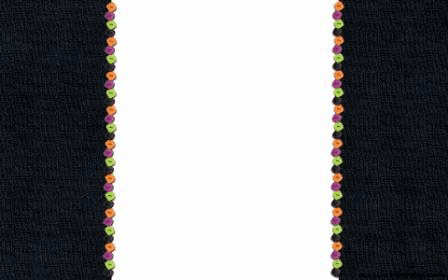
Shabby blogs offers some unique texture and graphic rendered Blogger backgrounds to choose from. All of the designs that they have are created to be standard width so you don't get a lot of flexibility to choose from; however, there are guides out there that can teach you how to extend the sidebars, header, and footer of your screen if you find one you love and this is something important to you. In addition to offering Blogger backgrounds Shabby blogs also has a section for cute little buttons that you can add to your site to give it an extra special touch.

shabby blogs backgroundshttp://www.shabbyblogs.com/backgrounds.htmlhttp://www.shabbyblogs.com/backgrounds.htmlhttp://www.shabbyblogs.com/backgrounds.html

Hot Bliggity Blog

Aside from having one of the coolest and creative names to say out loud, Hot Bliggity Blog has a wide selection of patterned-based blogs for your site. You can choose between different color schemes, and they also offer three different sizes to pick from, standard, widened, and full width. Best of all, they are really easy to install. All you have to do is click on the install link underneath the image. From there it will copy the code for you into your clipboard and give you instructions on where to paste it.

hot bliggity blog backgroundshttp://hotbliggityblog.com/http://hotbliggityblog.com/

Dotty Dot Dot

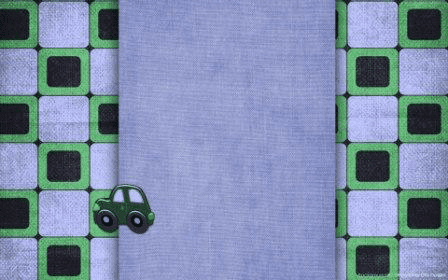
Dotty Dot is the place to go if you like geometric type backgrounds that are heavy on squares, plaid, circles, and of course dots. The website is a little bit hard to navigate, but they have a sidebar with a bunch of tags to help you sort through all the available templates and find something you like. Just about every color you can imagine is available if you plan on matching your Blogger backgrounds to your favorite color or font style. The widths of the most of the templates vary so some have heavy padded sidebars, whereas some are very skinny.

http://dottydotdotdesign1.blogspot.com/http://dottydotdotdesign1.blogspot.com/http://dottydotdotdesign1.blogspot.com/http://dottydotdotdesign1.blogspot.com/

LeeLou Blogs

Lee Lou Blogs offers Blogger backgrounds that look a lot like you would find in a scrapbook with a heavy dependency on small pictures and vector graphics. These free templates would go great with any home improvement blog or DIY arts and crafts writer. Most of the free backgrounds are standard size with the high padded sides, but like anything you can get access to more templates if you want to take advantage of any of his premium designs.

http://leelou-blogs.com/

CgTextures

If you just want something basic real basic that won't distract customers from your content, you can head over to CgTextures. Their site is full of photos and textures that could be added as a background image with a reduced transparency. The blog would still look great and you wouldn't have to worry as much about trying to match your font style and color so that it fits in with the background. Instead you can draw more focus on what's important and less on the site's bells and whistles.

cg textures for blogger backgrounds

Every Stock Photo

Bloggers that want less of an 'artsy' look to their site and instead more of a serious appeal can get a picture from Every Stock Photo to use as the background image. You can also benefit by using some of the pictures offered through this site within your blog posts so that you aren't stuck buying things from premium image providers. There search bar and navigation panel makes it easy to find exactly what you are looking for to see a unique feel to every page.

every stock photo background image

Shizoo-Design

Shizoo-Design is a German based design firm with about 554 different patterns to choose from. You can find everything from conservative shapes to abstract rainbows and splashes of color. All of the textures are provided in a range of size, anywhere from 1000x700 pixels to 1300x600 pixels so that they will comfortably fit your entire site's background and work with most browsers and computer screen sizes. Brushes and custom icons are also available from the site, free of charge.

shizoo design textures,blogger backgrounds

Patterns of Change

Patterns of Changes offers Blogger backgrounds that are cartoon oriented and that can best be tiled across the screen. The site is perhaps one of the easiest to use compared to all the others on the screen, providing a simple navigation bar where you can choose what color you'd like the pattern to be. When you select one of the colors provided, it will come up with a bunch of different patterns usually associated with that color. For instance, when the color brown is selected, one of the choices ia brown cake. Blogger backgrounds for this site might not be the best choice for business professionals, but they certainly are fun.

patterns of change blogger backgrounds

How to Add a Background Image using the Blogger Template Designer

If you have a background image that you want to upload, then follow these steps:

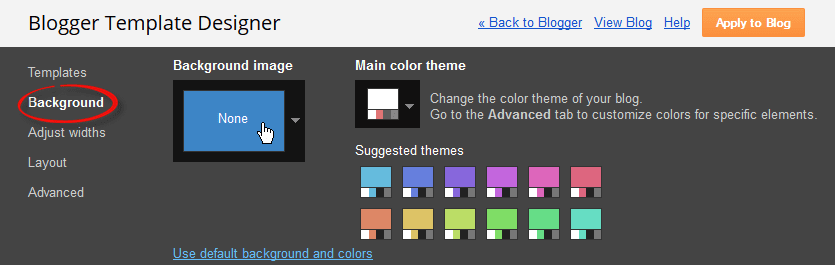
1. Log into your Blogger account and go to "Template", press the "Customize" button on the right side. Once the Blogger template designer has opened, you'll see the Background option on the left - click on it:

change blogger background

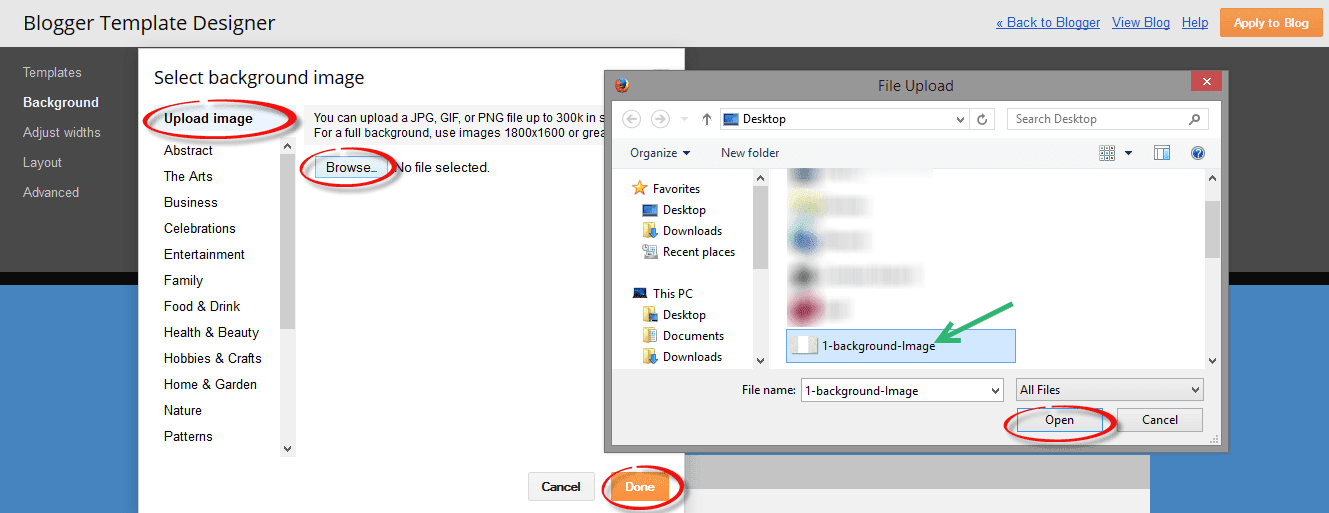
2. Now click on the box below the Background image title and it will open a window from where we can select a default background image. On the upper left side of this window, click Upload Image and select the image you would like to use from a location on your computer.

upload background image

Note that you should use a JPG, GIF, or PNG image that is no more than 300k in size. If your image is too large, then you can use the Kraken.io image optimizer to make the image file smaller.

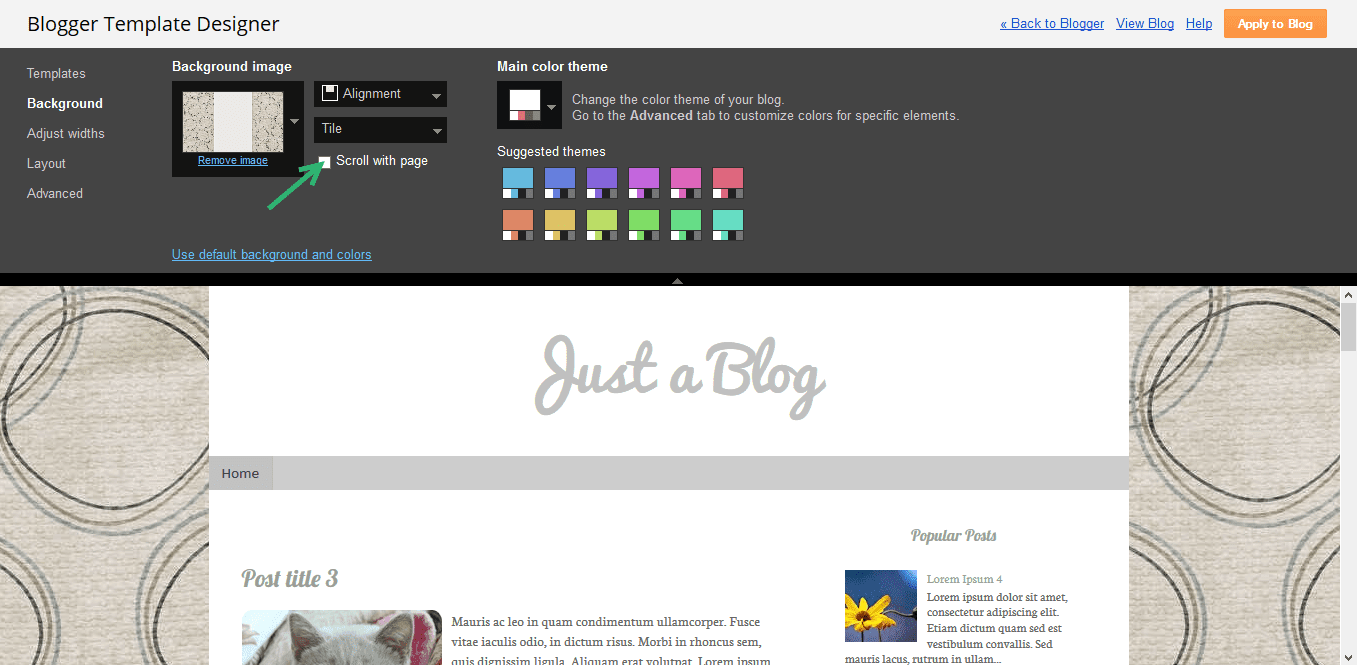
3. After you've uploaded your image, click 'Done' and you'll be taken back to the background menu. Here you will see additional options like: "Alignment", "Tile" and "Scroll with page":
  • Alignment: change the position of the background image to start either horizontal (left, center, right) or vertical (top and bottom);
  • Tile (Repeat): if you want a small background image to fill the page, choose to repeat (tile) horizontally and/or vertically.
  • Scroll with page: the box is checked by default, this means that the background scroll along with the page contents. If you want the background picture to not move as the page is scrolled and stay exactly where it is, uncheck this box.
background image position

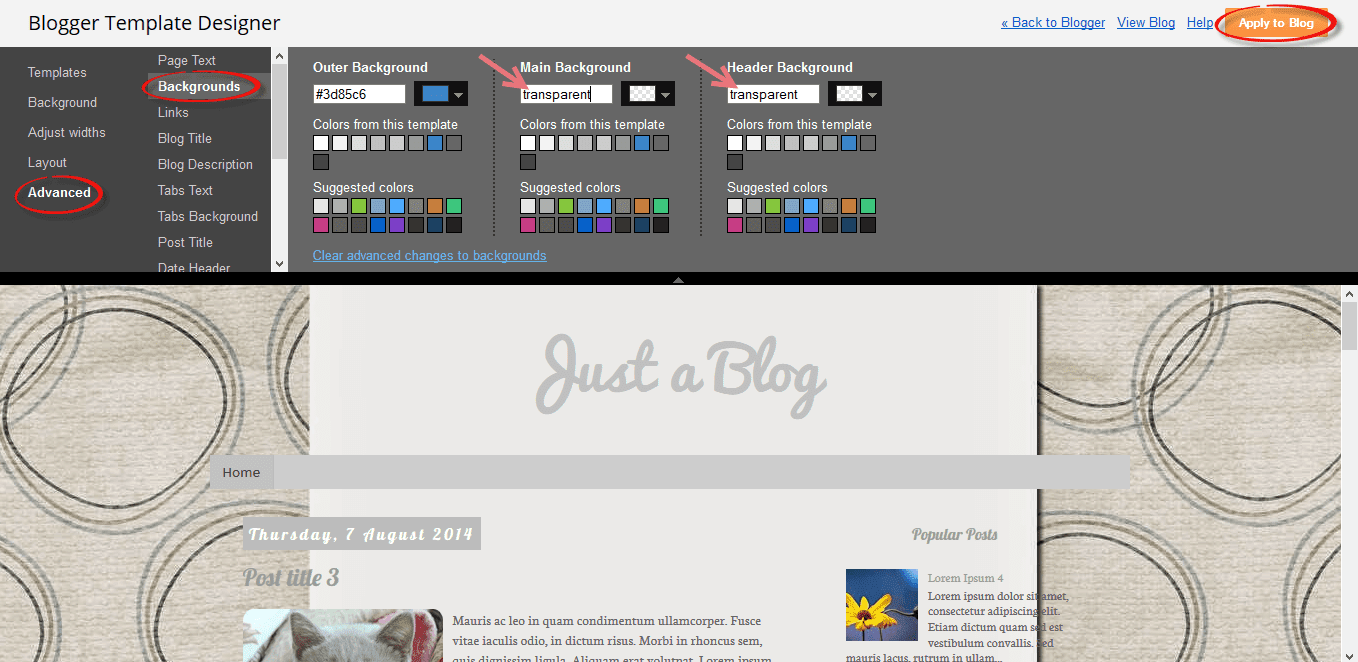
4. For a background image with plain color in the middle for content, you might want to remove the main and header background. Navigate to "Advanced" > "Backgrounds" and type the word "transparent" inside the "Main Background" and "Header Background" box:

change background color

5. If the background is smaller than the content area, we can fix this using CSS. Scroll down and click on the Add CSS option, then paste this CSS code inside the box:
body {
background-size: 200%;
}

.body-fauxcolumn-outer .cap-top {
background: none;
}
Note: to change the size of the background, modify the 200% value in red.

change background size

Once you're happy with the results, press the 'Apply to blog' button and enjoy the new background for your site.

How to Change Background in a Custom Blogger Template

Sometimes the above options might not appear in some custom Blogger templates if the body.background variable hasn't been defined. In this case, we will need to access the HTML of the template:

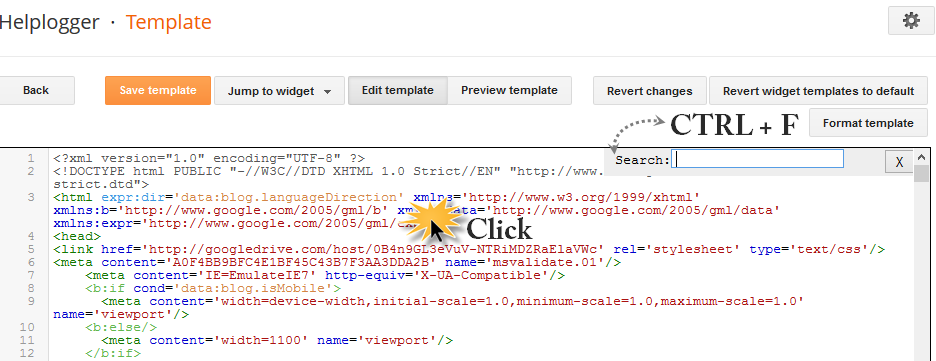
1. Go to "Template" and click the "Edit HTML" button, then click anywhere inside the code area. Press the CTRL + F keys to open the Blogger search box:

blogger template html

2. Paste or type the following tag inside the search box and hit Enter to find it:
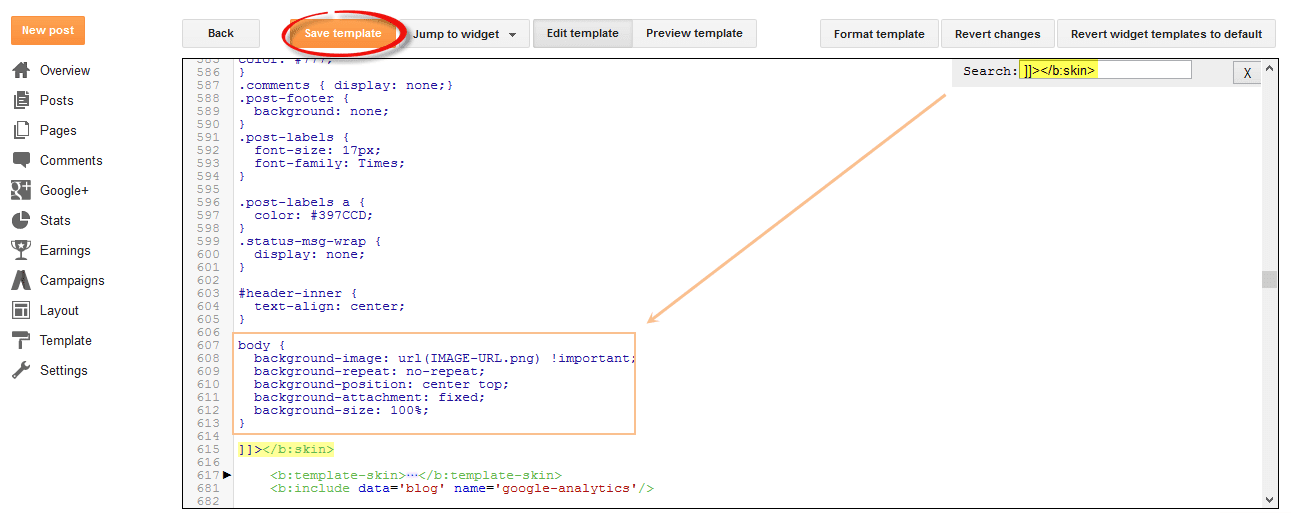
]]></b:skin>
3. Immediately before the ]]></b:skin> tag, paste one of the following code snippets:

For a large background image:
body {
background-image: url(IMAGE-URL.png) !important;
background-repeat: no-repeat;
background-position: center top;
background-attachment: fixed;
background-size: 100%;
}
Note: the no-repeat value prevents the image from repeating either vertically or horizontally. Use background-repeat: repeat-y if you'd like the image to repeat vertically, or background-repeat: repeat-x if you want it to repeat only horizontally. To increase the size of the background, change the 100% value.

adding background in blogger

If using a repeating pattern, add this CSS code instead:
body {
background-image: url(IMAGE-URL.png) !important;
background-repeat: repeat;
background-position: center top;
background-attachment: fixed;
}
4. Open a new tab and upload your background image to Blogger or an image hosting site, and copy the URL of your hosted image to your clipboard. If you don't know how to do it, please take a look at this tutorial.

After you copied it, replace the text highlighted in blue from above with your image url.

5. Finally, Preview the template to ensure that the background image appears as you want, and press the "Save template" button to save your changes. That's it!

Using the 8 sites listed above, you have a wide range to choose from when creating a site that really represents you. Given the right tools, designing you blog can be a fun hobby to enjoy that can spark your creativity and improve the quality of your writing. With such a large selection, the hardest part of setting up your new theme will be finding which one you like best.