Showing posts with label Make Money Online. Show all posts

16 Quick and Easy Tips to Increase AdSense CPC

Is AdSense working for you? Are you frustrated at your inability to make big money from AdSense regardless of your best efforts? Wonder if you will ever make real money from your blog? Well, read on, for I'm going to show you how to increase AdSense CPC the quick and easy way.

But before that, let's quickly walk you through the basics. CPC means "Cost Per Click". What's that? It means advertisers who use the AdSense program pay Google every time someone clicks on their adverts. When you join the AdSense network, you will be running AdSense ads on your blog or web pages and get paid 68% of the bid price for the advert - the rest goes to Google.

So if Google gets paid $4 for every click made on a specific ad for a certain keyword, you will get paid $2.72 every time a visitor to your website clicks on that ad, the one that is placed by Google on your web page.

Now, if you want to make real money from the AdSense program, you should try to maximize the CPC price. This means having the right kind of adverts on your web pages, the sort that make you the most amount of money per click.

improve adsense cpc


You cannot decide the CPC of the ads that are placed on your blog. All you can do is to build your website or blog in such a way that Google places high value adverts or those with higher CPC on your web pages. Google decides where to place the ads through an automated system.

Why Click Through Rate (CTR) Matters

There is another important thing you need to keep in mind in this context, apart from the CPC. It is called the CTR or the Click Through Rate. The CTR is the percentage of visitors that click on the ads on your web pages.

Ideally you will want more visitors that click on the ads than those who just read your blog posts and ignore the ads completely. You will want a higher CTR in order to increase AdSense CPC. Is that clear enough?

So, if you have a CTR of 4% with a CPC of $1.5 - which indicates that 4 visitors of every 100 click on your ads - that is much better than a CTR of 2% with a CPC of $2.40. With the first, you will make $20.40 a day if you have a daily traffic of 1,000 visitors, and with the second, you will only make $16.32 a day from a daily traffic of 1,000.

So, it's not enough to have a high CPC, you also need a high CTR. That's why, to make big money from your blog, you will need to focus on increasing AdSense CPC as well as the CTR.

Now, before I give you tips on boosting your AdSense CPC, let's try to understand why your current AdSense CPC is so low.

Reasons why your AdSense CPC is Low

  1. Niche
    Your website or blog belongs to a less profitable niche, one where your audience doesn't click on the ads. So if you have a blog that covers politics, for example, it's not your fault that you have a low CTR, it may have to do with your niche. Now, real estate blogs on the other hand, they have high CTRs.
  2. Geography
    It has to do with where your audience comes from. If much of your audience is located in a country where the clicks don't cost much, then you will have a low CPC as well.
  3. Mobile
    Maybe your website isn't mobile friendly as yet. Since the Mobile-Friendly update launched on April 21, 2015, Google penalizes websites that are not mobile friendly, through lower position on the SERPS and lower CPC values.
  4. Programmatic media buys
    Programmatic buying by advertisers has resulted in a massive slump in income for many bloggers that depend on Google AdSense for a living. Nothing you could do about that.
  5. Blocked advertisers
    You may have blocked a few advertisers for many reasons. You may have blocked your competitors from advertising on your site and you may have blocked a few companies whose policies you don't agree with. Well, the problem with that is that you will get penalized for this by AdSense through lower CPCs.
  6. Video
    You may have a successful YouTube channel, but the placement of YouTube ads on your website or blog has meant that the money is going to YouTube and not to AdSense. So you have a lower CPC.
  7. Poor targeting
    It's the advertisers' fault! They have no clue on how to target the right blogs for their products or services. So you have a men's fashion blog and for some strange reason you get adverts for women's fashion and accessories. Well, it's poor targeting by the advertisers, not your fault, but that lowers your CTR and CPC.
  8. Economy
    There is little you can do when there is a recession in your country or across the world and people are just not buying enough. So advertisers have no choice but to limit their marketing expenditure and your CPC suffers as a consequence.
  9. Seasonality
    It could be a seasonal thing. If you have a blog that offers match day predictions for the English Premier League, you won't have too many visitors during the off season when there are no matches played. So you will have a lower CPC at this time. Similarly, if you promote gifts or greeting cards on your website, you will have high CPC ads during the Holiday Season, and lower CPC ads for the rest of the year.
  10. Ads sizes
    Not all ads are the same. Some ads convert much more than others. Not having enough converting ads can reduce your CPC. Pay attention to the size of the ads - there are some sizes that convert better.
  11. Improper ad placement
    You have violated AdSense ad placement policies in some way without actually realizing it, and have been penalized by Google for it. Google has strict policies on the ads, and they frown upon the practice followed by some publishers where they trick users into clicking on the ads. This has to be avoided at all cost.
So, these are the 11 reasons why your AdSense CPC is low. Now, how can you increase AdSense CPC?

Here are 16 Quick and Easy Tips to Increase AdSense CPC

  1. Optimize your content for high value keywords - Do your keyword research and identify the best paying keywords within your niche. The way AdSense works is that advertisers bid for keywords. There are some keywords that get the best bids and have a much higher value. Those are the keywords that you should focus on and optimize your content for.

    There are some keywords that could be worth $100 or more per click. Do your research on them and include them as naturally as possible in your content. In the US, the best paying keywords are available in categories such as business services, bail bonds, casino, lawyer and asset management. Create content relevant to such popular niches and optimize your articles and blog posts with the best paying keywords.


  2. Focus on long tail keywords - It's not enough just to have the best paying keywords. You should do your research on SEO tools such as Google Keyword Planner and SEMRush and identify the best paying long tail keyword phrases which are relevant to your readers. Include these keywords in your content. Make sure to use the best SEO practices to optimize your content with these keywords - but keep it natural, don't stuff keywords without considering the grammatical correctness and the flow of the writing.
  3. Create engaging, high quality and profitable content - The quality of the content is the most important thing to be considered. You should have a clear idea of what your readers are looking for and provide them with the right kind of solutions to their problems. You should write content that creates value to a highly targeted audience, who are looking for information within a niche. The content should be SEO friendly and placed prominently on Google's SERPs. The higher the traffic, the more people that read your content, the higher will be your AdSense CPC. As simple as that!
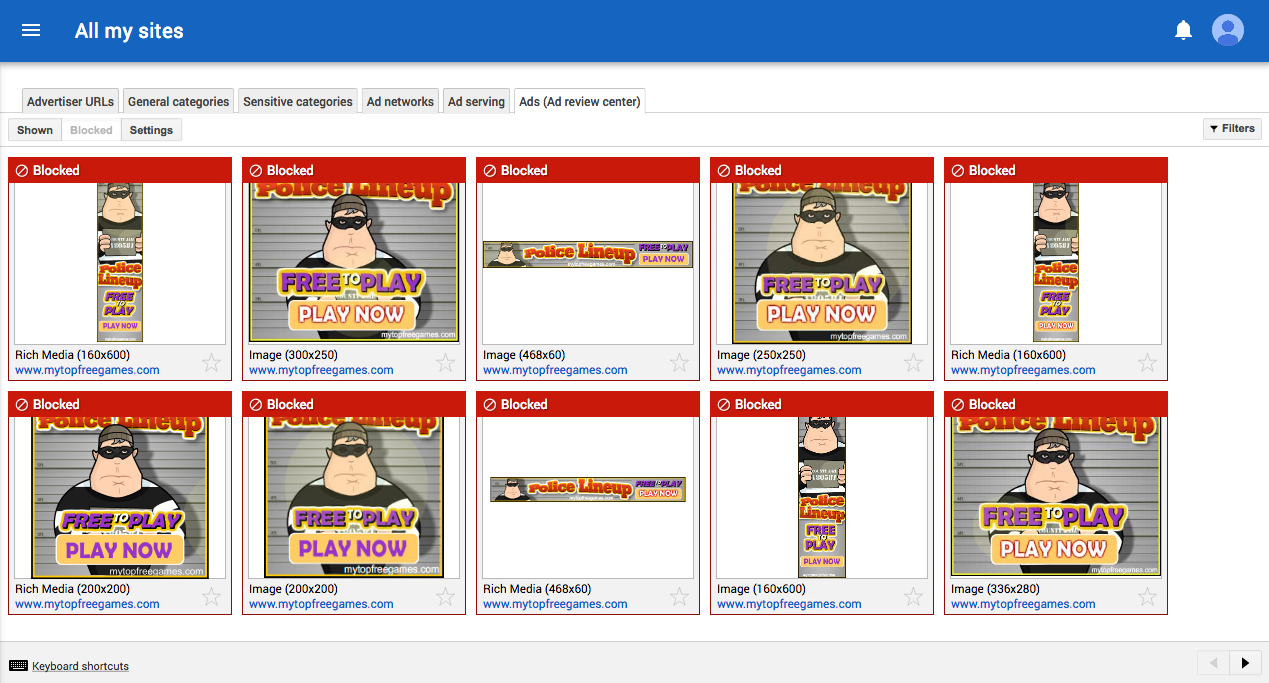
  4. Make good use of the AdSense Ad Review Center - The AdSense Ad Review Center is a tool that allows you to review individual ads so that you can decide whether to block them or to display them on your web pages. This gives you a much higher level of control and transparency over the ads that appear on your website or blog. It gives you complete control over what sort of products, services or brands are promoted on your website or blog. You should make use of this tool to display adverts from high paying advertisers only. Remember - not all AdSense adverts are supported by this tool. Ad Review Center only allows you to block ads at the product level and not at the website level.

  5. adsense ad review center

  6. Figure out the best ad sizes - The right kind of ad sizes and placements bring you the best paying CPCs. There are some ad sizes that are very effective for certain platforms, such as mobiles and tablets, but not so successful on other platforms, such as laptops. Choose the best ad sizes for various platforms and experiment with them till you get a CPC that you are comfortable with.
  7. Use Smart Pricing to your advantage - Advertisers of today want higher ROI and want real clients. Google understands this and makes an accurate projection on the conversion rate of the ads before deciding which ads to serve and where to place them. This is based on a "Smart Pricing" model which Google uses these days. You can use Smart Pricing to your advantage by displaying relevant ads, attracting high quality traffic to your blog and creating amazing content.
  8. Make use of the Competitive Ad Filter - the Competitive Ad Filter is similar in a lot of ways to Ad Review Center discussed earlier. The purpose of this tool is to filter out any unwanted ads and to prevent them from appearing on your site. You can use this tool to block ads from your competitors. You can block entire AdSense accounts or specific domains. Now, this doesn't do much for your CPC, but it ensures that your competitors don't display their ads on your site. The last thing you want is for your customers to be led to your competitors' websites.
  9. Follow Google's Mobile-Friendly guidelines - Since April 21, 2015, Google has made the mobile-friendliness of a website as one of the premier rankings factors for its algorithm. You have to optimize your website for the mobile; if you don't you will get penalized by Google in a big way. You must have a responsive web design.

    Advertisers like websites that are mobile friendly. Some pay more for mobile clicks than for desktop clicks and other prefer to advertise exclusively on the mobile. This is especially true of local businesses within a certain geographical area. So, to increase your CPC, make your website more mobile friendly.
  10. Experiment, mix and match, try out new things with your ads - Google AdSense has a special called "Experiments" which allows you to try out different things with your ads. You can do split testing on different ad formats, try different advertisers, make changes to the font type and background color, change ad sizes, change color schemes, block certain ad categories, etc. and find out what works and what doesn't. When you feel comfortable about something, stick to it for the long haul.
  11. Make use of the Google Ecosystem - Google likes publishers who are loyal to its platform. So join the Google Ecosystem, be a part of it. This means being on Google+, making use of Google Webmaster Tools, creating a Google Business account, having a YouTube channel of your own, using Google Docs, and so on. Spend more time on the Google platform, use more Google resources to earn Google's trust. Earning Google's trust is a surefire route to a higher CPC.
  12. Focus on certain high paying geographical areas - You should always focus on high CPC regions where advertisers pay more for clicks. So if your content is aimed at audiences within the United States, Sweden, Japan, Norway or Netherlands, you will most certainly have a much higher CPC compared to targeting countries such as India, South Africa, Bangladesh and Indonesia. You might want to purchase local domain addresses and created content specific to the high CPC region. You may even want to narrow down your geographical region to just cities - for example, any content focused on New York City, Dallas or London gets high paying ads.
  13. Make use of information from both Google Analytics and Google AdSense and link them for a better insight into your web traffic - Both Analytics and AdSense provide you with excellent information on your web traffic, revenue earned and deliver useful reports. Connect your Google Analytics and AdSense accounts for a better insight into your traffic, and get a sense of the audience behavior on your site - what they click more, where your highest CPC traffic is located and so on.
  14. Show only relevant ads - You should make sure that Google serves only the most relevant ads on your web pages. The way to do that is to make your content SEO friendly and easy to crawl for the search engine bots. You can start by focusing on the basics such as headings, meta tags and formatting your content. Also, turn off the remarketing ads in favor of contextual ads. All of these things could increase your CPC over time.
  15. Reduce the number of ad units on your blog - Try something different such as reducing the number of ad units on your blog. By reducing the supply, you can have the advertisers bid more for the limited space, which can lead to an increase in your CPC. It is about making the supply/demand mismatch work to your advantage.
  16. Use the Matched Content feature on AdSense - Google has a content recommendation service called as Matched Content for AdSense. So it this is available only to major publishers, but you can try and find out if you qualify for it or not. This involves replacing your local article recommendation engine with that of Google. The idea is to promote only the most relevant and most profitable content on your site to your visitors.
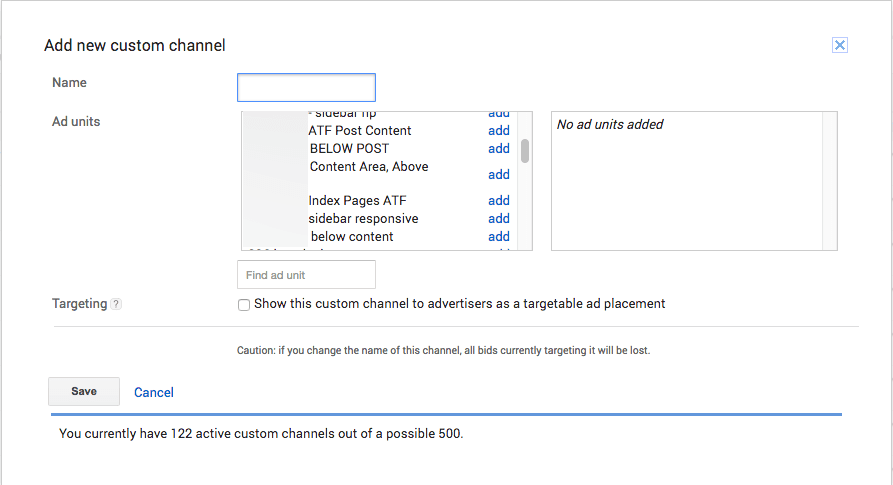
  17. Allow Placement Targeting - Advertisers are always willing to pay more for quality placement. Google has made it possible for advertisers to target specific sections within your website or specific formats. This is called as Placement Targeting. For this you will have to group the ads into Custom Channels - as many as 500 URLs - and give advertisers easy access to relevant content on your website.

  18. adsense add custom channel

Final Thoughts

I have discussed why your AdSense CPC is low and given you 16 quick and easy tips on increasing it. However, there are no hard and fast rules here. If none of the steps given above work, try something else to increase AdSense CPC. Just keep experimenting till something sticks. Hope you enjoyed reading this. As usual, I look forward to your questions and suggestions. Just send them in the comments below.

7 Legit Ways To Make Money Online Blogging in 2017

We've all heard those stories of someone that started a little blog one day and ten years later they've given up their day job because their blog is drawing in so much money for them they don't even need to get out of bed in the morning. The funny thing is, with a lot of hard work and time spent on getting your blog up and running, you can actually make a pretty penny out it. So, if you're interested in learning how to make money blogging then read on, I'll warn you now though, you're going to have to be seriously dedicated to get this running!

Make Money Online Blogging

Sell digital products

A really simple way to make money online is to sell things online. Whether you're looking at selling digital goods or physical ones, you need to think closely about where your skills and strengths lie. Setting up a blog that is geared towards selling your goods might seem like a great idea but it's better to set up a blog and add the odd link to other work that you're doing. People read blogs for the stories and information, not to be sold goods left, right and centre, so keep this in mind when you're starting out on the blogging journey.

Some commonly sold digital goods include: 
  • eBooks 
  • Audiobooks
  • Pictures & Videos
  • Digital music
  • Software programs
  • Website themes

Sell physical products

The other great thing to remember is that knowing your audience will make all the difference when you're selling goods online. Running a blog about cars and motorsport and trying to sell homemade paper flowers just won't mix. If paper bouquets are your passion and you know they're good enough to sell, then the best thing for it is to set up a secondary blog that focuses on something more in keeping with what you're selling. Remember though, don't push the sales from the get go. If people feel like they're being sold to, they won't be interested. If your goods are just supporting what you're saying in your blog then you'll find a lot more enquiries fly your way!

Some of the physical goods that you can sell:
  • Clothing
  • Jewelry
  • Handmade goods
  • Household Items
  • Electronics

Sell Advertising space

A really common way to make money from a blog is to sell advertising. The more traffic you have flowing through your page, the more likely you are to draw advertising agencies in and this can be a really quick way to make a little bit of extra money. If you're finding other ways of making money through your blog then you might want to think about using advertising space to your own benefit by advertising your own products! Taking people from your blog to your selling page will only generate a little bit of extra business for your sales. Sure, advertising someone else's websites might bring in the cash at the point of sale but would you make extra money from sales of your own goods? Just something to consider!

Sell online courses and eBooks

If you're really feeling confident in the topic of your blog then you might want to consider doing some form of educational documentation. Whether you do a few online courses or write an ebook, if your followers really respect your expertise in the field you're talking about then they will flock to what you have to offer. Obviously, the best products to sell will vary massively depending on the type of blog you run. Factual blogs will work well with eBooks, lifestyle blogs might offer some one to one coaching sessions and online courses might be best for those that are thinking about a change of scenery in the workplace. If in doubt, ask your readers what they'd like and whether they'd be interested! There's no better feedback than the people you're already writing for.

Freelancing

If you're reading all of these tips and thinking 'that doesn't apply to me' then worry not, you're not alone! We've all got our own areas of expertise and very often, the job you do for your career can make you some extra money at home. Whether you're coming from a financial background, web design or bookkeeping, they're all skills that are highly sought after for a lot of people. The great thing about advertising these skills on your blog is you're more likely to pick up a job that directly corresponds with your interests. Sick of making up advertisements for big businesses and fancy helping out a local dealer? Well your blog could be the perfect place to get business like that running. Before you know it, you could be a freelancer running your own business!

Here are some ideas:
  • Freelance writing
  • Data Entry
  • Virtual assistant work
  • Web Development
  • Marketing

Affiliate marketing

If all else fails then there's always the opportunity to sell other people's good through your blog. This doesn't necessarily include actively selling their goods in that you don't have to deal with the postage and packaging though! Affiliate marketing is an amazing way to make money from blogging if you're smart about how you go about it. Picking your affiliates sensibly and going for products that will actually hold the interest of your readers, a simple plug about the product at the end of the post might be all it takes. You might choose to go a little more in depth and focus an entire post on one product although this does depend on the sort of blog you run! Make-up and fashion blogs do exceedingly well at this sort of sales (and they often get free gifts out of it as an added bonus!)

Membership sites

Finally, offering a membership to your blog will allow people to check out extra content on your blog. This is a great way of making money when you're a well established blog as you're basically offering a bonus to people that pay for it while still keeping up with the basic info for people that have followed you from the start.

If you're thinking about starting a membership site but don't know what to do, here are some ideas:
  • Offer exclusive downloads each month via email (i.e. apps, graphics, recipes etc.)
  • Exclusive educational videos, blog posts, webinars, or courses
  • Downloadable guides or books 
  • Offer Expert advice
Making money through your blog is a great little bonus at the end of the month, however if you're really serious about it then you need to work hard and be dedicated to the cause. A sporadic blog that has no focus is much less likely to bring you any extra pennies in compared to someone who does weekly blogs and has specific themes on different nights. If you intend to make money out of your blog then your best bet is to sit down, give a good hard think as to the type of blog you're running and what goods you can offer in tandem with this. After you settle in, keep in mind that making seriously big bucks out of your blog means you have to be in it for the long run.

How to Use AdSense Custom Channels to Increase RPM

If you want to boost the AdSense revenue, then you have to try and use all the tools at your disposal to increase the RPM and take your income to new heights. AdSense custom channels are some of the best tools that you can use in this regards. The best thing about these custom channels is that advertisers love them and you can easily adapt them to your needs!

What are AdSense custom channels?

When you hear about Google AdSense custom channels, you will most likely be confused in regards to what they are and what they do. But despite the name that can confuse some people, the reason why they were created is that they offer a really good value for AdSense users. Simply put, these custom channels are designed as a reporting tool, and they enable you to manage your ad inventory without that much of a hassle.

adsense custom channels
You can also use them to turn the ad inventory into a solution that advertisers can target. As a result, you will be able to boost the AdSense revenue in no time. Aside from that, you can also generate a lot of competition for the advertisers. Of course, you do need to have a good amount of traffic to be appealing to the advertisers. But if you use this tool adequately, the overall results can be downright unique. The custom channels are designed to work with a variety of content hubs as well as publishers. But of course, you have to put all your knowledge to the test.

AdSense custom channels A/B testing and analytics

In case you want to boost your revenue with custom channels, you will have to figure out which are the best ads you have, and then you add them into custom channels. You can find the Custom Channels in the Advanced Reports section.


Here you can filter the type of ads you want to track, and you can also view an overview, active views, engagements, clicks and even custom information.

Thanks to the AdSense custom channels, you will get to track things like page performance for that ad, what surrounding content was the best, ad placement results, ad size performance and other relevant info. All these things do add up very well, and they are bound to bring you a unique and distinct set of features.

A/B testing is also easy to do with AdSense custom channels. You track the performance of a text ad against another text ad, or you can opt for a more complex ad test. In fact, you can even make image to text ad comparison if you want. The idea here is to use the power of reports to see which type of ad delivers the best performance.

Depending on your niche, some types of ads will work better when compared to others. So, the idea is to pick the right one that suits your needs. It's the best approach and one that does pay off immensely in the end.

How can you track what blog portion delivers the best revenue?

This is a very good question and a tricky one to answer as well. There are many reasons why you may be unable to answer this adequately. However, it all comes down to a single comparison. For example, you have a site about technology and another one about healthy eating. Both of them are blogs, but the healthy eating one delivers a much better RPM when compared to the technology one.

Obviously, when you do A/B testing and see this, you will most likely focus on creating more healthy eating content and less tech content. But your task is to figure out what went wrong with the technology blog too. You can use the power of AdSense custom channels to figure out what caused that issue. Studying the performance over time will help you see what is wrong and this way you can adapt the situation to your advantage.

Creating a targetable ad inventory with AdSense custom channels

AdSense custom channels offer your online assets to the advertisers so that they can be targeted without a problem. Basically, the companies that have a video ad about their phone repair services will want an ad slot on your phone-related pages, not on the homepage or anything else. The idea is to opt for targeting, and that's where AdSense custom channels excel very well. Besides, advertisers have a limited budget, so they do want to get the very best results from you.

What type of benefits do you get from this? First, you will see that allowing advertiser targeted ads will bring in more competition for ad location and better performing ads. You will also work with advertisers that are knowledgeable and know what they want. Google said they select the best performing ads for your page, so obviously this will help you as well. Plus, advertisers can do smart pricing and earn more money by getting targeted audiences. Simply put, everyone wins with this type of approach, and that's what manages to deliver the very best outcome.

How can you set up AdSense custom channels?

You need to figure out what you want to measure and share to the advertisers. Basically, you create an ad unit, and you can add that to the AdSense custom channels. You can add multiple ones if you want, that is up to you to make the right pick.

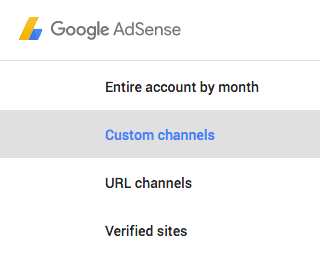
Simply put, you go to My Ads in the AdSense console > Content, and then you select Custom channels. Here you will have to press the New Custom Channel Button. Add a name to the custom channel, and then you can select the ad units that you want. It's important to let these ad units targetable; you will have a small option related to targeting under this.

new google adsense custom channel

You can also remove ad placements if necessary. If you want to see the performance, you just need to go to Performance Reports > Advanced Reports > Custom Channels.

How to optimize ad placement channels?

There are some methods you can use to achieve this. Edit some of the best performing channels and as we mentioned above, mark them as targetable. This will offer you a list with some interesting features. You will see the fields that are shown to advertisers. You can also pick where ads appear, and if necessary, the ad location can be for multiple places if you want.

edit adsense custom channel

At this point, you will also need to opt for a description of your website, and you should also tell the advertisers why they should be interested in placing ads on your site. Make sure that you harness all your copywriting power. It's not an easy thing to do, but it may be able to pay off extremely well in the end.

A good idea is not to make all your channels targetable. What you want is to target solely the ones that are valid for you, as that's what will make things shine for sure. It's a very important idea to try and focus on the most important channels at first. If this does work very well for you, then you can adapt it to the most important channels as you see fit.

Keep testing

It's always important to keep testing, because the more you do that, the better the results will end up being for you in the end. AdSense custom channels are designed to be an analytical tool, so it doesn't matter how many channels you have. If you have around 500, that's great, if not, experiment and try to create as many channels as you can.

You shouldn't expect each channel to deliver its best performance. It will take quite a lot of time and effort to adapt everything to suit your needs. But the idea here is that the more you focus on interacting with the audience, the better the results will be for sure. As long as you know how to handle all of this, the experience will be great, and your site will benefit from that.

Plus, you shouldn't expect AdSense custom channels to deliver the best possible value right off the bat. These things do tend to take quite a bit of time for them to work adequately. At first, it may be a bit simple, but as time passes you will see that the results get increasingly better.

The reason is simple, it will just make things a lot better for you, and the AdSense custom channels performance will increase too. Plus, you get to learn what's wrong and opt for what is meaningful. While it can take some time and effort to set up everything adequately, AdSense custom channels do work very well. So, try to create and adapt AdSense custom channels to your needs, then the AdSense RPM will increase exponentially!

How to Add AdSense Page-level ads in Blogspot

Recently, page-level ads were made available for blogspot bloggers and webmasters which means that you can now display AdSense Ads right on your mobile templates. You can now monetize your efforts on the templates as you do with mobile apps thanks to the Google Admob Ads.

Why Choose AdSense Page-level ads?

There are a number of reasons why you choose page-level ads from AdSense to bolster your revenue stream.
  • Increase Revenues
  • Provide Better User Experience
  • Two New Formats
  • Doesn't Count Against 3 Ad Limit
  • Optimized and Responsive to Mobile Needs

Page-level Ad Formats

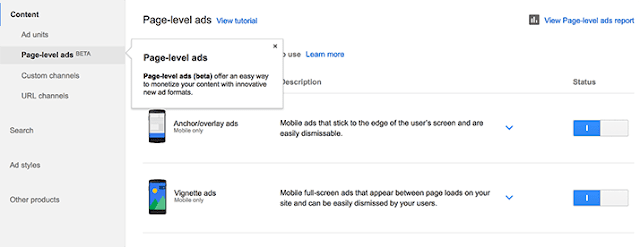
Today, the two types of page-level ads available include Anchors which are ads places at the bottom of the screen and Vignettes which are full screen ads that work similar to Admob's Interstitial adverts.
Vignettes tend to be more effective for mobile advertising.

how to add adsense page-level ads in blogspot

How to Setup Page-Level Ads in Blogspot Blogs

The good news is that you can install these ads from AdSense fairly quickly and easily thanks to the process which guides you through.

1. Log into your AdSense Account
2. Click on this link
3. Click the two toggle buttons to switch on "Anchor/overlay ads" and "Vignette ads"

enable adsense page-level ads in blogger

4. Scroll down and click the "Get Code" button

enable adsense page-level ads in blogger

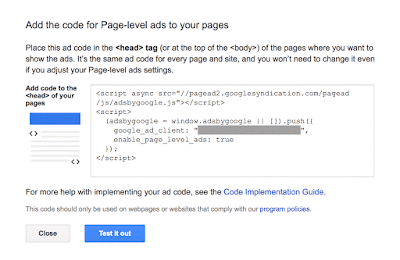
5. Copy the code

google adsense page-level ads code

6. Go to Blogger, then Template and Backup your Template
7. Click the 'Edit HTML' button and search for the </head> tag
8. Paste the page-level ad code above the </head> tag

Note: You will also need to replace the attribute async with async="async" in order to help complete the process, otherwise Blogger will give you an error message. Once you have completed these steps, all you need to do is save it to your template.

Test Page-level ads in your Blogger template

After installation, get out your mobile device so you can test the AdSense page-level ads and see if they are working correctly. You will need to be a visitor to your site in order to check out the ads.
  • Type #googleads at the end of the URL so you can access them
  • Select the ad format from the tabbed box that will appear above the body of the blog
  • Check out the ads
You will get to see the ads in action before the public does so that you can tell if they are working fine. If you are impressed with what you see, then it is ready to go. However, if you see something that you want to change or if the ads are not present, you'll need to start over again.

The Effectiveness of Page-level ads

Since October, 2015 when these ads were first rolled out the effectiveness that they have demonstrated is considerable. Today, the ads have been used in countries all over the world and they continue to impress. For those who have already used these mobile ads on WordPress or other blogger blogs you can see just how effective they have been in terms of reaching all of your visitors. In addition, the effect on your revenue may be considerable depending on the popularity of your blog.

In the end, AdSense page-level ads are remarkably effective for mobile use and will help you build a stronger income base for your blog.

Insert Adsense Inside Posts: After the First Paragraph

Want to know which part of your site or blog will bring you more profit? Add AdSense inside posts and then check out the famous Google AdSense heat map. Recent studies, however, showed that placing AdSense after the first paragraph of a site or blog is one of the best AdSense placement. Unfortunately, the default Blogger platform offered by Google doesn't allow placement of ad after the first paragraph. But because it has become one of the most profitable areas, plenty of webmasters have tried to take advantage of the best AdSense placement. How can you enjoy the same level of profit?

To solve the problem, we will just move the locations of the ads to be displayed by adding JavaScript and DIVs. With the following script, you can easily choose the paragraph or heading after which you want to inject the ad to. This way, you won't have to manually change every post.

adsense inside posts, adsense placement

How to Display AdSense Ads after the First Paragraph in Blogger

1. Log into your Blogger account, select your blog and click "Template" on the left side. Open the Template editor using the "Edit HTML" button.

2. Once the editor has opened, click anywhere inside the code area and press the CTRL + F keys (or Command + F) on your keyboard to open the editor' search box. Search the following line (press Enter to find it):
<data:post.body/>
Note: You will find multiple occurrences of <data:post.body/> but you need to stop at the second one, or if you don't see any changes, test the last one.

3. Add the below DIVs in red before and after like this:
<div id='adsense-target'><data:post.body/></div>
4. Copy the AdSense code that you want to show and use this tool to convert it into plain text. After conversion, add the following HTML and replace the "ADSENSE CODE HERE" text with the converted ad code just above the line that we just found:
<b:if cond='data:blog.pageType == &quot;item&quot;'>
<div id='adsense-content' style="display:block;text-align: center">ADSENSE CODE HERE</div></b:if>


Align AdSense Left or Right

By default, the Google AdSense ad unit will appear in the middle just after the first paragraph. If you are unhappy with the results and want to wrap text around the ad, you can choose one of the options below:

a) Align AdSense on the left - change <div id='adsense-content' style="display:block;text-align: center"> with:
<div id='adsense-content' style="display: inline-block;float: left;margin:15px 15px 15px 0px">
After modifying it, the ad will display something like this:

adsense inside posts, adsense placement

b) Align AdSense ad on the right of the content - change <div id='adsense-content' style="display:block;text-align: center"> with:
<div id='adsense-content' style="display:inline-block;float:right;margin:15px 0px 15px 15px">
5. Finally, right after <div id='adsense-target'><data:post.body/></div> from step 2, add this script:
<script type='text/javascript'>
function insertAfter(addition,target) {
var parent = target.parentNode;
if (parent.lastChild == target) {
parent.appendChild(addition);
} else {
parent.insertBefore(addition,target.nextSibling);
}
}
var adscont = document.getElementById(&quot;adsense-content&quot;);
var target = document.getElementById(&quot;adsense-target&quot;);
var linebreak = target.getElementsByTagName(&quot;br&quot;);
if (linebreak.length &gt; 0){
insertAfter(adscont,linebreak[0]);
}
</script>
Note:
- To insert the ad after the second paragraph, change "0" from the line in red with "2".
- If you want to put AdSense just below the heading h2 or heading h3 of a post, replace br from &quot;br&quot; with h2 or h3.

6. Click "Save template" to save the changes and you're done.

With this trick, you can insert AdSense after the first paragraph automatically in Blogger with ease. Now it's your turn to decide which format works best on your site.

Make Money With Steam This Holiday Season!


Make money on Steam

Winter is usually the most anticipated time for serious PC gamers, because the holidays mean one thing and one thing alone - gamer sales! Steam and EA's Origin, the two most popular digital game distribution platforms, have already kicked off their Christmas sales, and for gamers, this is nothing short of a spring vacation. However, for the business-minded, it is more than just a sale - it's an opportunity to make a few bucks easily.


Steam trading cards


To make any money from Steam, you need to familiarize yourself with the concept of Steam trading cards. These are cards you can trade, or sell on the Steam market. There are two basic types of cards, game cards and holiday/sale cards.


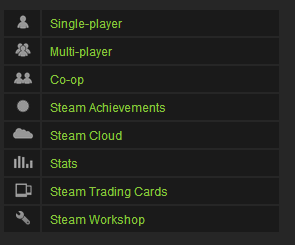
Each game on Steam has its own set of trading cards, provided that it is fully integrated with Steam and supports trading cards. To check if a game supports trading cards, visit its store page, and look for its Steam compatibility in the right sidebar.


Steam compatibility


Additionally, you can see a list of all games owned by you that support trading cards by going to the badges page under your profile.


Another type of trading card is the holiday/sale card. Steam runs a sale on holidays and special occasions all round the year, and the most common of these sales are the Summer and the Winter sales. Right now, the Winter/Christmas sale is underway.


How to get trading cards?


There are quite a few ways to get a card. Game cards are dropped randomly while you play a game. Each game has a collection of cards, but you don't get the whole collection this way. You only get roughly half of the collection for free. For a game with 10 cards, you might be allowed a maximum of 5 card drops. You can see how many card drops are left for each game under the Badges section in your profile.


Here's a trick: If you don't have time to spend on playing a game, you can keep the game minimized while you do your work - the cards will still drop!


This only applies to games that you purchased. For Free to Play games such as Team Fortress 2 or DOTA 2, you have to make purchases in-game to earn card drops.


There are two types of game cards - normal and Foil. Foil cards are rare, and hence more valuable. So keep a special eye out for them.


You can get holiday/sale cards while making game purchases during a major sale (Summer or Winter etc). Every $10 spent on a sale will get you a card. If that seems excessive, you can get a card by participating in the community voting. Every few votes in the 'Community Choice' deal get you a card. You can vote once in 8 hours during a sale, which usually lasts 10-15 days, giving you plenty of time to make a collection.


You can also get cards by buying them from the Steam market, or trading them from your friends.


Badges and Booster packs


Getting all the cards drops available for a game makes you eligible for a booster pack. You don't need to complete a collection for it. Once you complete a collection, you can craft a badge. So what are these badges and booster packs?


A booster pack contains 3 random cards, which might include a foil card (more valuable). Booster packs are awarded rarely, but randomly, provided that you are eligible (i.e. have gotten all card drops for a game). You don't have to play a game to win a booster pack - you just need to log into Steam at least once a week.


If you have purchased a game, but have not gotten all the card drops, then I'd suggest you do it as soon as possible. The more booster packs you're eligible for, the higher your chances of being awarded one.


When you complete a collection, you can use it to craft a badge. Badges give you experience for leveling up on Steam (which is also important), along with a chat emote, a background, and sometimes a voucher.


Steam has introduced a new concept this time around. You can use your cards to make Gems. Gems can be used to buy booster packs.


So, how to make money off all this?


I know all this might be confusing for beginners, but you'll soon get the hang of it once you familiarize yourself with Steam. Making money from steam is simple. You can sell all cards, badges, and booster packs for money on the Steam market. Now here's where it gets a little.....mathy.


Normal trading cards are very cheap, unless the game is new. They'll usually fetch you less than a dollar. Sometimes, only a few cents. A card's price rises and falls over time, like a stock market. It all depends on the supply and demand. You can search for a card in the market and look at its price history to get an estimate on what the card is worth.


Here's a look at the price history for one of the Holiday cards this winter.


Foil cards are rare, but they usually go for a lot more money - sometimes up to 10 times as much as normal cards. Just like normal and foil cards, there are normal and foil badges. But it's often not worth crating a foil badge. You'll make more money by simply selling the foil cards.


Now Booster packs go for a lot of money as well. Once you're rewarded with a Booster Pack, you can either open it or sell it. If you sell it, you'll get some decent money. But if you open it, and find a foil card in there along with other cards, you'll get even more money! But be advised that foil cards in booster packs are rare, so choose what you want wisely.


Sell games


Selling cards probably won't make you rich, but can give you a small and steady income. You can use that money to buy games for friends, who can then pay you in person. You cannot cash out the money you have in your Steam wallet.


Or here's another idea. During the sale, you can buy games at a much discounted rate. You can then sell those games for more money (but less than the official price) once the sale is over. A lot of people buy games outside of sales, so you can hit communities and connect with people to find interested buyers. You can even earn hundreds of dollars if you're willing to invest!


Considering that the Winter sale is currently going on, I say why not take these theories and put them to the test? I've already got a game minimized as I write this, hoping to get some card drops. And I'll be buying some more games from the great Winter deals as well. It's a great time to be gaming this time of the year - you can get some money off it!


Cheers :)

What to Do Before Applying for Google AdSense

It seems that everyone wants to make money by joining up with Google AdSense and why not? Google AdSense is a relatively simple, straightforward way to actually start earning some extra money with your efforts. However, things have changed from the early days of AdSense when joining was not much of an issue. Today, applying for AdSense takes more effort and some preparation so that you can take full advantage of their services.

First, you will need a good reason to apply for AdSense so you can reap the benefits that they offer. Here you will find out more about what Google AdSense is all about, what they offer and how you can properly prepare yourself before joining to really take advantage.

applying to google adsense

What is Google AdSense?

One of the most established internet networks to offer advertisement publishing, AdSense uses the Pay Per Click (PPC) system to help businesses reach out to others on the web. At one time, Google used to provide AdSense to everyone who used their Blogspot program, but now that has changed.

Today, AdSense is one of the most respected thanks to the many thousands of satisfied publishers and customers who use the service. It is straightforward, easy to use and always pays on time which makes it very attractive to anyone wanting to have this service. If you do your work the right way, it will pay better than any other similar service on the web.

However, it is their very success that now makes them harder to join. When you apply, everything has to be just right otherwise you will not be approved.

How to Avoid Getting Your Application Rejected

There are a number of things to avoid when applying for AdSense so that your entry will not be discarded. Here are just a few.

Read Google Policies: Just like studying for a test, Google posts their policies about what it takes for your site to get into AdSense. So, take the time to read them and be sure that your website follows the rules.

Have Good Content: If your website doesn't have good or sufficient content, it will not be accepted. So, be sure that you provide them with enough to review. In addition, it has to be neat, professional and grammatically correct otherwise it will give them the excuse to toss out your application.

Aesthetically Pleasing: Garish yellows and lots of distracting glitz will also stop you in your tracks when you apply for AdSense. Your website should have a good, solid design that is comfortable to look at and pleasing for the visitor.

Post Your Contact Information: If Google cannot find a way to contact you through your website, you might as well not apply. Having an "About Us" page with a contact form is the minimum to getting accepted.

Now that you've done the basics, it is time to hedge your bets when it comes to applying for AdSense by adding in items and procedures that will enhance your chances. While nothing is guaranteed, the following steps will help your website in getting approved.

10 Ways to Increase Your Chances when Applying for AdSense

1. Policy for Privacy

It may seem odd to have a privacy policy for your blog, but it is vital if you want to get AdSense approval. Without it, you might as well not apply at all. The policy itself should describe to those who visit your blog what they will see and what they can and cannot do.

2. Contact Information

This is where you put in your contact information. At the very least, it should consist of an email so that readers can contact you directly about any issue they have on your blog.

3. About Us

This is where you tell people a little about who you are, what your business does and how you are going to accomplish it. This is sort of like an introductory page to your efforts and it critical when you apply for Adsense.

4. Email & Name Verification

Be sure that you put your email as well as your name in your About Me or Contact Us page so that it will help Google verify you quickly.

5. Verify Age

Always use your correct name and date of birth when applying for AdSense. This is mostly for those who are under 18, but it is important to be truthful otherwise you'll never get approved.

6. Appropriate Design

Your blog should look attractive, professional and easy to use. You don't have to be fancy or pour in thousands of dollars, just make it clean and neat will be sufficient.

7. Have Plenty of Posts

Do you know that there is no minimum number of posts stated by Google in terms of what is required for joining AdSense? Even so, if you only have a handful, do not count on getting approved. You should shoot for about 500 or so before applying to demonstrate your seriousness about your efforts and make sure that they are at least 500 words in length.

8. Remember the Rules

No pornography, illegal items, advocating drug use or other items that will not get you any AdSense at all. Plus, if your posts are all less than 200 words, that will not work either.

9. Adds Value

Your blog or website must provide real value for your audience. This will not only help keep people visiting your site, but it will also impress Google as well.

10. Unique, Top Level Domain

Basically, this means that your domain should be a ".com" in order to succeed. Plus, the name itself needs to be short as possible, related to your area of interest and easy to remember.

When applying for AdSense, you will need to keep all of these things in mind so that you will be accepted. However, all of the attributes that Google AdSense requires are also ones that will boost your website as well. So, keep this in mind when you apply for AdSense because the result will be a blog that will start earning you another income stream that can build over time.

How to Add Adsense Ads In the Middle or Anywhere inside Blogger Posts

In a previous post, we saw how and where we can place Adsense ads on our blog; however, these methods would only work when we place the ads on predetermined and fixed locations. For posts area, the most common places are below the title, at the beginning of the post or at the end of it.
adsense placement

But what if we want to display an AdSense ad in the middle of a post?

We can manipulate the location of the ads to be displayed by adding a script inside the template and using a tag inside our post to where we want the AdSense ad to appear. Once added, we can place the ads anywhere, be it between paragraphs or in the middle of the content etc.

Related: Insert AdSense inside posts after the first paragraph

Manually inserting AdSense ads in the middle of posts in Blogger is pretty easy, just follow these steps below:

Adding Adsense Ads In the Middle or Anywhere inside Blogger Posts

Before proceeding, it is recommended to backup your template: go to "Template" and click on the "Backup/restore" button to save a copy on your hard drive.

Adding the script

Step 1. First thing we need to do is to parse the AdSense code and convert it to plain text. Then go to "Template", click on the "Edit HTML" button and click anywhere inside the code area to search using CTRL + F keys for this tag:
<data:post.body/>
Note: you may find it several times, but we need to stop at the second one. Or, if you can't see any changes, test the third one.


Step 2. Replace <data:post.body/> with this code:
<div expr:id='"adsmiddle1" + data:post.id'></div>
<b:if cond='data:blog.pageType == "item"'>
<b:if cond='data:blog.pageType != &quot;static_page&quot;'>
<div style="clear:both; margin:10px 0">
<!-- Add here the code of your ad -->
</div>
</b:if>
</b:if>
<div expr:id='"adsmiddle2" + data:post.id'>
<data:post.body/>
</div>
<script type="text/javascript">
var obj0=document.getElementById("adsmiddle1<data:post.id/>");
var obj1=document.getElementById("adsmiddle2<data:post.id/>");
var s=obj1.innerHTML;
var r=s.search(/\x3C!-- adsense --\x3E/igm);
if(r>0) {obj0.innerHTML=s.substr(0,r);obj1.innerHTML=s.substr(r+16);}
</script>
Step 3. Add the converted Adsense code on where you see the <!-- Add here the code of your ad --> annotation, then save the changes by clicking on the "Save template" button.

Note: For centering the ads, add the <center></center> tags before and after the AdSense code, like this:
<div style="clear:both; margin:10px 0">
<center>
<!-- Add here the code of your ad -->
</center>
</div>

Adding the AdSense annotation to display the ad

Step 4. When you create a New Post, add this annotation inside the "HTML" section to where you want the Google AdSense ads to appear:
<!-- adsense -->
For example:
This is a demo text. This is a demo text. This is a demo text. This is a demo text. This is a demo text. This is a demo text. This is a demo text. This is a demo text. This is a demo text. This is a demo text.<br /><br /> <!-- adsense -->This is a demo text. This is a demo text. This is a demo text. This is a demo text. This is a demo text. This is a demo text. This is a demo text. This is a demo text. This is a demo text. This is a demo text.
AdSense annotation in the middle of the post content
Please note that if you don't add this annotation to specify where to display the ad, then it will appear below the title by default.

So this is how we can add AdSense ads in the middle or anywhere inside our Blogger posts. Don't worry about violating the Google's Terms of Service because applying this method will not modify the ad' structure.

Making Money with your New Blog - Monetizing Basics


Most bloggers will start off their venture in the hopes of earning big from their blogs. And not without reason either. Multitudes of people are earning a decent sum online. You can too. Earning money from your blog while sitting at home is like a dream for most, and yet, is a reality for many as well. It isn't difficult, it just needs some dedication, and the right guidance. In this post, well talk about monetizing your blog to make money online.


Before you move on, do take a look at some of the basics of blogging that we've covered so far.


Part 6Making Money with your New Blog - Monetizing Basics


Google AdSense


Google AdSense is perhaps the most widely known advertising network, so much so that a lot of people, especially new bloggers don't know of any others except Google AdSense. So quite naturally, it'll be the first thing they apply to. Agreeably, Google AdSense is a good starter for beginners, and every blogger should try it at one point or another. However, for earning real hard cash, you'll need to look into some other networks.


Google AdSense is mostly a CPC network. CPC stands for Cost Per Click, and means that you get a certain amount for every click you get on your ads. You can also employ CPM (Cost Per Impression) as an AdSense publisher. CPM gives you a certain amount on the completion of a set Impressions target (for example $0.1 for every 1000 Impressions or views on your ads).


Here are some articles that will help you get the most out of your Google AdSense ads.


BuySellAds


Google AdSense is good in as far as 'getting-the-wheel-turning' is concerned. But these days, almost every other website is getting approved by Google AdSense, which has driven the ad-space and  competition up, and the cost down. That's why you get so little revenue per click.


This is where BuySellAds comes in. BSA does not operate like Google AdSense. Instead, they are Direct Ads. There's a marketplace where you get listed once you pass the BSA criterion of having over 60,000 unique pageviews per month. Advertisers can then pick you from the list, and choose you for hosting their ads based on your niche. This is one of the reasons why you should have a clearly defined niche, because it'll then be easier for sponsors for your niche to find your blog and advertise with it. Once you get picked, you get paid for putting up an ad for a certain period of time. Simple, yet effective. BSA is one of the biggest source of income for many intermediate to professional bloggers out there.


Read these articles to get a better idea about BuySellAds


Affiliate Ads


Affiliate Ads are yet another form of advertising, and they are based on compensations/commissions. The idea is, you promote a product or a service, get people to actually buy it, and then you get a certain sum as a reward for 'referring' that buyer.


This concept is pretty widely used now. Companies need to grow, and for that, they need customers. They'll do anything to get customers, which is why most online products and services, and even some offline companies too offer rewards for referrals. If you do it right, affiliate marketing can become your single largest source of income.


We here at MBT often share discount coupons from HostGator with our readers. HostGator in this case is acting as the host company, and will reward anyone who can bring in customers for it. If you visit their homepage, you will see how you can even earn $2000+ in one month just from referrals!


Here are some posts that ought to help you out with Affiliate Marketing


Got questions? Please feel free to ask in the comments section below. And please, try to keep it relevant. Thank you :)

11 Most Popular Female Bloggers of 2013!


Popular Female bloggers

Today when the biggest competitor of man out there in industry is woman, even the online earning medium too is equally availed by the powerful ladies who know how to cash their talent. It was once perceived that women lack in technical skills and it was somehow true too when the technical work was all limited to the real world, thanks to the online earning strategies, now the chances to make money online are equally available for both-man and woman.


When it comes to blogging, women are a sound contestant of the race and are generating good revenue with their blogs.


Being a female blogger myself, here are a few inspirational women who are known for their work. All data is latest for 2013 especially.  Have a look!


List of Most Popular Female Bloggers


1. Gina Trapani


Alexa Rank: 625


Niche: Self-improvement


gina trapani


The lady who has made it to the top 10 richest bloggers of the world is the owner of Life hacker. The site has always been an inspiration for me where the main focus is given to how actually one can improve his personality. Gina is an active social blogger and the founding editor of her blog. She earns about $110,000 a month with her blogging skills.


Impressive!


2) Rita McGrath


Alexa Rank: 4068


Niche: Marketing


rita_mcgrath


  Rita started her blog in 1994 as a not-for-profit blog with an aim of improving the practice of management and its impact in the changing world. Although initially the blog focused on Hardvard University only, now the blog has turned into an organization where there are 30 employees, having offices in New York City, India and UK.


3) Ree Drummond


Alexa Rank: 7,645


Niche: Food


Ree Drummond


When it comes to mixing some ingredients and making the best out of it, the Pioneer woman has no comparisons. Whether you are a housewife or a business woman, your interest in cooking is something most evident. Ree Drummond provides all what you might be looking for in food on her blog which is widely followed across the globe.


4) Heather & Jessica


Blog: Go Fug Yourself


Alexa Rank: 18,000


Niche: Fashion and Style


heather and jessica


Heather & Jessica have been keeping an eagle’s eye on every move taken in the fashion industry to share it all with their readers. A good site to follow.


5) Jenny Lawson


Alexa Rank: 28,433


Niche: Humor


Jenny Lawson


If you are looking for some great fun to laugh on, you must visit Jenny’s blog. The blog contains every aspect of life, giving it a new touch, making it hilarious. The site has a relatively good traffic rank in the cities of Hartford and Washington (DC).


6) Julie, Janet, Francesca, & Sarah


Blog:  Remodelista


Alexa Rank: 31172


Niche: Design


remodelista team


If you are looking for a platform to learn more about interior designing and wish to give your home a new look; then this site will provide you some decent ideas to follow.


7) Sara K. Smith


Blog: Wonkette


Alexa Rank: 32,975


Niche: Politics


sara k. smith


Women were never behind in the field of politics and Sara Smith has proved it through her work. Wonkette is a popular political site owned by this female blogger. The blog covers all the highlights and latest political affairs


8) Ariel Meadow Stallings


Alexa Rank: 50,404


Niche: Fashion


stalllings


Offbeat Bride is most popular website for brides who dare to walk off the beaten aisle. The site is all about fashion, advice, photos, and more for couples who think differently about their weddings. The site is viewed by over 170,000 unique visitors a month and has over 1.2 million page views each month.


9) Martina Zavagno


Blog: Adverblog


Alexa Rank: 62,968


Niche: Marketing


martina zavagno


Matrina is working as an insider in an integrated marketing firm and is more than willing to share all her knowledge with her readers through her blog.


10) Danielle LaPorte


Alexa Rank: 73,342


Niche: Branding


Danielle Laporte


She’s positive, slightly spiritual, avant, and fully facing the possibility of every day, which is probably why so many people turn to her for guidance on how they can expand their brands, their campaigns, their work, and their minds!


11) Tamar Weinberg


Alexa Rank: 87,000


Niche: Social Media


tamar WEINBERG


The lady whom we know as a Community & Marketing Manager at Mashable, Tamar has been all up in social interactions for 15 years. Although her personal blog needs more than what she is contributing at mashable, it is likely to expect techpedia one of the biggest rivals of mashable in the coming months.


So you see, women can make it all possible no matter which ever field you pick to compare the capabilities of a man with a woman. One thing that is common in all of these women is their consistency and high spirit.


Hope that you enjoyed reading about the magnificent ladies of the blogging world,


Wishes


10 Underestimated Ways of Making Money Online


underestimated ways to make moneyMaking money online and earning your livings via your laptop is becoming one of the most popular earning methods. Statistics have shown that there has been a significant increase in the number of people who are cashing their talent by utilizing the online platform, which for sure is a good replacement of any other real world job.





It is interesting to find that when you question people about all the possible online earning strategies available, all you come across is either blogging or freelancing. There are no doubts about the significance of the two; yet, it is to be remembered now that with the spreading awareness among the potential entrepreneurs, the two stated fields are becoming saturated and complicated. If you look forward to build your blog, you need reasons; pretty good to attract your potential readers, as it is, there are more than a billion sites that are running on the same niche as yours. Similarly, now that freelancing is turning into a giant monster, every next person is known as a freelancer which in turn has created a tough competitive freelance market.


If you have tried your luck as a blogger or a freelancer and failed to attain effective results, all you need to do is to check out the huge list of alternates. Although there are trillions of ways to make money online, here are 10 underestimated ways to earn online.


1) Cash your Talent at Fiverr


No matter how magical your words are, no matter how dedicated you are towards your online business, your start-up earning a day is no more than $2-3 a day as an average. How about bidding your talent for $5 all in all? If the idea sounds decent enough, here comes Fiverr.com at your rescue.


images (22)


Fiverr is a site that allows you to offer your services (whether be of any type) for $5. The members can sell their gigs to people and can buy the services for the same price too.


According to a research that I did few months back, there are all possibilities that a member can earn more than $200 a month through Fiverr. The site deducts $1 as the service charges and the seller gets his $4 through PayPal easily.


Therefore if you are an interesting person and have got a command on something special, creative and worth showing-off, register yourself for free at Fiverr, and enjoy some extra income as a start-up.


2) Use SEOclecks and make money


If you are looking for better SEO services other than Fiverr and searching for affordable SEO services with quality, then do not hesitate to check this out! SEOclerks is an amazing micro job website, you may find many micro job offering sites but what stands it different from others is that, here you can buy affordable SEO services provided by SEO professionals and could also sell your own services on your terms and price. Here people are offering mass amount of services ranging from Article Translating to Webhosting or you could offer selling anything you want!


seoclerks


Getting paid or ordering is as easy as logging into the account. Simple money transactions can be made via PayPal or Payza. In case you don’t have any of them, just provide your profile e-mail for payments to receive.


3) Turn your Photography into an e-business!


It was recently that I came across a catchy line on a social media and that was “You are not a photographer, you just have got a good Camera”! That’s so true. These days, thanks to digitalization, all of us have got the potential to turn into a photographer and make money by selling high definition pictures online. All it needs is a little homework and time to get a hold of the skill.


Digital DSLR Camera with money


There are many sites that exclusively works on the same principle where either few of them sell random pictures from you or place an order to get perfect clicks for them.


Few sites are:


1)Photo Merchant


2)SmugMug


3)Zenfolio


5)ifp3


6)DigiLabs


7)Instaproofs


8)PhotoReflect


4)Hubpages.com


Being a writer myself, I have an additional vote for hubpages.com. If you think you are capable of playing with words and know how to put your thoughts down on paper, article writing is surely one of the decent ways to get recognition for your work and money equivalent altogether. Like many other sites like Squidoo.com and ezinearticles, hubpages.com shares the revenue with its member on the basis of readership been generated by their articles.


hubpages


There are, however, few guidelines which, in case of failure can reject your articles leading to the waste of good amount of time.


5) Make money by uploading Files


How about earning money for uploading files and getting some dollars according to the number of downloads your uploaded files make? The idea itself sounds great, isn’t it? There are people who do not have technical skills or even the power of writings so this one is surely one of the best remedies for them. There are many sites that offer reasonable packages to their members, here are a few:


1)Docstoc.com


Payment on uploading: 50/50 revenue generated


2)Deposifiles.com


Payment on uploading: $25 per1000 downloads


3)Uploading.com


Payment on uploading: $1-100 for every 1000 downloads


4)Crocko.com


Payment on uploading: $1 per 500 downloads


5)Shareapic.com


Payment on uploading: $0.22 for every 1000 picture views


What you need to consider here is the choice you make to upload the file. Think about uploading a video of your backyard and a solution manual of a physics book. Ask yourself that will people be interested in downloading your file? If yes, then figure out that why would they do so. A right choice can bring you good dollars while a lame one can actually eat your time without giving back any favors to you.


6)Earn with your iPhone!


It would be difficult to cover all aspects that an online earning medium covers. You can even make money with your iPhone and make a better use of it in spite of using it for casual activities. There are companies that are associated with the development of iPhone applications and need people to test their applications and provide them reviews. These companies offer an online support and no matter wherever you are situated, you can avail this opportunity and make considerable amount of money.


money with iphone


Few sites are:


1) Swagbucks


Potential Earnings/Task: Approx $10


2) Gigwalk


Potential Earnings/Task: $5- $90


3). EasyShift


Potential Earnings/Task: $3- $20


Adding some extra dollars in your pocket is wise, especially when you enjoy using your iPhone.


7)Enjoy Profit with Forex Trading


Forex is a Currency market where currency trading takes place, facilitating the exchange of currencies (similar to the currency exchangers where you buy or sell the currencies). These days when the online transactions have become the basic necessity of every single business, no matter, big or small, Forex provides a good way to make money utilizing the opportunity that is open for all equally, if they know a little about Forex and Forex Trading Principles.


forex-trading


Once done with signup, step 1 is done, now you are required to add money to your Forex account that you have planned to start trading with. If you have a PayPal Account, well enough, if not, good news is, you can transfer your amount with wire transfer and many other online money transfer options.


This is important to mention here that although the profits are great in forex trading; even the loss is unbearable at times. It is better to invest your “Extra Money” here only.


8) Facebook fan pages


People take Facebook as a Social Networking site only, however, it can turn into a business with profits that are beyond your imaginations. Simple Question that might be clicking all of you is-how? Isn’t it? With Facebook Fan Pages, you can make as much as you want, if you are innovative enough to target a huge audience.


make money on facebook


Social media is enjoying huge audience and getting started with a controversial/worth-following/happening fan page is a good option. What actually happens is, according to the reach and reputation of your fanpage, there are advisors who approach you for advertising their products/services on your page. All in all, it’s a great way to make money.


9) Make money By Online translation!


When you have nothing to cash, you at least have a language to use. Online medium covers this talent as well. There are sites that need online translators to make their products and services available in all languages.


Few sites are:


1. TranslatorsTown


2. TranslatorsBase


3. TRADUguide


4. Proz


5. Trally


You can earn up to $200 a month depending on the package you chose for yourself.


10) Use triod.com


Triond is a different publishing platform, where anyone can sign up and start submitting content. You aren’t limited to just articles here; in fact, you can submit videos, images and what not. It is true that initially the site doesn’t brings huge rewards, but there is something to motivate the beginners.


Therefore, if you are looking forward to start your career online, you must judge you capabilities first and choose a right option for yourself. That brings us to the end of the topic for now, Share your views about the above stated ways and let us know your experiences related to them.


Wishes,