Penguin 3.0 Is Still Rolling Out According To Google!


Google Penguin 3.0


If you are wondering why you have been observing unusual traffic states throughout the past few weeks, it might probably because of Google Penguin. Day 45 or so since the Penguin 3.0 first started rolling out, and it is still going on. This makes it a very significant update since the 2.0 iteration last year, although the exact toll on the total percentage of queries is still unclear.


The original filter was introduced in 2012 and it was designed to target sites deemed to be spammy, especially those violating Google's guidelines regarding link-building. Google has improved this filter and the Penguin 3.0 is said to be much more efficient.


What is Penguin?


The basic idea is to bring up quality content on SERPs (Search Engine Results Pages) rather than content that has good SEO. Penguin is conceptually focused on removing webspam and sites that use 'black hat' SEO techniques, such as cloaking, keyword stuffing, hidden texts, etc. Unethical tricks, in other words.


If you got hit by Penguin, then you are in trouble. It means Google doesn't like your site! And it's that serious. You seriously need to think over some things, because chances are, you are spamming or tricking users in some way even you might not realize. Don't worry though. While difficult, recovery is possible.


Why the long roll-out?


Google began the roll-out of Penguin 3.0 on October 17, 2014, which was 45 days ago, or over six-weeks ago. It is very unusual for it to be still rolling out. In addition, many sites that reported changes on Thanksgiving, only saw recoveries. Meaning, it looked like somewhat of a reversal of the Penguin 3.0 roll-out that happened in October.


The results for this roll-out, however are still unclear. The Penguin 3.0 roll-out initially impacted about 1% of queries.


One possible explanation for this is that Google has been working on the update constantly to cover up potential pitfalls, or they might have noticed some flaws in the algorithm that could have adversely impacted traffic for a lot of sites. Hence, they saw fit to carry on the update with tweaks to make it better.


Whatever the reason, it is unprecedented, and goes on to show how messy this whole affair could be for webmasters. But perhaps it is for the greater good.


If you have have been impacted by Penguin 3.0, do let us know what sort of impact have you noticed - positive or negative? Do you think Google should constantly keep rolling out search filters like this?

European Parliament Calling For Break Up Of Google!


Google


The European Parliament has finally voted in favor of a resolution to break up Google by 'unbundling' the search engine from the rest of its business. The vote calls upon the European Commission, which is the EU’s antitrust regulator, to “enforce EU competition rules [and] to consider proposals with the aim of unbundling search engines from other commercial services.”


What does it mean?


What this means is, if the European Commission decides to oblige, then Google will have to break up its search engine from the rest of its business, at least in the EU. The vote passed overwhelmingly (384 to 174, with 56 abstentions), but the European Parliament doesn't have the power to actually enforce it - that's up to the European Commission.


The ruling calls for all search engines operating in the EU to be broken up from their commercial services, and it doesn't specifically names Google. But since Google has a 90%share of the search market in Europe, it is by far the biggest stakeholder in this motion.


Why the ruling?


The EU Parliament states that there's a “need to prevent online companies from abusing dominant positions.” In order to prevent such abuse, EU Parliament is calling on the European Commission to “unbundle search engines from other commercial services.”


European politicians are of the opinion that Google’s position as a market leader may pose a threat to the digital economy. They argue fair access to information and online products is not possible since Google has influence over how search results are displayed.


This is yet another example EU trying to impose legislation on Google, having passed right to be forgotten earlier this year. This is a stark contrast to how Google is treated by lawmakers in the United States, with a recent court ruling declaring Google has every right to display search results however it wants.


US senators and congressmen even attempted to intervene in EU Parliament’s vote by sending letters expressing their concern over the proposal to break up Google.


With the vote being passed there is now significant pressure on the EU Commission to act, which means we have certainly not heard the last of this story. We'll keep you posted about future developments.

How To Change Your YouTube Account URL?


Are you stuck with your YouTube account URL you picked long ago that doesn't quite capture the essence of what you do anymore? Despair not, for YouTube is giving you a way out. You can now get a new custom URL that's more befitting of your brand. This is definitely better than opening up a brand new channel, and losing all of your previous subscribers. The option will be made available over the next week.


Starting this week, YouTube will be sending out emails and notifications to qualifying users that will give them the opportunity to claim a new URL.


YouTube will suggest some potential URLs for you to choose from based on your channel’s description, Google identify, and websites associated with your YouTube account. One you pick your new URL, your subscribers will be automatically redirected if they try to get to your account via the old URL.


Be careful, because once you change your URL once you won’t be able to change it again, so make sure it’s one you’re fully satisfied with.


How does it work?


First, you have to meet YouTube’s eligibility requirements, which are as follows:


  • 500 or more subscribers

  • Channels is at least 30 days old

  • Channel has uploaded a photo for the channel icon

  • Channel has uploaded channel art


You may also be able to qualify for a custom URL after linking and verifying your website with your YouTube channel.


You’ll know if you qualify for a new custom URL because YouTube will notify you via email. From there you can take the following steps:


Changing the Account URL


  • Sign in to YouTube and navigate to the Creator Studio.

  • Look for your “Get a new custom URL” notification and click in the included link

  • You’ll be redirected to claim a custom URL.

  • You’ll see the custom URL(s) you’ve been approved for. These cannot be changed. You may also need to add a few letters or numbers to make the URL unique to you.

  • Click the box next to “I agree to the Terms of Service” then click Change URL in the bottom left corner.

  • This URL will be linked to both your YouTube channel and your Google+ identity. Once your URL has been approved, you cannot request to change it. When you’re certain, click Confirm choice.


After that you should be all set to reap the benefits of your new URL.

The Fastest Growing Social Networks And Apps For Marketers Today


tumblr

What is the hottest social networking platform to be on right now? If you thought Pinterest or Instagram, then you'd be close. But not close enough. If you thought Facebook, you couldn't have been more wrong! This time, the baton has been picked up by a network that's a blogging platform as well! A report by Global Web Index reveals that Tumblr is now the fastest growing social network, with its active user base having grown 120% in the past six months!


Fastest growing social networks


Many people underestimate the usefulness of Tumblr, even though it has huge potential for SEO and social media marketing. Tumblr is quickly growing in popularity, and is now the fastest growing social network today!


Pinterest came in second with a 57% growth, followed by Instagram, LinkedIn, Twitter and YouTube. Guess who came in last? Facebook with a user growth of just 6%. But then again, when you have more than a Billion users, how much more can you grow?


Fastest growing apps


The Global Web Index report also revealed some insights into the fastest growing mobile apps. As expected, Snapchat topped this list, notable for its popularity with teen and 20-something users.


Snapchat grew 56% this year, followed by Facebook Messenger and Instagram. But there’s a huge caveat here — Facebook literally forced all of its users to download the Facebook Messenger app in order to send private messages to people on their friends list. You have to wonder how much its user base would have grown had that not been the case.


While Facebook reigns supreme in terms of user base on both desktop and mobile, GWI notes that it has some major challenges to face:


Firstly, people are growing tired of it, with 50% of members in the UK and US saying that they’re using it less frequently than they used to (rising to 64% among teens)… Since the start of 2013, we've seen behaviors like sharing photos and messaging friends fall by around 20 percentage points.


Why are we sharing these stats? Well these are the places social marketers are supposed to be right now! Strike the iron while it is hot, or not at all! Good luck :)

Now Use Google To Get Insights Into Hottest Products This Holiday Season


The winter holiday season is just around the corner, with Black Friday just a few days away. For retailers, this is probably the busiest time of the year as shoppers from around the world wait for the annual sales. To help retailers maximize their business prospects this holiday season, Google has released a new set of mobile features to its Google Shopping platform, as well as some insights that will help online stores research the hottest products this holiday weekend


According to Google, nearly 50% of people aged 25-34 use their phone to shop online while they’re actually standing in line waiting to pay for something at a brick and mortar store.


This holiday season will be the most mobile-driven ever, Google says, with shopping searches coming from smartphones already up 3.5x year over year with further growth expected.


As of this week, searching for a product on your mobile device will bring up more detailed information within Google’s Knowledge Graph. Shoppers will not only learn more information about the product, but also where to buy it, who has it in stock, and what other customers think about it.


Google has also introduced a unique 360 degree view of the product so you can take it for a spin and see it in greater detail before deciding to buy it.


Most popular searches


Google reveals that 27% of shoppers have already started hunting down Black Friday deals online. If you want to optimize your content for what are typing in , here are some of the top queries:


  • what time do stores open on black friday

  • what time does black friday start

  • when does black friday end

  • what to buy on black friday


That’s interesting, but what products are people searching for? Google has you covered there too. They've done the work for you by looking at search trends on Google, insights from Google Consumer Surveys and top trending purchases Google Express to come up with a list of this holiday season’s hottest items.


Popular items


Game consoles and tablets are the top trending gifts on Google Shopping, with wearable technology like fitness trackers being on the rise.


Retro toys are cool again. Thanks in part to the new movie “Ouija”, searches for “Ouija boards” are up 300% since October. Nothing feels more like the holidays than getting together with friends and family around a Ouija board, am I right?


For what it’s worth, searches for “Barbie Dream House” and “My Little Pony” are up as well compared to last month. I wonder how many of those My Little Pony searches are coming from Bronies?


As the weather gets colder, searches for “Hunting boots” and “Canada Goose jackets” top the list of trending apparel searches, up 46% and 140% respectively. A newcomer has entered the fold, as “jogger pants” are reportedly up 39% from October.


If you’re an affiliate marketer, or an ecommerce store owner, hopefully those insights will help you rake in more sales over the next few weeks.

5 Cool Recent Post Widgets for Blogger

For bloggers that pride themselves on always staying up-to-date with new content, a recent post widget for Blogger can be an invaluable tool. A recent posts widget for blogger is in many ways similar to a 'breaking news alert' that journalists love to use during their reports, providing the most recent and relevant posts that you have to offer.

Adding a recent post widget for Blogger helps to reduce the dependency on email marketing, because you don't have to send out an email just to let people know you made a new post. Instead, it updates automatically for everyone to see. You can then use this information to design scheduled email newsletters, and take advantage of what's often referred to as the 'Twitter effect' where audiences will regularly check back on your site for the possibility that new posts are available. Without this, you force people to do run their own search for information and content, increasing the likelihood that they'll leave the site and hurt your bounce rate.

Once you've managed to attract visitors to one of your posts using the recent post widget for Blogger, it will continue to act as an accessible secondary resource to navigate around your site. That way, you can avoid having them sifting through old content that might be outdated. If you'd rather show off some of your best posts instead of your most recent posts, you can do that instead, or add that feature to the bar with just a few alterations.

Apart from looking great and taking up minimal space, there are too many benefits for you not to have a recent post widget for Blogger. The best part about these add-ons is that they come in a wide variety of designs that will fit any theme. If you're interested in adding a widget to your site, here are 5 cool recent post widgets that might catch your eye and fit perfectly with your Blogger template:
recent posts for blogger, cool widgets

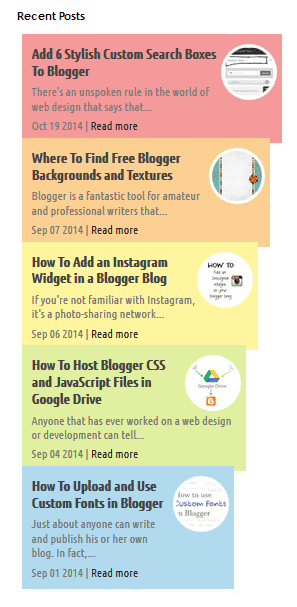
Recent Posts Style #1

rainbow widget, recent posts
<script type="text/javascript">
function showlatestpostswiththumbs(t){document.write('<ul class="recent-posts-container">');for(var e=0;e<posts_no;e++){var r,n=t.feed.entry[e],i=n.title.$t;if(e==t.feed.entry.length)break;for(var o=0;o<n.link.length;o++){if("replies"==n.link[o].rel&&"text/html"==n.link[o].type)var l=n.link[o].title,m=n.link[o].href;if("alternate"==n.link[o].rel){r=n.link[o].href;break}}var u;try{u=n.media$thumbnail.url}catch(h){s=n.content.$t,a=s.indexOf("<img"),b=s.indexOf('src="',a),c=s.indexOf('"',b+5),d=s.substr(b+5,c-b-5),u=-1!=a&&-1!=b&&-1!=c&&""!=d?d:"https://blogger.googleusercontent.com/img/b/R29vZ2xl/AVvXsEjhLf5ExkzyOu1r63yR_mUlC86xYHWRCy_HPB7ITQil907JbjufMwSLRxZQOzOtHEca04SkfSTEljhDolmsdaC11I5pOt74K8rK-FDPRJlzIkKp2ubZoFHEjPThJw19ED-kJ5EJkn58a6EC/s1600/no-thumb.png"}var p=n.published.$t,f=p.substring(0,4),g=p.substring(5,7),v=p.substring(8,10),w=new Array;if(w[1]="Jan",w[2]="Feb",w[3]="Mar",w[4]="Apr",w[5]="May",w[6]="Jun",w[7]="Jul",w[8]="Aug",w[9]="Sep",w[10]="Oct",w[11]="Nov",w[12]="Dec",document.write('<li class="recent-posts-list">'),1==showpoststhumbs&&document.write('<a href="'+r+'"><img class="recent-post-thumb" src="'+u+'"/></a>'),document.write('<div class="recent-post-title"><a href="'+r+'" target ="_top">'+i+"</a></div>"),"content"in n)var A=n.content.$t;else if("summary"in n)var A=n.summary.$t;else var A="";var k=/<\S[^>]*>/g;if(A=A.replace(k,""),1==post_summary)if(A.length<summary_chars)document.write(A);else{A=A.substring(0,summary_chars);var y=A.lastIndexOf(" ");A=A.substring(0,y),document.write(A+"...")}var _="",$=0;document.write('<br><div class="recent-posts-details">'),1==posts_date&&(_=_+w[parseInt(g,10)]+" "+v+" "+f,$=1),1==readmorelink&&(1==$&&(_+=" | "),_=_+'<a href="'+r+'" class="url" target ="_top">Read more</a>',$=1),1==showcommentslink&&(1==$&&(_+=" <br> "),"1 Comments"==l&&(l="1 Comment"),"0 Comments"==l&&(l="No Comments"),l='<a href="'+m+'" target ="_top">'+l+"</a>",_+=l,$=1),document.write(_),document.write("</div>"),document.write("</li>")}document.write("</ul>")}
</script>
<script type="text/javascript">
var posts_no = 5;
var showpoststhumbs = true;
var readmorelink = true;
var showcommentslink = false;
var posts_date = true;
var post_summary = true;
var summary_chars = 70;
</script>
<script src="/feeds/posts/default?orderby=published&alt=json-in-script&callback=showlatestpostswiththumbs"></script>
<a style="font-size: 9px; color: #CECECE; margin-top: 10px;" href="https://allbloggertrick4u.blogspot.com/2014/11/5-cool-recent-post-widgets-for-blogger.html" rel="nofollow">Recent Posts Widget</a>
<noscript>Your browser does not support JavaScript!</noscript>
<link href='http://fonts.googleapis.com/css?family=Ubuntu+Condensed' rel='stylesheet' type='text/css' />
<style type="text/css">
img.recent-post-thumb{width:50px;height:50px;float:right;margin:5px -5px 0px 0px;-webkit-border-radius:50%;-moz-border-radius:50%;border-radius:50%;padding:3px;background: #fff}
ul.recent-posts-container {list-style-type: none; background: #fff;padding: 0px;font:12px 'Ubuntu Condensed', sans-serif;margin: 5px 0px 5px 0px;}
ul.recent-posts-container li:nth-child(1n+0) {background: #F49A9A; width: 100%}
ul.recent-posts-container li:nth-child(2n+0) {background: #FCD092; width: 95%}
ul.recent-posts-container li:nth-child(3n+0) {background: #FFF59E; width: 90%;}
ul.recent-posts-container li:nth-child(4n+0) {background: #E1EFA0; width: 85%;}
ul.recent-posts-container li:nth-child(5n+0) {background: #B1DAEF; width: 80%;}
ul.recent-posts-container li {padding:5px 10px;list-style-type: none; margin: 0 0 -5px; color: #777;}
.recent-posts-container a { text-decoration:none; }
.recent-posts-container a:hover { color: #222;}
.post-date {color:#e0c0c6; font-size: 11px; }
.recent-post-title a {font-size: 14px;color: #444; font-weight: bold;}
.recent-post-title {padding: 6px 0px;}
.recent-posts-details a{ color: #222;}
.recent-posts-details {padding: 5px 0px 5px; }
</style>

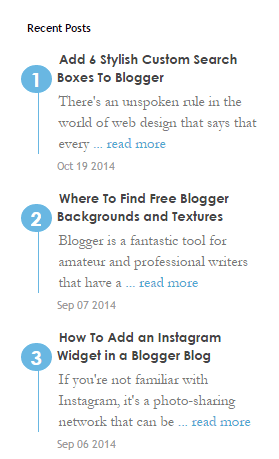
Recent Posts Style #2

recent posts widget for blogger
<div class="recentpoststyle">
<script type="text/javascript">
function showlatestposts(e){for(var t=0;t<posts_no;t++){var r,s=e.feed.entry[t],n=s.title.$t;if(t==e.feed.entry.length)break;for(var a=0;a<s.link.length;a++)if("alternate"==s.link[a].rel){r=s.link[a].href;break}n=n.link(r);var i="... read more";i=i.link(r);var l=s.published.$t,o=l.substring(0,4),u=l.substring(5,7),c=l.substring(8,10),m=new Array;if(m[1]="Jan",m[2]="Feb",m[3]="Mar",m[4]="Apr",m[5]="May",m[6]="Jun",m[7]="Jul",m[8]="Aug",m[9]="Sep",m[10]="Oct",m[11]="Nov",m[12]="Dec","content"in s)var d=s.content.$t;else if("summary"in s)var d=s.summary.$t;else var d="";var v=/<\S[^>]*>/g;if(d=d.replace(v,""),document.write('<li class="recent-post-title">'),document.write(n),document.write('</li><div class="recent-post-summ">'),1==post_summary)if(d.length<summary_chars)document.write(d);else{d=d.substring(0,summary_chars);var f=d.lastIndexOf(" ");d=d.substring(0,f),document.write(d+" "+i)}document.write("</div>"),1==posts_date&&document.write('<div class="post-date">'+m[parseInt(u,10)]+" "+c+" "+o+"</div>")}}
</script>
<script type="text/javascript">
var posts_no = 5;var posts_date = true;var post_summary = true;var summary_chars = 80;</script>
<script src="/feeds/posts/default?orderby=published&amp;alt=json-in-script&amp;callback=showlatestposts">
</script><a style="font-size: 9px; color: #CECECE;margin-top:10px;" href="https://allbloggertrick4u.blogspot.com/2014/11/5-cool-recent-post-widgets-for-blogger.html" rel="nofollow">Recent Posts Widget</a>
<noscript>Your browser does not support JavaScript!</noscript>
<style type="text/css">
.recentpoststyle {counter-reset: countposts;list-style-type: none;}
.recentpoststyle a {text-decoration: none;color: #49A8D1;}
.recentpoststyle a:hover {color: #000;}
.recentpoststyle li:before {content: counter(countposts,decimal);counter-increment: countposts;float: left;z-index: 1;position:relative;font-size: 15px;font-weight: bold;color:#fff;background:#69B7E2; margin:13px 5px 0px -6px;line-height:30px;width:30px;height:30px;text-align:center;-webkit-border-radius:50%;-moz-border-radius:50%;border-radius:50%;}li.recent-post-title{margin-bottom: 5px;padding: 0;}
.recent-post-title a {color: #444;text-decoration: none;font: bold 13px "Avant Garde",Avantgarde,"Century Gothic",CenturyGothic,AppleGothic,sans-serif;}
.post-date {font-size: 11px;color: #999;margin:5px 0px 15px 32px;}
.recent-post-summ {border-left:1px solid #69B7E2; color: #777; padding: 0px 5px 0px 20px; margin-left: 10px; font: 15px Garamond,Baskerville,"Baskerville Old Face","Hoefler Text","Times New Roman",serif;}
</style></div>

Recent Posts Style #3

recent posts gadget

<script type="text/javascript">
function showlatestpostswiththumbs(t){document.write('<ul class="recent-posts-container">');for(var e=0;e<posts_no;e++){var r,n=t.feed.entry[e],i=n.title.$t;if(e==t.feed.entry.length)break;for(var o=0;o<n.link.length;o++){if("replies"==n.link[o].rel&&"text/html"==n.link[o].type)var l=n.link[o].title,m=n.link[o].href;if("alternate"==n.link[o].rel){r=n.link[o].href;break}}var u;try{u=n.media$thumbnail.url}catch(h){s=n.content.$t,a=s.indexOf("<img"),b=s.indexOf('src="',a),c=s.indexOf('"',b+5),d=s.substr(b+5,c-b-5),u=-1!=a&&-1!=b&&-1!=c&&""!=d?d:"https://blogger.googleusercontent.com/img/b/R29vZ2xl/AVvXsEjhLf5ExkzyOu1r63yR_mUlC86xYHWRCy_HPB7ITQil907JbjufMwSLRxZQOzOtHEca04SkfSTEljhDolmsdaC11I5pOt74K8rK-FDPRJlzIkKp2ubZoFHEjPThJw19ED-kJ5EJkn58a6EC/s1600/no-thumb.png"}var p=n.published.$t,f=p.substring(0,4),g=p.substring(5,7),v=p.substring(8,10),w=new Array;if(w[1]="Jan",w[2]="Feb",w[3]="Mar",w[4]="Apr",w[5]="May",w[6]="Jun",w[7]="Jul",w[8]="Aug",w[9]="Sep",w[10]="Oct",w[11]="Nov",w[12]="Dec",document.write('<li class="recent-posts-list">'),1==showpoststhumbs&&document.write('<a href="'+r+'"><img class="recent-post-thumb" src="'+u+'"/></a>'),document.write('<div class="recent-post-title"><a href="'+r+'" target ="_top">'+i+"</a></div>"),"content"in n)var A=n.content.$t;else if("summary"in n)var A=n.summary.$t;else var A="";var k=/<\S[^>]*>/g;if(A=A.replace(k,""),1==post_summary)if(A.length<summary_chars)document.write(A);else{A=A.substring(0,summary_chars);var y=A.lastIndexOf(" ");A=A.substring(0,y),document.write(A+"...")}var _="",$=0;document.write('<br><div class="recent-posts-details">'),1==posts_date&&(_=_+w[parseInt(g,10)]+" "+v+" "+f,$=1),1==readmorelink&&(1==$&&(_+=" | "),_=_+'<a href="'+r+'" class="url" target ="_top">Read more</a>',$=1),1==showcommentslink&&(1==$&&(_+=" <br> "),"1 Comments"==l&&(l="1 Comment"),"0 Comments"==l&&(l="No Comments"),l='<a href="'+m+'" target ="_top">'+l+"</a>",_+=l,$=1),document.write(_),document.write("</div>"),document.write("</li>")}document.write("</ul>")}
</script>
<script type="text/javascript">
var posts_no = 5;
var showpoststhumbs = true;
var readmorelink = true;
var showcommentslink = true;
var posts_date = true;
var post_summary = true;
var summary_chars = 40;</script>
<script src="/feeds/posts/default?orderby=published&alt=json-in-script&callback=showlatestpostswiththumbs"></script>
<a style="font-size: 9px; color: #CECECE; margin-top: 10px;" href="https://allbloggertrick4u.blogspot.com/2014/11/5-cool-recent-post-widgets-for-blogger.html" rel="nofollow">Recent Posts Widget</a>
<noscript>Your browser does not support JavaScript!</noscript>
<link href='http://fonts.googleapis.com/css?family=Oswald' rel='stylesheet' type='text/css'/>
<style type="text/css">
img.recent-post-thumb{padding:2px;width:65px;height:65px;float:left;margin:0px 10px 10px;border: 1px solid #69B7E2;}
.recent-posts-container {font-family:'Oswald', sans-serif;font-size:12px;}
ul.recent-posts-container li{list-style-type: none; margin-bottom: 10px;font-size:12px;float:left;width:100%}
ul.recent-posts-container {counter-reset: countposts;list-style-type:none;padding:0;}
ul.recent-posts-container li:before {content: counter(countposts,decimal);counter-increment: countposts;z-index: 1;position:absolute; left: 0px; font-size: 13px;font-weight: bold;color: #fff;background: #69B7E2;line-height:25px;height:25px;width:25px;text-align:center;-webkit-border-radius: 50%;-moz-border-radius: 50%;border-radius: 50%;}
.recent-posts-container a{text-decoration:none;}
.recent-post-title {margin-bottom:5px;}
.recent-post-title a {font-size:12px; text-transform: uppercase; color: #2aace3;}
.recent-posts-details {margin: 5px 0px 0px 92px;font-size:11px;}
.recent-posts-details a{color: #777;}
</style>

Recent Posts Style #4

recent posts for blogger, cool widgets
<script type="text/javascript">
function showlatestpostswiththumbs(t){document.write('<ul class="recent-posts-container">');for(var e=0;e<posts_no;e++){var r,n=t.feed.entry[e],i=n.title.$t;if(e==t.feed.entry.length)break;for(var o=0;o<n.link.length;o++){if("replies"==n.link[o].rel&&"text/html"==n.link[o].type)var l=n.link[o].title,m=n.link[o].href;if("alternate"==n.link[o].rel){r=n.link[o].href;break}}var u;try{u=n.media$thumbnail.url}catch(p){s=n.content.$t,a=s.indexOf("<img"),b=s.indexOf('src="',a),c=s.indexOf('"',b+5),d=s.substr(b+5,c-b-5),u=-1!=a&&-1!=b&&-1!=c&&""!=d?d:"https://blogger.googleusercontent.com/img/b/R29vZ2xl/AVvXsEjhLf5ExkzyOu1r63yR_mUlC86xYHWRCy_HPB7ITQil907JbjufMwSLRxZQOzOtHEca04SkfSTEljhDolmsdaC11I5pOt74K8rK-FDPRJlzIkKp2ubZoFHEjPThJw19ED-kJ5EJkn58a6EC/s1600/no-thumb.png"}var h=n.published.$t,f=h.substring(0,4),w=h.substring(5,7),v=h.substring(8,10),A=new Array;A[1]="Jan",A[2]="Feb",A[3]="Mar",A[4]="Apr",A[5]="May",A[6]="Jun",A[7]="Jul",A[8]="Aug",A[9]="Sep",A[10]="Oct",A[11]="Nov",A[12]="Dec",document.write('<li class="recent-posts-list">'),1==posts_date&&document.write('<div class="post-date">'+A[parseInt(w,10)]+" "+v+" "+f+"</div>"),1==showpoststhumbs&&document.write('<a href="'+r+'"><img class="recent-post-thumb" src="'+u+'"/></a>'),document.write('<div class="recent-post-title"><a href="'+r+'" target ="_top">'+i+"</a></div>");var g="",k=0;document.write('<div class="recent-posts-details">'),1==showcommentslink&&(1==k&&(g+=" <br> "),"1 Comments"==l&&(l="1 Comment"),"0 Comments"==l&&(l="No Comments"),l='<a href="'+m+'" target ="_top">'+l+"</a>",g+=l,k=1),1==readmorelink&&(1==k&&(g+=" | "),g=g+'<a class="readmorelink" href="'+r+'" class="url" target ="_top">Read more</a>',k=1),document.write(g),document.write("</div>"),document.write("</li>")}document.write("</ul>")}
</script>
<script type="text/javascript">
var posts_no = 5;
var showpoststhumbs = false;
var readmorelink = true;
var showcommentslink = true;
var posts_date = true;
</script>
<script src="/feeds/posts/default?orderby=published&alt=json-in-script&callback=showlatestpostswiththumbs"></script>
<a style="font-size: 9px; color: #CECECE; float: right; margin-top: 5px;" href="https://allbloggertrick4u.blogspot.com/2014/11/5-cool-recent-post-widgets-for-blogger.html">Recent Posts Widget</a>
<noscript>Your browser does not support JavaScript!</noscript>
<link href='http://fonts.googleapis.com/css?family=Oswald' rel='stylesheet' type='text/css'/>
<style type="text/css">
img.recent-post-thumb {padding: 2px; width:35px;height:35px;float:right;margin: -14px 0px 0px 5px; border: 1px solid #cea5ac; border-radius: 10%;}
.recent-posts-container {font-family: 'Oswald', sans-serif;  float: left;width: 100%;min-height: 70px;margin: 5px 0px 5px 0px;padding: 0;font-size:12px;}
ul.recent-posts-container li {padding:5px 0px;min-height:65px; list-style-type: none; margin: 0px 10px 5px 35px;}
ul.recent-posts-container {counter-reset: countposts;list-style-type: none;}
ul.recent-posts-container li:before {content: counter(countposts,decimal);counter-increment: countposts;z-index: 2;position:absolute; left: 5px; font-size: 16px;color: #4D4D4D;background: #F7F7F7;padding: 9px 14px; border: 1px solid #efefef;}
.recent-posts-container a { text-decoration:none; }
.recent-posts-container a:hover{color: #4DACE3;}
.post-date {color:#e0c0c6; font-size: 11px; }
.recent-post-title a {font-size: 13px; text-transform: uppercase; color: #5C4D4D;}
.recent-post-title { margin: 5px 0px; }
.recent-posts-details {border-top: 4px solid #AC707A; margin-top: 5px; padding-top: 5px;}
.recent-posts-details a{ color: #888;}
a.readmorelink {color: #4DACE3;}
</style>

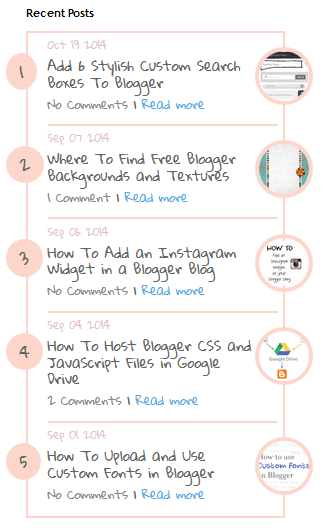
Recent Post Style #5

recent posts, blogger gadget
<script type="text/javascript">
function showlatestpostswiththumbs(t){document.write('<ul class="recent-posts-container">');for(var e=0;e<posts_no;e++){var r,n=t.feed.entry[e],i=n.title.$t;if(e==t.feed.entry.length)break;for(var o=0;o<n.link.length;o++){if("replies"==n.link[o].rel&&"text/html"==n.link[o].type)var l=n.link[o].title,m=n.link[o].href;if("alternate"==n.link[o].rel){r=n.link[o].href;break}}var u;try{u=n.media$thumbnail.url}catch(p){s=n.content.$t,a=s.indexOf("<img"),b=s.indexOf('src="',a),c=s.indexOf('"',b+5),d=s.substr(b+5,c-b-5),u=-1!=a&&-1!=b&&-1!=c&&""!=d?d:"https://blogger.googleusercontent.com/img/b/R29vZ2xl/AVvXsEjhLf5ExkzyOu1r63yR_mUlC86xYHWRCy_HPB7ITQil907JbjufMwSLRxZQOzOtHEca04SkfSTEljhDolmsdaC11I5pOt74K8rK-FDPRJlzIkKp2ubZoFHEjPThJw19ED-kJ5EJkn58a6EC/s1600/no-thumb.png"}var h=n.published.$t,f=h.substring(0,4),w=h.substring(5,7),v=h.substring(8,10),A=new Array;A[1]="Jan",A[2]="Feb",A[3]="Mar",A[4]="Apr",A[5]="May",A[6]="Jun",A[7]="Jul",A[8]="Aug",A[9]="Sep",A[10]="Oct",A[11]="Nov",A[12]="Dec",document.write('<li class="recent-posts-list">'),1==posts_date&&document.write('<div class="post-date">'+A[parseInt(w,10)]+" "+v+" "+f+"</div>"),1==showpoststhumbs&&document.write('<a href="'+r+'"><img class="recent-post-thumb" src="'+u+'"/></a>'),document.write('<div class="recent-post-title"><a href="'+r+'" target ="_top">'+i+"</a></div>");var g="",k=0;document.write('<div class="recent-posts-details">'),1==showcommentslink&&(1==k&&(g+=" <br> "),"1 Comments"==l&&(l="1 Comment"),"0 Comments"==l&&(l="No Comments"),l='<a href="'+m+'" target ="_top">'+l+"</a>",g+=l,k=1),1==readmorelink&&(1==k&&(g+=" | "),g=g+'<a class="readmorelink" href="'+r+'" class="url" target ="_top">Read more</a>',k=1),document.write(g),document.write("</div>"),document.write("</li>")}document.write("</ul>")}
</script>
<script type="text/javascript">
var posts_no = 5;
var showpoststhumbs = true;
var readmorelink = true;
var showcommentslink = true;
var posts_date = true;
</script>
<script src="/feeds/posts/default?orderby=published&alt=json-in-script&callback=showlatestpostswiththumbs" rel="nofollow"></script>
<a style="font-size: 9px; color: #CECECE; float: right; margin-top: 5px;" href="https://allbloggertrick4u.blogspot.com/2014/11/5-cool-recent-post-widgets-for-blogger.html" rel="nofollow">Recent Posts Widget</a>
<noscript>Your browser does not support JavaScript!</noscript>
<link href='http://fonts.googleapis.com/css?family=Lobster|Gloria+Hallelujah' rel='stylesheet' type='text/css' />
<style type="text/css">
img.recent-post-thumb {width:50px;height:50px;float:right;margin: -4px -35px 0px 0px; border: 4px solid #FCD6CB; border-radius: 100%;}
.recent-posts-container {font-family: 'Gloria Hallelujah', cursive;  float: left;width: 100%;min-height: 55px;margin: 5px 0px 5px 0px;padding: 0;font-size:12px;}
ul.recent-posts-container {counter-reset: countposts;list-style-type: none; background: #fff; }
ul.recent-posts-container li:before {content: counter(countposts,decimal);counter-increment: countposts;z-index: 2;position:absolute; left: -20px; font-size: 16px;color: #616662;background: #FCD6CB;padding: 9px 14px; border-radius: 100%; margin-top: 15px;}
ul.recent-posts-container li {padding:5px 0px;min-height:50px; list-style-type: none; margin: -2px 5px 5px 5px;  border-top: 2px solid #FCD6CB;}
ul.recent-posts-container {border: 2px solid #FCD6CB; }
.recent-posts-container a { text-decoration:none; }
.recent-posts-container a:hover { color: #222;}
.post-date {color:#e0c0c6; font-size: 11px; }
.recent-post-title a {font-size: 14px;color: #616662;}
.recent-post-title {padding: 6px 0px;}
.recent-posts-details a{ color: #888;}
.recent-posts-details {padding-bottom: 5px;}
a.readmorelink {color: #4DACE3;}
</style>

How to Add Recent Posts Widget on Blogger

Want to add one of the styles above? Just follow the following steps below:

Step 1. Log into your Blogger dashboard and click on your blog
Step 2. Go to "Layout" and click the "Add a gadget" link on the right side
Step 3. From the pop-up window, scroll down and select the "HTML/JavaScript" gadget:


Step 4. Paste the code of the chosen widget found below it.
Step 5. Hit the "Save" button... and you're done!

Keep Your Blog Updated

Using a recent post widget for Blogger can truly benefit you and improve your skill as a blogger. As you can see, these designs can look great on Blogger sites, but they do act a little bit like a progress report for the author. If you start to fall behind, the dates on your recent post widget will definitely give you away.

Set a schedule and make sure that you are making regular posts on the blog. These posts will be automatically updated on your widget and readers can view this information whenever they want. Add your recent post widget for Blogger on the every page of the blog or in your template so that these posts can encourage others to continue reading, thus increasing the total time spent on your site.

Add 6 Stylish Custom Search Boxes To Blogger

There's an unspoken rule in the world of web design that says that every website have a search box. You can, and should, design a custom search gadget to Blogger that contributes to the theme of your site while providing some key benefits to both your customers and you.

Benefits to Customers

Search boxes not only help to increase your website's design usability, but they're very convenient to site visitors and regulars. For those that have been to your site before, they know what they want and they want it now. These are the impatient people who don't feel like wading through different links. If you don't accommodate this problem you might risk losing those readers.

For newer customers who want to get a feel for your site before investing any more time, it gives them the chance to look for their interests on both eCommerce sites and blog sites.

Benefits To You

Adding a custom search gadget to Blogger perhaps best benefit eCommerce sites because it's an industry that inherently offers a lot of very specific products. For instance, if you sold clothing apparel and someone was only look for shirts, the search would result would only bring up shirts so that person can look through everything in one place.

Bloggers might not have products to offer, but adding a custom search gadget to Blogger can help site analytics and SEO. Google Analytics offers a tool that will track all the searches performed by your search bar, so that you can use this data when improving your keyword usage and content choices. Google web crawlers and search engine bots will also test out phrases in these boxes on the rare occasion to make sure that all your content leads to somewhere creates a closed loop.

Add Your Own Custom Search Gadget To Blogger

Just because you should have a search bar doesn't mean you you're restricted to what time. Your site's search bar should be easy to find and readily available whenever someone needs it, but other than that the look of the design is up to you. If you want to add a custom search gadget to Blogger, here are 6 stylish choices to pick from. Just copy the code below the search box that you want to add and follow the steps below:

<style type="text/css">
#searchbox{background:#d8d8d8;border:4px solid #e8e8e8;padding:20px 10px;width:250px}input:focus::-webkit-input-placeholder{color:transparent}input:focus:-moz-placeholder{color:transparent}input:focus::-moz-placeholder{color:transparent}#searchbox input{outline:none}#searchbox input[type="text"]{background:url(https://blogger.googleusercontent.com/img/b/R29vZ2xl/AVvXsEhRLFwO4qpR8S5jjTfkJSDvUNMXxZvtZsRF8ErIAE4t-oHYcP437spGNlNM9DelnyS25QCA4Kz65oCeetE5FSpHxHpWZanwLULFY4YDK-Oatn97qYVx5nyoH51QhPf0OgSBpFrd1sy4WCFw/s1600/search-dark.png) no-repeat 10px 6px #fff;border-width:1px;border-style:solid;border-color:#fff;font:bold 12px Arial,Helvetica,Sans-serif;color:#bebebe;width:55%;padding:8px 15px 8px 30px}#button-submit{background:#6A6F75;border-width:0;padding:9px 0;width:23%;cursor:pointer;font:bold 12px Arial,Helvetica;color:#fff;text-shadow:0 1px 0 #555}#button-submit:hover{background:#4f5356}#button-submit:active{background:#5b5d60;outline:none}#button-submit::-moz-focus-inner{border:0}
</style>
<form id="searchbox" method="get" action="/search">
<input name="q" type="text" size="15" placeholder="Type here..." />
<input id="button-submit" type="submit" value="Search" /></form>

<style type="text/css">
#searchbox{width:240px}#searchbox input{outline:none}input:focus::-webkit-input-placeholder{color:transparent}input:focus:-moz-placeholder{color:transparent}input:focus::-moz-placeholder{color:transparent}#searchbox input[type="text"]{background:url(https://blogger.googleusercontent.com/img/b/R29vZ2xl/AVvXsEhRLFwO4qpR8S5jjTfkJSDvUNMXxZvtZsRF8ErIAE4t-oHYcP437spGNlNM9DelnyS25QCA4Kz65oCeetE5FSpHxHpWZanwLULFY4YDK-Oatn97qYVx5nyoH51QhPf0OgSBpFrd1sy4WCFw/s1600/search-dark.png) no-repeat 10px 13px #f2f2f2;border:2px solid #f2f2f2;font:bold 12px Arial,Helvetica,Sans-serif;color:#6A6F75;width:160px;padding:14px 17px 12px 30px;-webkit-border-radius:5px 0 0 5px;-moz-border-radius:5px 0 0 5px;border-radius:5px 0 0 5px;text-shadow:0 2px 3px #fff;-webkit-transition:all 0.7s ease 0s;-moz-transition:all 0.7s ease 0s;-o-transition:all 0.7s ease 0s;transition:all 0.7s ease 0s;}#searchbox input[type="text"]:focus{background:#f7f7f7;border:2px solid #f7f7f7;width:200px;padding-left:10px}#button-submit{background:url(https://blogger.googleusercontent.com/img/b/R29vZ2xl/AVvXsEj3MGpAp4zx0ebX8Q6SjbnHuCYgSpGIWF6f8CfAnKiuvosxKS8VQW3l6v8_wTDv0TqpO-jbIhCX-UyWkif-WuYVF4MyIhgEgeakNfyq6nnhkCrSlOXLnK_EvE_2fRruADh_QIpCvr6CLG9E/s1600/slider-arrow-right.png) no-repeat;margin-left:-40px;border-width:0;width:43px;height:45px}
</style>
<form id="searchbox" method="get" action="/search" autocomplete="off"><input name="q" type="text" size="15" placeholder="Enter keywords here..." />
<input id="button-submit" type="submit" value=" "/></form>

<style type="text/css">
#searchbox{background:url(https://blogger.googleusercontent.com/img/b/R29vZ2xl/AVvXsEhbTJ-ErMX9RtF4KO3mNBjKeqxwGx7_LTJ0ptgYo2o81XnPY_rOl-fCPFhJfQwS5vl_iTyPW_wq2SwdK9k9SMBRpG00JHPH0rurziaNhCZ0E-uq7xiRY6PZHkkyKgZaOGAEJtFsb0V23rM4/s1600/searchbar.png) no-repeat;width:208px;height:29px}input:focus::-webkit-input-placeholder{color:transparent}input:focus:-moz-placeholder{color:transparent}input:focus::-moz-placeholder{color:transparent}#searchbox input{outline:none}#searchbox input[type="text"]{background:transparent;margin:3px 0 0 20px;padding:5px 0;border-width:0;font-family:"Arial Narrow",Arial,sans-serif;font-size:12px;color:#828282;width:70%;display:inline-table;vertical-align:top}#button-submit{background:url(https://blogger.googleusercontent.com/img/b/R29vZ2xl/AVvXsEgqw5qEk-gZbwuGjluehT3C2kysjbl5N6SUUx3KuUfvog8l-wMoALwVgloxQWPoaAjtPEXIj0EwmwyyAks6bNPrcWsHr-21WgOAxrPAOoHXpp7UhyqvEsOFKRg7B6dktJ0sdEvsMU7NsTMU/s1600/magnifier.png) no-repeat;border-width:0;cursor:pointer;margin-left:10px;margin-top:4px;width:21px;height:22px}#button-submit:hover{background:url(https://blogger.googleusercontent.com/img/b/R29vZ2xl/AVvXsEh8Hhbj_d_JPHPcDjBScAPPqQq4akWRW3dUMaN7JpsJV8mAK42Hi2FxCgvCpDjbU0fyUCr5385cxMpnfzpbFKFP54mXi6Y07z9aq_GcsFucdDaIycF57Amicc_Ak1NG4COs3ujTeY2kbanP/s1600/magnifier-hover.png) no-repeat}#button-submit:active{background:url(https://blogger.googleusercontent.com/img/b/R29vZ2xl/AVvXsEh8Hhbj_d_JPHPcDjBScAPPqQq4akWRW3dUMaN7JpsJV8mAK42Hi2FxCgvCpDjbU0fyUCr5385cxMpnfzpbFKFP54mXi6Y07z9aq_GcsFucdDaIycF57Amicc_Ak1NG4COs3ujTeY2kbanP/s1600/magnifier-hover.png) no-repeat;outline:none}#button-submit::-moz-focus-inner{border:0}
</style>
<form id="searchbox" method="get" action="/search" autocomplete="off"><input name="q" type="text" size="15" placeholder="search..." /><input id="button-submit" type="submit" value="" /></form>

<style type="text/css">
#searchbox{background:url(https://blogger.googleusercontent.com/img/b/R29vZ2xl/AVvXsEgOYlewJHMtgt6B3b4uK3HdF04Yk7gUIvDhEVKqK0JTErCTY2tmtqv-3HBPuLgN01h9UzJXHu1r36yl5O0q7gCUXBuo8vC2987sFsbddnJbbH2l9Uzf8CQ_cvw8mpqJSqoseweEPO9n-gEJ/s1600/search-box.png) no-repeat;height:27px;width:202px}input:focus::-webkit-input-placeholder{color:transparent}input:focus:-moz-placeholder{color:transparent}input:focus::-moz-placeholder{color:transparent}#searchbox input{outline:none}#searchbox input[type="text"]{background:transparent;margin:0 0 0 12px;padding:5px 0;border-width:0;font:italic 12px "Arial Narrow",Arial,sans-serif;width:77%;color:#828282;display:inline-table;vertical-align:top}#button-submit{background:url(https://blogger.googleusercontent.com/img/b/R29vZ2xl/AVvXsEggP5We3pSONvl_3ZTS-OBpnOqMFfjCd_BwYMH2tDkjSqbcwNQkpWfqbOI68PDocpjNeOzsmuYTO6PvyfR7DGT1Ljpl0z6lR-1d0mQpc7gLm_w5XI9zBskaQu-VkTQj1CwjeV6oFleDpKg3/s1600/search-button.png) no-repeat;border-width:0;cursor:pointer;width:30px;height:25px}#button-submit:hover{background:url(https://blogger.googleusercontent.com/img/b/R29vZ2xl/AVvXsEgjReLO0_sAtLF9c1X0C_0s56fAoHo-TqLg47wy0LyhLUAFf0Y1UOz3m_6s73mk5hIEf8g9d3U20Znx46kuT7FDJPVtBrMCCWpmexNEM3Upffdhk2akjsdUAwQG5X_RB7RjnfkOr3zC81ty/s1600/search-button-hover.png) no-repeat}#button-submit::-moz-focus-inner{border:0}
</style>
<form id="searchbox" method="get" action="/search" autocomplete="off"><input name="q" type="text" size="15" placeholder="search..." /><input id="button-submit" type="submit" value="" /></form>

<style type="text/css">
#searchbox{background:url(https://blogger.googleusercontent.com/img/b/R29vZ2xl/AVvXsEhxXrVDgNlAj6X1HLmxoM6tkyLjvgZy4SrYMPuE0JkguaEnz3pxMpu6iOrwUOdK2qaighQcc1nYeiWZOJm-SR2mGJ-TbJNwt7mPgN162xdA2yvuMwTjtKRoi0oAd6Slod60bwUQpw_RKM6i/s1600/search-box1.png) no-repeat;width:250px;height:65px}input:focus::-webkit-input-placeholder{color:transparent}input:focus:-moz-placeholder{color:transparent}input:focus::-moz-placeholder{color:transparent}#searchbox input{outline:none}#searchbox input[type="text"]{background:transparent;padding:2px 0 2px 20px;margin:10px 15px 0 0;border-width:0;font:bold 16px "Brush Script MT",cursive;color:#595959;width:65%;display:inline-table;vertical-align:top}#button-submit{background:url(https://blogger.googleusercontent.com/img/b/R29vZ2xl/AVvXsEi-mXkiupwExNSDNYoJZI54MR0_qT5kb5cAKFuUcTYDMiHOO8QegxY4ad0Yyg-L51vi8iwQvO1_SOOHjeBBdz6RAEH_hj9_a-8NXdL1Msj3bihyphenhyphen0p2zbnPne1GRw9WnTRNpfm8f4lXaJ2Nw/s1600/magnifier.png) no-repeat;border-width:0;cursor:pointer;margin-top:10px;width:19px;height:25px}#button-submit:hover{background:url(https://blogger.googleusercontent.com/img/b/R29vZ2xl/AVvXsEjgVtHT25xlZR5JvBgxQasCfE-Ulhj_V5Lmpb0y4egOVZ9TJnOOEO_glxPONmedPgZMP5Tnf51n8KO7SqMFSs4Yvte3FEeWfYuuaYsXCsvgal9VaDsnEDRxjYl8tPnl9UjLPLOBAQffGmJL/s1600/magnifier-hover.png) no-repeat}#button-submit:active{background:url(https://blogger.googleusercontent.com/img/b/R29vZ2xl/AVvXsEjgVtHT25xlZR5JvBgxQasCfE-Ulhj_V5Lmpb0y4egOVZ9TJnOOEO_glxPONmedPgZMP5Tnf51n8KO7SqMFSs4Yvte3FEeWfYuuaYsXCsvgal9VaDsnEDRxjYl8tPnl9UjLPLOBAQffGmJL/s1600/magnifier-hover.png) no-repeat;outline:none}#button-submit::-moz-focus-inner{border:0}
</style>
<form id="searchbox" method="get" action="/search" autocomplete="off"><input class="textarea" name="q" type="text" size="15" placeholder="Search here..." /><input id="button-submit" type="submit" value="" /></form>

<style type="text/css">
#searchbox{width:280px;background:url(https://blogger.googleusercontent.com/img/b/R29vZ2xl/AVvXsEi0tfcXmG8frps67utQ6IfN7lGyyRbf3W1b0Wr_UlGSF_x1LxHaGd7Bjok6206dFVzvOpM73JBIQXn9GbeEbflahtN0wNIJ6OpMagbW-O-kSmVEBhb2o97kuQ36MJ3gmiZgl-mVZUgMJR8c/s1600/search-box.png) no-repeat}#searchbox input{outline:none}input:focus::-webkit-input-placeholder{color:transparent}input:focus:-moz-placeholder{color:transparent}input:focus::-moz-placeholder{color:transparent}#searchbox input[type="text"]{background:transparent;border:0;font:14px "Avant Garde",Avantgarde,"Century Gothic",CenturyGothic,"AppleGothic",sans-serif;color:#f2f2f2!important;padding:10px 35px 10px 20px;width:220px}#searchbox input[type="text"]:focus{color:#fff}#button-submit{background:url(https://blogger.googleusercontent.com/img/b/R29vZ2xl/AVvXsEjV2Z3V7Zh-aHrhXDVNdgHNz2gNwyUqXGH366YxZ5fqodsr8tftvpQw39fv12vvo4Ij4pvb8jpS0s2ZtebIZLoHpQhHhdO5R7031NZ13cHHDeUGEMfoGA4qiwRQKr5GQ4jmWL2_J_oHA-O_/s1600/search-icon.png) no-repeat;margin-left:-40px;border-width:0;width:40px;height:50px;cursor:pointer}#button-submit:hover{background:url(https://blogger.googleusercontent.com/img/b/R29vZ2xl/AVvXsEg9xFwIwD4vdmmoRTXoIIooTMOw3jk9LGIf_r7_kX6gYOva8tC_2nkUUEUI0qCBV1Z4ybKFdvM1ztfSKrgf1wJvT8mCu93psbuKxdweXIL7lbli3Pf1jqquZAH6eJ1oTgamENyw-E39-Ewp/s1600/search-icon-hover.png)}
</style>
<form id="searchbox" method="get" action="/search" autocomplete="off"><input name="q" type="text" size="15" placeholder="Enter keywords here..." /><input id="button-submit" type="submit" value=" "/></form>

Steps: How to Add a Custom Search Box to Blogger

Step 1. Log in to your Blogger account, then go to Layout > click on the 'Add a gadget' link on the left side.

Step 2. Choose HTML/JavaScript from the pop-up window > paste the code of the search box inside the empty box.

Step 3. Press Save.


That's it!

There you have it, 6 stylish choices that will let you take advantage from all the great benefits of using a search box, while still helping you make your blog stand out. After adding your new search bar, your visitors will be able to navigate through your site and get to the same place using both the box and the navigation bar.