How To Earn Money From Propeller Ads / Earn Money Faster In Blogger

Do you want to earn money faster from blogging ? then you are at right place. So far I have created many posts about earning money from blogging like adhitz, infolinks, revenue hits, chitika and affiliate networks but today I am going to tell you about propeller ads which is a faster way to earn money. Its one of the best way to earn faster from blogging with only one disadvantage and that is its first minimum payout is $100 and after that you can payout if you reach $25.

Don't leave this network because of a higher payout rate. Just give it atleast a try and you will see that its easier to earn from propeller ads as compared to other ads and also you can reach this high threshold because of there great ads.

Propeller ads advantages:

1. Accepts any site easily, no minimum traffic is required.

2. All ad sizes are available(square, rectangle, 800X600, 160X600 etc).

3. Payment methods include PayPal, Bank Wire, Payoneer Prepaid Mastercard ®, Payoneer Global Bank Transfer, ePayments, EPESE and Webmoney.

4. Higher revenue generating Mobile ad units are available.

5. Higher CPM(cost per 1000) - $3, $2, $1 minimum CPM rates.

propeller-ads-high-cpm-101helper-blogger

6. If you don't have a blog or site you can still earn money with propeller ads using these native ad links, these links generate high revenues. So you can earn per view.

7. It is a pay per view ad network, its native ad links earn you per view. You can earn $0.20 to $0.50 per day with even low traffic.

8. Propeller ads referral program is really really good, you can earn $1 to $2 from 5 referrals per month. So more referrals equals to more money.

9. Ad units do not slow down your site, these are really optimized for faster performance.

10. Real time analytics of how your ad units are performing, updated every minute.

11. On-click / popup ads are also available and you can customize them to maintain your visitors experience while serving ads. You can allow 2 popups per visitor which means if you have 100 views per day your ad gets 200 views per day and that can generate you good rates depending on region of your traffic.

12. If you have videos on your blog or you have a blog only about videos then propeller ads can help you with it, they have video ads too.

13. You can use it with Google Adsense but don't use pop-ups, you can use interstitial ads.

Propeller ads Disadvantages:

1. Minimum payout is $100 for the first payout and after that you can payout with a minimum threshold of $25.

So these were the advantages and disadvantages of propeller ads. With only one disadvantage which is also for the first and last time, I consider this network good and recommend it. So if I am able to convince you then give it a try and share your experience with me by leaving a comment below.
How To Earn Money From Propeller Ads ?

Step 1: Sign up for a Propeller Ads account as publisher.

Step 2: Go to your email and verify your account.

Step 3: Login to your Propeller ads account.

Step 4: Click on Sites in the menu on left side.

Step 5: Click on + Add new site button.

Step 6: Paste your blog link and click on submit

how-to-add-site-to-propeller-ads

Step 7: Verify domain by copying the meta tag and paste it in your blog theme just after <head>.


Step 8: Save your theme and go back to your propeller ads account and click on verify.

Step 9: Once you verify your account you can make a banner.

how-to-create-banners-in-propeller-ads-101helper

Step 10: After making a banner, just copy its code and go to blogger layout and click on add a gadget, select HTML/Javascript and paste your ad code.

Step 11: Save and you are done.

Tips To Increase Earnings In Propeller Ads:

If you want to get CPM upto $5 then use following:

1. Native Direct ads
2. Popup ads in blogs which do not have Adsense.
3. Mobile Interstitial and dialog ads.
    Use popup boxes in your blog with checkuout this offer buttons or fixed bars with buttons and use the native ads links, it will increase your earnings for sure.

    You can also use native ads links in posts, sidebars and anywhere where they can be visited.

    How To Use Propeller Ads To Earn Money From Facebook Page, Twitter Account Or Social Network ?

    If you have a Facebook page or twitter account with a huge audience then you can double up your earnings. How ? follow below steps:

    Step 1: Go to propeller ads and login to your account or sign up and then login.

    Step 2: Click on sites and click on Add new channel.

    Step 3: Create a Native Direct Ad.

    how-to-create-banners-in-propeller-ads

    Step 4: Copy the link and post it on your Facebook page, Tweet it Or share it on Instagram and earn money for every view.

    Join Propellers Ads with QR Codes


    Search keywords: propeller ads earnings,propeller ads tutorial,propeller ads cpm rates,payout propeller ads vs adsense propeller ads review 2017,earn money from faster in blogger from propeller ads,earn money fromfacebook,twitter

    Addthis Pop-up Social Sharer Widget For Blogger

    Pop-up Social Sharer Widget For Blogger

    We all know that popups are really beneficial to get followers, likers and traffic and thats why tools like Hellobar is used by many. I also use Popups because my visitors give response more to popups rather than sliders or fixed content. Similarly its very hard to get content shared so popups work for it too. And its important to get content shared because more sharing equals to more traffic. Popup share buttons are not new, many of use have used them but popup have either 5 or 6 buttons so visitor is limited to share content only to some social networks and may be he or she is not using any of these networks so it will be a waste of time you will not get content shared.

    So I brought you a new idea, Why don't we use addthis popup sharer, it has all social buttons plus it doesn't need long coding and too many scripts so it doesn't slow down our blogs. So in this post I am going to share addthis popup sharer along with some customization. So you can get popup by the time when you want.


    How To Insall Addthis Pop-up Social Sharer Widget In Blogger ?

    Step 1: Go to your blog theme and edit your HTML.

    Step 2: Search For   </head> 

    Step 3: Just above it paste the following script.
    <script src='https://code.jquery.com/jquery-1.10.2.js'/>

    Step 4: Now just below  </head>  paste the following code
    <script>
    $(function() {
        setTimeout(function() {
            $(&#39;.addthis_button_compact&#39;).trigger(&#39;click&#39;);
        }, 120000);
    });
    </script>

    Step 5: Save theme and go to layout.

    Step 6: Click on add a gadget and select HTML/Javascript.

    Step 7: Paste below code in HTML/Javascript window.
    <a class="addthis_button_compact"></a>
    <script type="text/javascript" src="//s7.addthis.com/js/300/addthis_widget.js#pubid=ra-55f1e2dc50b66fd0" async="async"></script>
    });
    </script>

    Step 8: Save you gadget and view blog to see sharer popup.


    Modifications:

    You can't modify it too much because its all created by addthis, we are just automatically triggering it using the script in step 3 and step 4. When you add the script of step 7 in you layout you are actually adding addthis sharing button and by the scripts you are triggering it to popup, so if a visitor wants he can intentionally open the popup by clicking on addthis button  + 

    To change popup time of widget, make changes in the highlighted[120000] part of code given in step 4. 120000 means 120 seconds = 2 mintues.

    I hope you found this post helpful. If not tell me in comments below. If you have any opinion or suggestion you can share in comments of contact me.

    Thanks for visiting 101Helper.

    Search keywords: Pop-up Social Sharer Widget For Blogger,Popup share buttons,Facebook, twitter,google+,pinterest,addthis share buttons,boost social sharing,get traffic from social networks

    Blogger Not Accepting Javascript / Error Parsing XML - Solved !


    If you are blogging for even 2 months you must have seen this error once when you tried to add a javascript in you blog theme. This error appears when a javascript contains some symbols like $ or & or sometime =. All these errors show error when theme is saved. and the error says "Error parsing XML, line number, column number: The reference to entity "version" must end with the 'example' delimiter".


    As shown in above image, blogger is not accepting Facebook like button code and showing error. To solve this error I have to simply make this code acceptable by blogger.

    You might have problem saving codes of some ads like media.net ads, chitika ads, bidvertiser ads etc all these ads are sometimes not accepted by blogger so you can fix them by following this post and run ads or custom scripts.


    How to add javascript codes in blogger without parsing error ?

    Follow below steps:

    (1). Grab the javascript code which you want to fix in to a notepad or paste it in your blog's <head> or elsewhere in your blog template.

    (2). Copy below piece of Text / HTML tag.

    //<![CDATA[

    (3). Now paste it after <script> or <script type='text/javascript'> of your javascript code.

    (4). Now find the closing tag of your script i.e <script> and paste below piece of HTML above it.

    //]]>

    (5). Save your theme.

    You didn't see any error right ? if this worked for you feedback and share this post with others. If not share your problem by leaving a comment below.

    Your final code should be like below:

    <script type='text/javascript'>
    //<![CDATA[
    function myFunction() {
    var btn = document.createElement("Click");
    window
    .open("URL")
    }
    //]]>
    </script>

    Though it is a small error but I thought to share how to fix it because it is asked by many bloggers who encountered this error. Hope it helps!

    Thanks for visiting +101helper.

    Search keywords: blogger not accepting javascript error,how to add javascript in blogger post,fix xml parsing error blogger,how to fix xml parsing error blogspot,javascript not accepting blogger template

    16 Quick and Easy Tips to Increase AdSense CPC

    Is AdSense working for you? Are you frustrated at your inability to make big money from AdSense regardless of your best efforts? Wonder if you will ever make real money from your blog? Well, read on, for I'm going to show you how to increase AdSense CPC the quick and easy way.

    But before that, let's quickly walk you through the basics. CPC means "Cost Per Click". What's that? It means advertisers who use the AdSense program pay Google every time someone clicks on their adverts. When you join the AdSense network, you will be running AdSense ads on your blog or web pages and get paid 68% of the bid price for the advert - the rest goes to Google.

    So if Google gets paid $4 for every click made on a specific ad for a certain keyword, you will get paid $2.72 every time a visitor to your website clicks on that ad, the one that is placed by Google on your web page.

    Now, if you want to make real money from the AdSense program, you should try to maximize the CPC price. This means having the right kind of adverts on your web pages, the sort that make you the most amount of money per click.
    improve adsense cpc


    You cannot decide the CPC of the ads that are placed on your blog. All you can do is to build your website or blog in such a way that Google places high value adverts or those with higher CPC on your web pages. Google decides where to place the ads through an automated system.

    Why Click Through Rate (CTR) Matters

    There is another important thing you need to keep in mind in this context, apart from the CPC. It is called the CTR or the Click Through Rate. The CTR is the percentage of visitors that click on the ads on your web pages.

    Ideally you will want more visitors that click on the ads than those who just read your blog posts and ignore the ads completely. You will want a higher CTR in order to increase AdSense CPC. Is that clear enough?

    So, if you have a CTR of 4% with a CPC of $1.5 - which indicates that 4 visitors of every 100 click on your ads - that is much better than a CTR of 2% with a CPC of $2.40. With the first, you will make $20.40 a day if you have a daily traffic of 1,000 visitors, and with the second, you will only make $16.32 a day from a daily traffic of 1,000.

    So, it's not enough to have a high CPC, you also need a high CTR. That's why, to make big money from your blog, you will need to focus on increasing AdSense CPC as well as the CTR.

    Now, before I give you tips on boosting your AdSense CPC, let's try to understand why your current AdSense CPC is so low.

    Reasons why your AdSense CPC is Low

    1. Niche
      Your website or blog belongs to a less profitable niche, one where your audience doesn't click on the ads. So if you have a blog that covers politics, for example, it's not your fault that you have a low CTR, it may have to do with your niche. Now, real estate blogs on the other hand, they have high CTRs.
    2. Geography
      It has to do with where your audience comes from. If much of your audience is located in a country where the clicks don't cost much, then you will have a low CPC as well.
    3. Mobile
      Maybe your website isn't mobile friendly as yet. Since the Mobile-Friendly update launched on April 21, 2015, Google penalizes websites that are not mobile friendly, through lower position on the SERPS and lower CPC values.
    4. Programmatic media buys
      Programmatic buying by advertisers has resulted in a massive slump in income for many bloggers that depend on Google AdSense for a living. Nothing you could do about that.
    5. Blocked advertisers
      You may have blocked a few advertisers for many reasons. You may have blocked your competitors from advertising on your site and you may have blocked a few companies whose policies you don't agree with. Well, the problem with that is that you will get penalized for this by AdSense through lower CPCs.
    6. Video
      You may have a successful YouTube channel, but the placement of YouTube ads on your website or blog has meant that the money is going to YouTube and not to AdSense. So you have a lower CPC.
    7. Poor targeting
      It's the advertisers' fault! They have no clue on how to target the right blogs for their products or services. So you have a men's fashion blog and for some strange reason you get adverts for women's fashion and accessories. Well, it's poor targeting by the advertisers, not your fault, but that lowers your CTR and CPC.
    8. Economy
      There is little you can do when there is a recession in your country or across the world and people are just not buying enough. So advertisers have no choice but to limit their marketing expenditure and your CPC suffers as a consequence.
    9. Seasonality
      It could be a seasonal thing. If you have a blog that offers match day predictions for the English Premier League, you won't have too many visitors during the off season when there are no matches played. So you will have a lower CPC at this time. Similarly, if you promote gifts or greeting cards on your website, you will have high CPC ads during the Holiday Season, and lower CPC ads for the rest of the year.
    10. Ads sizes
      Not all ads are the same. Some ads convert much more than others. Not having enough converting ads can reduce your CPC. Pay attention to the size of the ads - there are some sizes that convert better.
    11. Improper ad placement
      You have violated AdSense ad placement policies in some way without actually realizing it, and have been penalized by Google for it. Google has strict policies on the ads, and they frown upon the practice followed by some publishers where they trick users into clicking on the ads. This has to be avoided at all cost.
    So, these are the 11 reasons why your AdSense CPC is low. Now, how can you increase AdSense CPC?

    Here are 16 Quick and Easy Tips to Increase AdSense CPC

    1. Optimize your content for high value keywords - Do your keyword research and identify the best paying keywords within your niche. The way AdSense works is that advertisers bid for keywords. There are some keywords that get the best bids and have a much higher value. Those are the keywords that you should focus on and optimize your content for.

      There are some keywords that could be worth $100 or more per click. Do your research on them and include them as naturally as possible in your content. In the US, the best paying keywords are available in categories such as business services, bail bonds, casino, lawyer and asset management. Create content relevant to such popular niches and optimize your articles and blog posts with the best paying keywords.


    2. Focus on long tail keywords - It's not enough just to have the best paying keywords. You should do your research on SEO tools such as Google Keyword Planner and SEMRush and identify the best paying long tail keyword phrases which are relevant to your readers. Include these keywords in your content. Make sure to use the best SEO practices to optimize your content with these keywords - but keep it natural, don't stuff keywords without considering the grammatical correctness and the flow of the writing.
    3. Create engaging, high quality and profitable content - The quality of the content is the most important thing to be considered. You should have a clear idea of what your readers are looking for and provide them with the right kind of solutions to their problems. You should write content that creates value to a highly targeted audience, who are looking for information within a niche. The content should be SEO friendly and placed prominently on Google's SERPs. The higher the traffic, the more people that read your content, the higher will be your AdSense CPC. As simple as that!
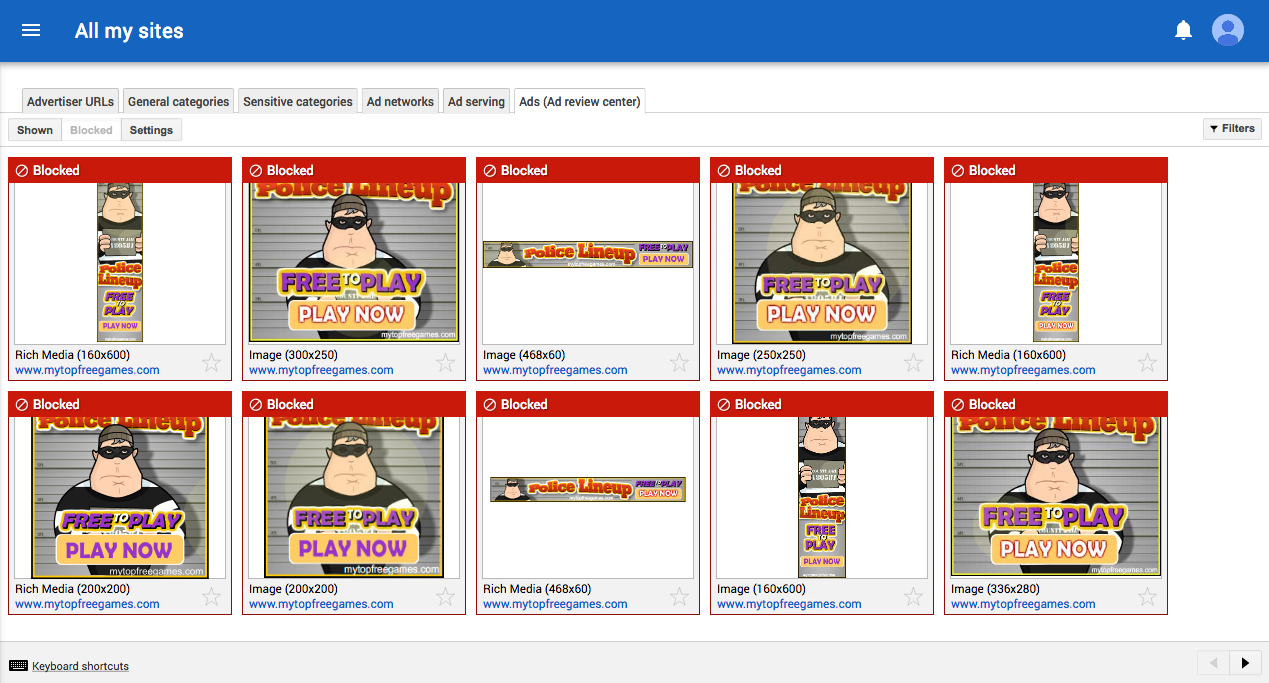
    4. Make good use of the AdSense Ad Review Center - The AdSense Ad Review Center is a tool that allows you to review individual ads so that you can decide whether to block them or to display them on your web pages. This gives you a much higher level of control and transparency over the ads that appear on your website or blog. It gives you complete control over what sort of products, services or brands are promoted on your website or blog. You should make use of this tool to display adverts from high paying advertisers only. Remember - not all AdSense adverts are supported by this tool. Ad Review Center only allows you to block ads at the product level and not at the website level.

    5. adsense ad review center

    6. Figure out the best ad sizes - The right kind of ad sizes and placements bring you the best paying CPCs. There are some ad sizes that are very effective for certain platforms, such as mobiles and tablets, but not so successful on other platforms, such as laptops. Choose the best ad sizes for various platforms and experiment with them till you get a CPC that you are comfortable with.
    7. Use Smart Pricing to your advantage - Advertisers of today want higher ROI and want real clients. Google understands this and makes an accurate projection on the conversion rate of the ads before deciding which ads to serve and where to place them. This is based on a "Smart Pricing" model which Google uses these days. You can use Smart Pricing to your advantage by displaying relevant ads, attracting high quality traffic to your blog and creating amazing content.
    8. Make use of the Competitive Ad Filter - the Competitive Ad Filter is similar in a lot of ways to Ad Review Center discussed earlier. The purpose of this tool is to filter out any unwanted ads and to prevent them from appearing on your site. You can use this tool to block ads from your competitors. You can block entire AdSense accounts or specific domains. Now, this doesn't do much for your CPC, but it ensures that your competitors don't display their ads on your site. The last thing you want is for your customers to be led to your competitors' websites.
    9. Follow Google's Mobile-Friendly guidelines - Since April 21, 2015, Google has made the mobile-friendliness of a website as one of the premier rankings factors for its algorithm. You have to optimize your website for the mobile; if you don't you will get penalized by Google in a big way. You must have a responsive web design.

      Advertisers like websites that are mobile friendly. Some pay more for mobile clicks than for desktop clicks and other prefer to advertise exclusively on the mobile. This is especially true of local businesses within a certain geographical area. So, to increase your CPC, make your website more mobile friendly.
    10. Experiment, mix and match, try out new things with your ads - Google AdSense has a special called "Experiments" which allows you to try out different things with your ads. You can do split testing on different ad formats, try different advertisers, make changes to the font type and background color, change ad sizes, change color schemes, block certain ad categories, etc. and find out what works and what doesn't. When you feel comfortable about something, stick to it for the long haul.
    11. Make use of the Google Ecosystem - Google likes publishers who are loyal to its platform. So join the Google Ecosystem, be a part of it. This means being on Google+, making use of Google Webmaster Tools, creating a Google Business account, having a YouTube channel of your own, using Google Docs, and so on. Spend more time on the Google platform, use more Google resources to earn Google's trust. Earning Google's trust is a surefire route to a higher CPC.
    12. Focus on certain high paying geographical areas - You should always focus on high CPC regions where advertisers pay more for clicks. So if your content is aimed at audiences within the United States, Sweden, Japan, Norway or Netherlands, you will most certainly have a much higher CPC compared to targeting countries such as India, South Africa, Bangladesh and Indonesia. You might want to purchase local domain addresses and created content specific to the high CPC region. You may even want to narrow down your geographical region to just cities - for example, any content focused on New York City, Dallas or London gets high paying ads.
    13. Make use of information from both Google Analytics and Google AdSense and link them for a better insight into your web traffic - Both Analytics and AdSense provide you with excellent information on your web traffic, revenue earned and deliver useful reports. Connect your Google Analytics and AdSense accounts for a better insight into your traffic, and get a sense of the audience behavior on your site - what they click more, where your highest CPC traffic is located and so on.
    14. Show only relevant ads - You should make sure that Google serves only the most relevant ads on your web pages. The way to do that is to make your content SEO friendly and easy to crawl for the search engine bots. You can start by focusing on the basics such as headings, meta tags and formatting your content. Also, turn off the remarketing ads in favor of contextual ads. All of these things could increase your CPC over time.
    15. Reduce the number of ad units on your blog - Try something different such as reducing the number of ad units on your blog. By reducing the supply, you can have the advertisers bid more for the limited space, which can lead to an increase in your CPC. It is about making the supply/demand mismatch work to your advantage.
    16. Use the Matched Content feature on AdSense - Google has a content recommendation service called as Matched Content for AdSense. So it this is available only to major publishers, but you can try and find out if you qualify for it or not. This involves replacing your local article recommendation engine with that of Google. The idea is to promote only the most relevant and most profitable content on your site to your visitors.
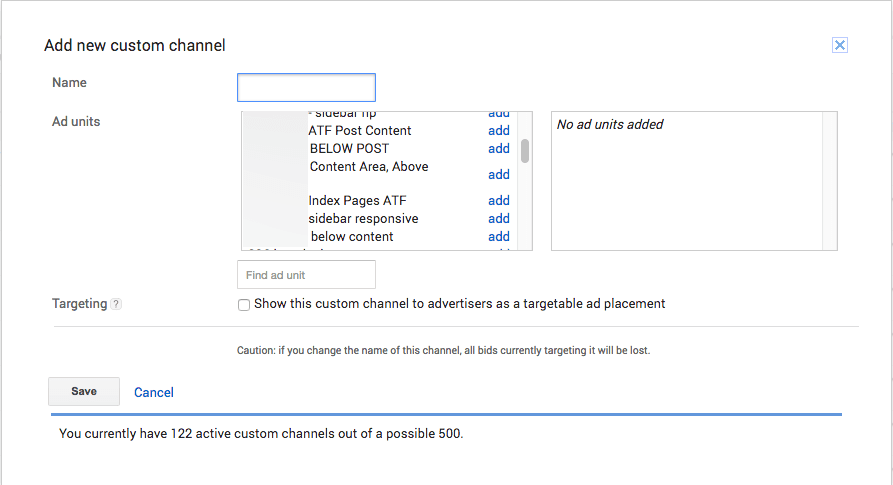
    17. Allow Placement Targeting - Advertisers are always willing to pay more for quality placement. Google has made it possible for advertisers to target specific sections within your website or specific formats. This is called as Placement Targeting. For this you will have to group the ads into Custom Channels - as many as 500 URLs - and give advertisers easy access to relevant content on your website.

    18. adsense add custom channel

    Final Thoughts

    I have discussed why your AdSense CPC is low and given you 16 quick and easy tips on increasing it. However, there are no hard and fast rules here. If none of the steps given above work, try something else to increase AdSense CPC. Just keep experimenting till something sticks. Hope you enjoyed reading this. As usual, I look forward to your questions and suggestions. Just send them in the comments below.

    How To Get High Quality Links In 2017

    How To Get High Quality Links In 2017

    Why Are Links So Important?

    Gaining links has always been a factor to determine the success of a website. Google algorithms recognise the value of an organic link, especially if the link is earned from an authoritative website.

    Even in 2017, link building remains a priority for SEO professionals who are trying to rank their website well. There is a slight change, however.

    Due to more recent updates in Google algorithms, like Google Penguin, Google now focuses a whole lot more on link quality, over link quantity.

    Nowadays, only the highest quality links, which have good quality content and natural looking anchor texts, will be approved by Google's algorithm. The better the quality, the more chance you have of ranking your website above competitors.

    But what does it take to get high quality links?


    The Cost Of Building Links For SEO:

    Building high quality links, which are 'natural looking', can cost you a lot of time and money - whilst building low quality links can cost you, well… with being penalized.

    Creating a great backlink profile for your website not only takes up a lot of your time and effort in prospecting and outreach-approaching to journalists and websites, but also costs a lot of money through a person's time, as well as the price it might cost to submit a guest post on a site.

    Authoritative websites such as Forbes, Huffington Post and Entrepreneur even accept guest post contributions. However, their high standard entry requirements mean that only few websites manage to receive the high quality backlink from these sites. This leaves the majority of websites on the internet with low to medium quality backlinks.

    By considering the following, you'll be on your way to bagging yourself some high quality links in 2017:

    Finding Relevant Sites To Outreach To:

    The first stage of the link building process consists of browsing the internet to find relevant websites to pitch content ideas to. There are several pieces of software that you could use to help you along the way. I tend to use Buzzstream, the CRM for content marketing and link building. This allows you to search for relevant websites, and store them all in one place ready to reach out to.

    When searching for relevant sites, there are two things you need to consider. You need to first check the domain authority of the site you are looking to reach out to. I always recommend focusing on websites with a domain authority of 50+ if you want to generate the highest quality links. You also need to check that the website is actually accepting content in the first place. You don’t want to waste the person's time pitching them a content idea if it says clearly on their site that they aren’t accepting posts.


    Outreaching To Gain High Quality Links:

    focus-on-quality-links

    Once you have finished prospecting and have created a list of websites that you’d potentially like to write for, outreach is your next step. Outreach is the stage which you should invest most of your time into. Otherwise, how else are you going to build relationships with the persons who handle the editorial on the site?

    It is best that you begin with writing out a great initial email to send. Instead of sending out a generic email which looks like it has been copied and pasted from many outreach templates, you must tailor the email so that is personalised and specific to the person or company that you are addressing. You need to make your email pitch stand out amongst hundreds of others.

    Though don’t be put off if it takes multiple attempts at outreach before the site actually considers that your idea is a good fit for them, it happens.

    Writing Good Quality Content:

    It’s all well and good outreaching to websites asking for a link, but what actually is it that you are offering to them in return? No one enjoys being approached solely for a favour, unless it is worth it. So think to yourself, is the content and the link worth being on the stranger's site?

    When outreaching, you need to connect with the addressee. How do you do this? By finding out a bit about them, and speaking like-minded to them. You could do this by checking out their LinkedIn or their personal Twitter account. You must clarify exactly what it is that you will be providing them and how this relates to them individually. You need to consider the quality and uniqueness of the content which you are going to write for this site in exchange for a link.

    First make it clear from your email pitch the quality of the content you will provide. And second, make it clear in the content itself. Show them that your piece adds value to the readership of their high authoritative site, and that you haven’t just wasted their time.

    Content is extremely competitive these days. The best pieces of content are of long form, comprehensive, optimized with images and provide users with value.

    Provide content which people will actually want published on their site for their audience to read and engage with.

    You might also like reading: How To Write A Powerful Blog Post ?


    But how do you know what content to produce?

    You should look out for the content which is generating the most interaction and engagement on the net. There are several ways of doing this. First you could look at content which your competitors are producing and see if that topic is receiving much engagement such as social engagement and shares. Similarly, there are several pieces of software which you could use to show you high engaged content on the internet, such as Ahrefs.

    When writing content, you should write something which is unique and not something that users would have read before. If you come up with a unique piece of content, then a website is most likely going to want you to publish it on their site and give a link in exchange.

    Building Engagement With Great Content:

    High quality content doesn’t only provide you with a link in exchange, but will also build engagement from users. The better the quality of content, the more chances there are that people will enjoy reading the content and will want to share it for others to read too. In return, this will help to increase the awareness of yourself as an author or your company, as well as promote your knowledge in the industry (as shown in the content).


    In 2017, it isn’t about getting hundreds of low quality links which are blatant blackhat SEO techniques, it is about putting in the time and effort to reach out to the most relevant and high authoritative websites, despite how challenging it may be. You might face frustrations and people turning you down along the way, but it will be worth it in the end. Outreaching to build high quality links in 2017 is a process of refining and personalising your pitch, providing relevance, and stating what added value your content will offer to the authoritative site!

    libby teager speechless webdesign
    • Libby Teager
    • Site URL: http://speechlesswebdesign.com/
    • Libby enjoys socialising. Which means that she likes to go out with her friends, drink, then hit the gym to work it off. She’s a social media addict, who turned it into her profession. She loves her role as an account manager and researcher at Speechless Web Design. Almost as much as Big Macs. She once ate 3 in 24 hours.
    • View Author's Profile

    Search keywords: link building sites list, how to get quality backlinks, how to create backlinks manually, Quality Links In 2017, backlinks seo, how to create backlinks for my website 101helper.

    7 Legit Ways To Make Money Online Blogging in 2017

    We've all heard those stories of someone that started a little blog one day and ten years later they've given up their day job because their blog is drawing in so much money for them they don't even need to get out of bed in the morning. The funny thing is, with a lot of hard work and time spent on getting your blog up and running, you can actually make a pretty penny out it. So, if you're interested in learning how to make money blogging then read on, I'll warn you now though, you're going to have to be seriously dedicated to get this running!

    Make Money Online Blogging

    Sell digital products

    A really simple way to make money online is to sell things online. Whether you're looking at selling digital goods or physical ones, you need to think closely about where your skills and strengths lie. Setting up a blog that is geared towards selling your goods might seem like a great idea but it's better to set up a blog and add the odd link to other work that you're doing. People read blogs for the stories and information, not to be sold goods left, right and centre, so keep this in mind when you're starting out on the blogging journey.

    Some commonly sold digital goods include: 
    • eBooks 
    • Audiobooks
    • Pictures & Videos
    • Digital music
    • Software programs
    • Website themes

    Sell physical products

    The other great thing to remember is that knowing your audience will make all the difference when you're selling goods online. Running a blog about cars and motorsport and trying to sell homemade paper flowers just won't mix. If paper bouquets are your passion and you know they're good enough to sell, then the best thing for it is to set up a secondary blog that focuses on something more in keeping with what you're selling. Remember though, don't push the sales from the get go. If people feel like they're being sold to, they won't be interested. If your goods are just supporting what you're saying in your blog then you'll find a lot more enquiries fly your way!

    Some of the physical goods that you can sell:
    • Clothing
    • Jewelry
    • Handmade goods
    • Household Items
    • Electronics

    Sell Advertising space

    A really common way to make money from a blog is to sell advertising. The more traffic you have flowing through your page, the more likely you are to draw advertising agencies in and this can be a really quick way to make a little bit of extra money. If you're finding other ways of making money through your blog then you might want to think about using advertising space to your own benefit by advertising your own products! Taking people from your blog to your selling page will only generate a little bit of extra business for your sales. Sure, advertising someone else's websites might bring in the cash at the point of sale but would you make extra money from sales of your own goods? Just something to consider!

    Sell online courses and eBooks

    If you're really feeling confident in the topic of your blog then you might want to consider doing some form of educational documentation. Whether you do a few online courses or write an ebook, if your followers really respect your expertise in the field you're talking about then they will flock to what you have to offer. Obviously, the best products to sell will vary massively depending on the type of blog you run. Factual blogs will work well with eBooks, lifestyle blogs might offer some one to one coaching sessions and online courses might be best for those that are thinking about a change of scenery in the workplace. If in doubt, ask your readers what they'd like and whether they'd be interested! There's no better feedback than the people you're already writing for.

    Freelancing

    If you're reading all of these tips and thinking 'that doesn't apply to me' then worry not, you're not alone! We've all got our own areas of expertise and very often, the job you do for your career can make you some extra money at home. Whether you're coming from a financial background, web design or bookkeeping, they're all skills that are highly sought after for a lot of people. The great thing about advertising these skills on your blog is you're more likely to pick up a job that directly corresponds with your interests. Sick of making up advertisements for big businesses and fancy helping out a local dealer? Well your blog could be the perfect place to get business like that running. Before you know it, you could be a freelancer running your own business!

    Here are some ideas:
    • Freelance writing
    • Data Entry
    • Virtual assistant work
    • Web Development
    • Marketing

    Affiliate marketing

    If all else fails then there's always the opportunity to sell other people's good through your blog. This doesn't necessarily include actively selling their goods in that you don't have to deal with the postage and packaging though! Affiliate marketing is an amazing way to make money from blogging if you're smart about how you go about it. Picking your affiliates sensibly and going for products that will actually hold the interest of your readers, a simple plug about the product at the end of the post might be all it takes. You might choose to go a little more in depth and focus an entire post on one product although this does depend on the sort of blog you run! Make-up and fashion blogs do exceedingly well at this sort of sales (and they often get free gifts out of it as an added bonus!)

    Membership sites

    Finally, offering a membership to your blog will allow people to check out extra content on your blog. This is a great way of making money when you're a well established blog as you're basically offering a bonus to people that pay for it while still keeping up with the basic info for people that have followed you from the start.

    If you're thinking about starting a membership site but don't know what to do, here are some ideas:
    • Offer exclusive downloads each month via email (i.e. apps, graphics, recipes etc.)
    • Exclusive educational videos, blog posts, webinars, or courses
    • Downloadable guides or books 
    • Offer Expert advice
    Making money through your blog is a great little bonus at the end of the month, however if you're really serious about it then you need to work hard and be dedicated to the cause. A sporadic blog that has no focus is much less likely to bring you any extra pennies in compared to someone who does weekly blogs and has specific themes on different nights. If you intend to make money out of your blog then your best bet is to sit down, give a good hard think as to the type of blog you're running and what goods you can offer in tandem with this. After you settle in, keep in mind that making seriously big bucks out of your blog means you have to be in it for the long run.

    How To Install Emoji Reactions(Smileys) In Blogger


    We all are familiar with emoji reactions because all of us use social networks and chatting and texting is incomplete without emoji reactions(smileys). These emoji reactions help us to explain our feelings about things and so I decided to create a post about it. So far I have seen in many blogs that they have emoji reactions in comment form and a emoji code is to be placed where emoji is to be shown but that's too old and most people don't like it. So I decided to tell you about these new type of emoji reactions that are placed in the bottom of post and show reaction of people to that post.

    Maybe you are thinking why should I add emoji reactions in my blog, it is useless but let me tell you that blogging is not just about growing blog more and more and earn money, but you must have something more which will make your blog special and these emoji reactions will grab attention of many visitors and will also tell them about how many people liked your post. Here is a picture of emoji reactions which can be added in your blog posts.


    Look how cute these are ! , I have taken a screenshot of these smileys and you can see that there are certain numbers tell us expression of people. So its a good thing for your blog, ain't it ? if not tell me in comments !

    Features Of Emoji Reactions Buttons:

    1. Ofcourse these buttons are absolutely free.

    2. You can add them in website or blog.

    3. Compatible with mobile and desktop site.

    emoji-reaction-example-blogger

    4. Reaction clicks are counted by IP.

    5. Analytics available.

    How To Install Emoji Reactions Buttons In Blogger ?

    Follow below steps:

    Step 1: Go to Sharethis Reaction Buttons.

    Step 2: Click on  GET REACTION BUTTONS  button.

    Step 3: Align your buttons to left, right or center.


    align-emoji-buttons-blogger

    Step 4: Click on  REGISTER & GET THE CODE  button.

    Step 5: Enter your domain/blog URL, Email and password, check the terms and use box and click on   GET THE CODE .

    how-to-get-sharethis-reaction-buttons-emoji-smileys-in-blogger

    Step 6: Copy the first code and go to blogger dashboard > Theme and click on Edit HTML.

    sharethis-emoji-reactions-code-blogger

    Step 7: Paste the first code after  <head>  in your theme code and save theme.

    Note: In case if blogger is not saving theme when you paste the first code after  <head>  then replace "&" from your script with  &amp;  as shown below

    <script type="text/javascript" src="//platform-api.sharethis.com/js/sharethis.js#property=597b0fd3ea2b3c001261916f &amp; product=inline-reaction-buttons"></script>


    Step 8: Copy second code as shown in the image above and paste it where you want to show reaction buttons.

    To Show Reaction Buttons Below Posts:

    If you want to show reaction buttons below your posts then copy below code and paste it above  <div class='post-footer'>  in your theme code.
    <b:if cond='data:blog.pageType == "item"'>
    <div class="sharethis-inline-reaction-buttons"></div>
    </b:if>

    Note: You will find  <div class='post-footer'>  two times in your theme paste the above code above second  <div class='post-footer'> .

    Step 9: Save your theme.

    Step 10: Go to Sharethis and login to your account.

    Step 11: Click on Labs(beta) in the menu on left side and choose Inline Reaction buttons.


    Step 12: Turn on your reaction buttons and wait for 5 minutes to let your reaction buttons get activated and start appearing below your posts.

    how-to-activate-sharethis-emoji-buttons-blogger

    Congratulations, you are done! wait for 5 minutes to see reaction buttons!


    If Reactions Button Are Not Appearing: 

    Sometimes reaction buttons still don't appear even after 5 minutes of activation, in that case go to your Sharthis account, Login to it and click on Property Settings and verify your email by clicking on the send verification button and go to your email and click on the verification button sent from Sharethis.

    sharethis

    I hope you found this post helpful and enjoyed reading it, read more from below. If you have any question ask me in comments or you can contact us.

    Thanks for visiting +101helper .

    Search keywords: smileys for blogger,add emojis to blogger posts,facebook smileys in blogger,smiley reaction buttons below blog posts,emoticons blogger script,blogger emoji