Our Visit To "Beacon Light Academy" - Meeting The Angels

Beacon Light Academy SeminarAfter having conducted several seminars and conferences across the country in different universities and delivering the message of Online entrepreneurship through Content Marketing across the globe, it was now time to meet those little Angels face to face who needed a slight push to transform their dreams into reality. After the deadliest attack on "Army Public School (APS)" in Peshawar, the terror did not stop unless it tried to frightened the students in Karachi.  Beacon Light Academy became the first target of terrorism when some unidentified men threw two grenades early morning at this school on February 3, 2015. Fortunately none was injured [Source]. On February 7 the principal of this effected school invited us i.e. STCnetwork and my best friend Rafay baloch from RHA Info Sec for a seminar on "Victims of Slave Mentality". The Seminar aimed at promoting the true sense of Online entrepreneurship amongst students through Web Development, Content Marketing, Security research & Penetration testing. The Seminar was later delayed due to security concerns and was conducted instead on February 14, 2015, where more than 150+ Angels (Students from secondary grades) actively participated without any fear! Lets share some important highlights of the event.

victims of slave mentality seminar

Event Venue & Speakers

All Details on the Facebook event Page - Victims of Slave Mentality

Mohammad Mustafa and Rafay Baloch

What Was The Event all about?

Education without application is like buying cents for dollars. A map without key. As a fresh graduate myself, throughout my academic life, I have always kept a close look on the unequal distribution of wealth amongst society. Sometimes I would blame the nature for the imbalance of living standards but with time as I gained more experience about the social cash flow system, human Psychology and the Rise and Fall of poor and rich communities, I started understanding why despite the same God gifted potentials, some humans live a far better life whilst others struggle all life to fulfill their dreams but they end up in despair. Those who succeed in life are either by luck, resources or by one basic rule of life and that is Dreaming With Open Eyes. I term such people as followers of PLAN B and the rest as Victims of Slave mentality i.e. PLAN A

Note: Those who choose to be free of worldly desires by choice are Holy people and they are not part of our discussion ever for they are people of wisdom and great intellect and deserve full respect at all times. The above classification between two different standards of life is meant to educate students and make it easy for them to explore their inner strengths and the gift of true knowledge.

We gave a basic definition of both these classes of people first time on our Seminar at NED University on BluePrint To PlanB back in 2103 which I am quoting below for reference:

 Plan A

A Plan oriented individual is always led by society norms and rules, he is always the follower and never an initiator. This spoon fed life which starts from school level and continues till graduation leads him to his ultimate goal and that is "The hunt for Job". He is always afraid to invest his energies into a more productive form of work. Take an example of a school nerd, whose ultimate aim is scoring high in class. He may be good in studies but poor in extra curricular activities, poor in communication skills and social interaction. Most of Plan A oriented students often fell prey to depression and frustration. Upon completion of their graduation they are left with nothing but fixed salary jobs where they spend rest of their lives, dreaming of getting a sustainable Income one day but they die as ordinary citizens and never as distinguished names that could be remembered for decades.


 Plan B

Self Fed, financially stable, always hungry and thirsty to innovate and create something new and unique. That's what that defines a Plan B oriented mind. Can a Plan A student pause his university studies in middle just because he needs more time to turn his innovation into reality? Of course he wont, but people like bill gates, Abraham Lincoln, zukerberg, Steve Jobs, John Mackey, Ted Turner,  were amongst those who taught they will better apply knowledge and never worship it blindly. PlanB believers look for opportunities and the moment they find a loop hole, they give their best to utilize it properly.They are always students with dexterous minds always looking to learn and apply. They are practical thinkers and better planners. They are normal students but they don't keep one goal in life, they keep multiple parallel goals in life. They never follow social trends. They try to develop college skills during school life and university skills during college life. They are always ahead of time and never bond their potentials to social restrictions set by the dead slow walking society. They dream of empires and never getting enslaved by big giants. They never dream of joining Microsoft or Google but they dream of inventing one of their own. They are indeed Plan executors and day dreamers!

We shared with them real life stories of successful young entrepreneurs around the globe, internet's proper use, Ways of building a lucrative income online, Earning Secrets of Social Media Giants and of course not forgetting our Self-applied Online earning strategies.

We motivated them that Excellence is not dependent on Age or Time, they can attain it before time just like Arfa Karim Randhawa did, who became the youngest Microsoft Certified Professional at the age of nine in 2004! Or Babar Iqbal who started computer programming at the age of 5 or Akrit Pran Jaswal who performed his first surgery at the age of seven!

We also shared the story of Nick D' Aloisio  who was an average school going guy but his summly App that he created during his 10th grade got sold out for over $30 Million US Dollars to Yahoo!

We also discussed how whatsapp emerged and was soled for $19 billion dollars to Facebook which ones rejected giving job to the same developer

We then concluded that all these legendary figures achieved all this because they believed in a PLAN B setup of life! They did not swim with normal flow of academic trends, they did not restrict themselves to home or social bounds, they instead invested time and energy to explore their hidden powers.

The Most Unusual Thing!

We were approached for Autographs!

We kept wondering why would they take our autographs for I personally consider myself not worthy of it but later as we realized that it was a gesture of thanksgiving by these little angels who were extremely excited to discover their hidden talents and capabilities. Casual seminars often aim at product or idea promotion and they rarely touch the hearts of the attendees but Alhamdulillah these paper autographs were enough a proof to let us know that we delivered the message with full sincerity. We thanked God for all this honor and also prayed for these kids to live up their dreams in true spirit.

Certificates and Gifts Distribution

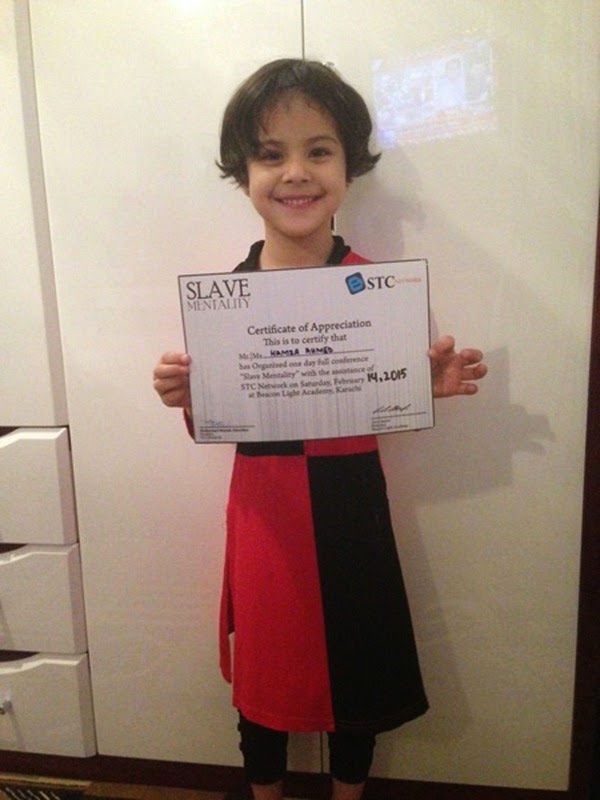
Slave Mentality Certificate

Certificates were distributed amongst students after the seminar by the school administration.

We distributed three gift hampers amongst students during the Q&A session. Unfortunately the photographers missed capturing those memorable moments.

STCnetwork certificatesSTCnetwork certificatesMohammad's signatureOrganizers certificate contentMy nephew Ammar Munir AhmedMy Niece Sana Aimal

Received Shields!

We express our gratitude to the principal of Beacon Light Academy Madam Azra for her hospitality and token of appreciation in the form of a memorable Shield.

Shield Given To Speakers

Event Photos

We are sorry for not sharing professional set of photos today because we had avoided taking our Personal Photographer "Saad" with us because the organizers suggested that they had around four cameras and they could easily cover the entire event. But they missed many precious shots and most importantly failed to capture Rafay's pics. =<

So these are the only pictures we received.

Beacon light academy Seminar

Beacon light academy Seminar

Mohammad Mustafa in Beacon light academy Seminar

Mohammad Mustafa in Beacon light academy Seminar

Beacon light academy Seminar

Beacon light academy Seminar

Mohammad Mustafa in Beacon light academy Seminar

Questions in Beacon light academy Seminar

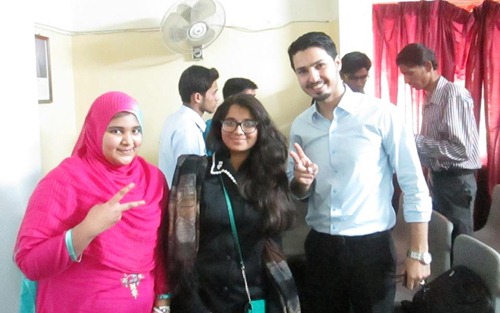
Mohammad with Rafay Baloch

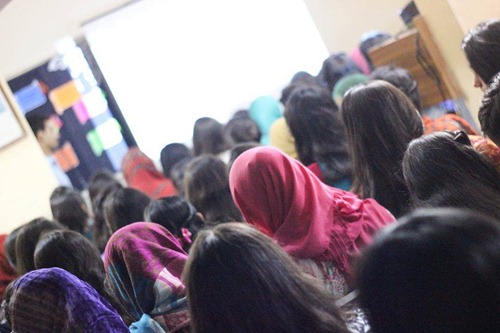
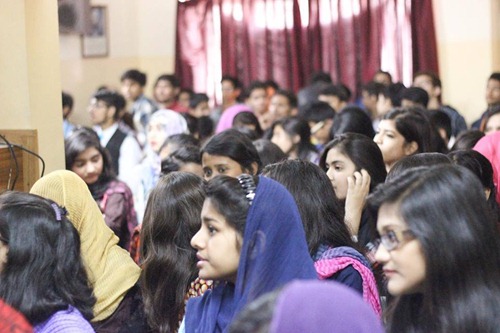
Audience at beacon light academy

Audience at beacon light academy

Mohammad with sisters from beacon light academy

presentation at beacon light academy

presentation at beacon light academy

presentation at beacon light academy


Special Thanks

We would like to express our sincere thanks and appreciation to Madam Azra, the honorable principle of Beacon light academy for inviting us to the school and giving us a chance to share our online earning strategies with the students.

Madam Azra - Principal Beacon Light Academy

Sameer Rehmani the genius who made it possible. Design Credits of Certificates, Shields and Event Pamphlets goes to him.  

Sameer Rehmani from beacon light academy

And all the Organizers!

Organizers and speakers at beacon light academy

Where Will We Go Next?

God knows best, we have no perfect plans. From the past 3 years we conducted several seminars across the country in different universities but from this year onwards we will narrow down our approach to Schools and colleges. We will try our best to encourage students across the country to kick start their Online Business dreams.

Thank you for always being a great source of motivation. You keep us alive as long as you keep on reading us! Thank you to Beacon Light School for honoring us with an opportunity to share our Online business ideas with the students. We wish you a successful future, full of opportunities and creativity. You guys deserve the best of life!

Peace and blessings be upon you all! =>

5 Fastest And Seo Templates For Blogger

5 fastest templates for blogger | 101helper

Seo, money, style, content, blog is not only about all this and other things but fast loading and speed is also a very important for a blog. Fast loading plays a vital role in making more fans and audience for a blog because a blog which loads slowly like a snail isn't liked by anyone. I am sure that you also don't like slow loading blogs and for the same reason I am creating this post. In this post I will show you some fastest blogger templates because blogger templates are too simple and after a little customization they slows down automatically, so we need an upgrade. So if you want a fast loading blog, I recommend you to use any of the below fast loading template.


(1). Seo fix template for blogger:


Seo fix template for blogger | 101helper

Like its name it is not only seo optimized but also loads fast among all the below templates. It loads faster than the blink of an eye. It has clean, clear and simple design. This template could be used for all kinds of blog such as news, tutorial blog, games, magazine, ppc sites etc. Its clear design looks so decent and also provides a user friendly environment to users. You can see a live demo below. This template is available for free. Some of the features of this template are given below: 
  • It is 100% free without any cost.
  • Fast loading and clear design.
  • Simple and decent look! with eye friendly colors
  • Optimized for seo. 
  • Compatible with all browsers.
  • Simple admin layout.
  • Ads ready,Breadcrumbs and social share buttons.
  • Drop-down menu.
  • Built in gadgets(related posts).


(2). Excelencia blogger template:

Excelencia blogger template | 101helper

Excelencia is a seo optimized, fast loading, responsive and cool template. It has built-in gadgets like recent posts widget, recent comment widget. It is available for free. It is ads ready too and good for blogs using infolinks ads. There is a problem with all blogs that infolinks inframe ads aren't shown, this problem is solved in this template. This template is designed in such a way that all kinds of ads appear in this template. It has a responsive design with auto-zoom effect and much more. This theme is good for magazines, music, news, tutorials and gamming blogs. You can see a live demo of this template below. some of the features of this template are mentioned below:
  • This template is free of cost.
  • Ads ready and compatible with all ads networks such as infolinks.
  • Seo optimized.
  • Well decorated design with decent colors.
  • Built-in gadgets(recent posts and comments gadget).
  • Grid view with responsive design.

(3). GoGreen blogger template:


GoGreen blogger template | 101helper

The title "GoGreen" expresses the decent and eye friendly color of this template. It has a green color and it is a full width template. It has a grid view and all the features that every blogger want. Best for magazine blogs, news blogs and literature blogs. You can see a live demo of this template below and some more features are also mentioned below:

  • Very good and impressive look.
  • Available for free as well as you can buy a full version(without copyright tags) for $30.
  • It is one of the most fast template.
  • 100% seo friendly.
  • Ads ready and responsive design.
  • It is a Grid view template.


(4). TriVusion blogger template:

TriVusion blogger template | 101helper

TriVusion loads very fast just in milliseconds. It has a good design with clean and clear look. It is available for free. This template is good for news, education, tutorials etc. You can see a live demo of this template below. Some of the features of trivusion are given below:
  • It is free of cost.
  • 100% ready for ads.
  • Fast loading(milliseconds).
  • Seo optimized.
  • This template has two menus, one on the top of the header and the second below it.
  • Eye friendly colors are used to design this template.
  • Contract look(small images, less css and javascript, small description of posts etc).

(5). Dollar Sense template:


Dollar Sense template | 101helper

This template is similar to TriVusion with a little difference of share buttons,menu color and ad spaces. It has a good design, with user friendly interface. Such a bold use of colors that attracts users towards it. Available for free and good for all kinds of blogs specially news, education, presentation etc. Some of the features of Geo wall are mentioned below:
  • It is available for free.
  • Fast loading and clear design. 
  • Ads and seo ready.
  • Social sharing buttons.
  • Two types of menus, similar to trivusion.
  • Compatible with most of browsers.
  • Bold use of colors and simple design.


I hope you like this post and it was helpful to your. If any of the link is not working please inform me by leaving a comment below. Tell me is my template loading fast? and is it users friendly?. Share this post with others. Follow and subscribe to get instant updates about blogger templates, tips, tricks,seo etc.

Search tags: Templates for blogger, blogger templates, Fast loading blogger templates, Seo friendly blogger templates, Responsive blogger templates, Simple blogger templates, Blogger templates download.


Using Description For Seo/Fixing Duplicate Description In Blogger

description for seo in blogger | 101helper

A description is added to a blog to describe it to tell people what the blog is about. In blogger there are three different ways to add a description but most of the users are aware of only two. One way to add description to blog is using meta codes, the second way is to add description in header(layout) and the third way to add description is to add it in search preferences. But if description is added in all of these regions it cause a problem of that is in every post even if it has its own description, blog description will go with it because blogger doesn't work as other sites that every post/page/directory/homepage has its own description. As description plays a very important role in Seo therefore every has to focus it.

How does description work for seo?

It is very easy to point out the work of description for seo. You might have noticed that in every search engine there is a short description below the link of every site which have some words highlighted by bold text, these highlighted words are the words which are searched and are highlighted to represent that the result resembles to words you have searched. So a blog having keywords in description is a successful blog as search engines target words which are typed to search so if the most searched words(high density keywords) exists in your blog description then in every search result(related to your content) your blog will surely appear. See an example of a search made for word "101helper" below:


How does description work for seo? | 101helper

From above image you can conclude that Google targets the words used in description and hence description plays a vital role in seo.


Types of description in blogger:


In blogger description can be added in three ways, see one by one below:


(1). Meta description:


This is the description added to a blog using meta code. It appears in all posts/pages/categories and homepage of blog. Using this method is good if you have a description with keywords resembling your blog's content.


 Meta description | 101helper

Related post: Meta codes optimization in blogger.


(2). Description in Header:


This description is added to header(in layout). It appears on every page but it is not shown in search results. Only meta and the below description is concerned with seo.


Description in Header | 101helper
   
(3). Description in search preferences:

This description is in search preferences of your blog in the settings option. It not only contains the description of your blog but also enables you to allow description for specific posts.


Related post: How to enable search description in every blog post for seo.  


How to enable search description in every blog post for seo

Suggestions to use description for better seo:

As description plays an important role in seo therefore it should be used in such a way that we could say that out blog is among best seo friendly blogs. Hence here I will give you some suggestions to use description in an appropriate way. 

I am not talking about the description in header as I think it doesn't have any concern with seo but still I advice you to add a description in header so to be 100% sure that their is no doubt in my blog's seo. 

After adding description to header of your blog move to the next part that is meta code which is really important, but you have to use this tag carefully. I suggest you to use meta description in such a way which you prefer among below two ways:

(1). Meta description in only Homepage:

Use this tag only if you are sure that your description doesn't resemble your content.

<b:if cond='data:blog.url == data:blog.homepageUrl'><meta content='Write here' name='description'/></b:if> 

this code will show the description only in homepage and hence won't cause problem of duplicate description.


(2). Meta description tag for all pages:

Use this tag if you are sure that your description resembles your content e.g if you have a blog with content related to making money on internet and you have a description that contains words similar to your posts words then I suggest you to use this tag.

<meta content='Write here' name='description'/>

(2). Meta description in Search preferences(Fixing duplicate description):

This option exists in search preferences in settings of your blog which lets you to enable description for each post and page but while enabling it, you can add a description that will be added to every post/page description and if you don't add description to any of your post or page that will be counted as duplicate description. If you are using the above meta description and this one too but also adding description to every page and post then you will see only one duplicate description error that is Homepage. But if you use two different description in meta tag and search preferences meta tag then it won't cause any duplicate description problem.  

On more thing about duplicate meta description is that the categories in blogger don't have any description and can not be added because there is no option for that so categories will automatically use the homepage description and it will cause duplicate meta description error, you can remove it by using robots txt. For instance:

User-agent: Mediapartners-Google
User-agent: *
Disallow: /search
Allow: /

Sitemap: http://your-blog.blogspot.com/feeds/posts/default?orderby=UPDATED

The above robots.txt will block categories in search engines so you won't see any duplicate description. Make sure to add a different description to each of your page and post.

Do you have any question or suggestions? if yes then leave a comment below. Follow and subscribe to get latest news about new seo posts. Share this post with others if you like it.

Search  tags: Using description for seo/fixing duplicate description in blogger, Seo tips for blogger, Blogger seo tips, Seo guide, 101Helper seo tips.

How To Get Your Blog To The Top Of Google Search Results

How to get your blog to the top of Search results | 101helper

An issue about seo and bringing blog or site to search result's front page is common with every blogger and webmaster. Despite of applying all the seo tips, meta codes and new seo tricks still there is no improvement? so what to do? let me tell you how to bring your blog to front page of search results. After reading and following this post you will surely see an improvement in your blog's seo and traffic. Before I start let me clear that you should follow all the seo posts which I have created before. You can read them here. After following all the seo tips given in these posts you can follow this post. In this post I will give you some most effective tips to get your site on top of the search results of any search engine. 
Register a Domain:   

Registering a domain is a guaranteed way to get your site on top of the search results. It doesn't mean that only registered sites are on the top but it is the easiest and fastest way to get on the top. Do not register a cheap domain, register a domain at a famous domain hosting company like Google, hostgator, weebly, webs.com etc and also buy an seo package while buying a domain.


Socialize your site/blog:


Share your site on social networks. Get as many shares as you can. The more shares you get the more you go on top. Search engines index these sites on the top of the search results which is more popular and the sign of popularity is more social shares.


Build backlinks:


Backlinks also decide the popularity of your blog/site. A blog with more backlinks is on the top of the search results, but backlinks shouldn't be cheap or spam. Try to create quality backlinks to get your site in top of the search results. Learn how to create quality backlinks for blogger.


Use rich snippets:


Richsnippets in blogger

Rich snippets are used in many websites, some common rich snippets are star ratings, search box in search results and breadcrumbs. Rich snippets plays a vital role in getting a site to the top of search results. How rich snippets are helpful to get you site to the top? because the sites having stars below its title in search result are visited by most visitors as it is rated by people so a site visited again and again is indexed in the top search results.


Webmaster Tools:


It is not easy to submit each and every link of site to search results therefore use the webmaster tools of search engines, submit your sitemap to them and leave it to search engines they will index all your articles one by one. Recommended search engines are Google, Bing and Yandex.


Keep Interesting content:  


In my every post(about traffic) I suggest to keep a unique, meaningful and interesting content because content is the king of a blog or site and the only reason for which a visitor visits your site/blog so keep an interesting content and give a solid reason to visitors for visiting your blog. If you have a great content then nobody can stop your blog to appear on the top of search results until unless someone steal your content. 


Seo friendly template:

Before your blog start journey to the top of the search results use a 100% seo optimized template i.e optimized title, optimized meta codes, optimized description, optimized robots.text etc. Your blog's template will decide the fate of your blog whether it would be on the first page of search results or no.


Focus On Keywords:

Keywords are on of the most important things which needs to be focused to show a website or blog on the first page of search results. Keywords are of two types e.g short keywords and long tail keywords. Both of them are important but long tail keywords are very important in bringing a site to the top of the search results. So focus on keywords too, to maximize your seo and get your site to page one of search results.

You Might Also Like: How To Choose Right Keywords To Boost Your Traffic - Blogger Seo

Increase your traffic:


Increase your blog traffic to 40,000 or 50,000 views, it will play a major role in getting blog to the first page of search results. Search engines show those links on the top of the search results which already have many visitors. Each of your post must have above 1000 views.


Alexa rank:

Alexa is a website which keeps data of websites/blogs which are popular. In order to get your site on the tops of search results you must improve your blog's alexa rank first. It is on of the fastest way to get your blog to the top of search results and increase your blog traffic. There are three basic ways to improve your alexa rank:
  • Create quality backlinks as much as you can.
  • Reduce your bounce rate. You can do it by keeping visitors longer in your blog. 
  • Share your blog on social networks.
Final words:

After applying all the above and other seo tips wait for some months as it is not a one night work. It takes days, weeks, months and sometimes years to get on the top of the search results. It totally depends on your blog category and content. The more useful and interesting content you have the more you will get visitors and you will be listed on the top of search results.


If you have any suggestion or any message just leave a comment below, I will get back to you soon. Thanks for visiting 101Helper, keep visiting for more tips, seo tips, tricks,gadgets and tutorials. If you like this post and don't want to miss my next post, subscribe to this post below. Help me spread my blog by sharing this post with others.


Search tags: How to get your blog to the top of Search results, Top of the search results guide, Seo guide, Boost traffic guide, How to boost my blog traffic, Steps to get high traffic, How to bring your blog to top of the Google, bing, 101Helper tips to increase blog traffic. 

How To Fix "blogid,postid,image_url,updated" Errors In Blogger

How to fix Google webmaster tools errors in blogger | 101helper

Do you have alot of error in your Google webmaster tools structured data? if yes and you are seeking for how to fix Google webmaster tools errors like Missing required field "updated", image_url, blogid, postid etc then you are at right place. These errors can be easily remove in just a few simple steps. These errors harms the performance of your blog therefore these should be removed immediately. This tutorial is only for blogger so if you are a site owner then I am not sure about if it would work in your site or no. In this article I will show you to how can you remove errors from your Google webmaster tools structured data. So lets get started! follow below steps to remove errors from your blog's structured data.

Step 1: Go to Google webmaster tools and open your site.

Step 2: Click on search appearance in the menu on left side and choose structured data.


Google webmaster tools tutorials for blogger

Step 3: Click on the error and choose the post which is appearing to have error and click on test live data, it will show you the errors which I am going to fix in below steps.

Step 4: Copy the piece of code which is appearing as error and go to blogger template and click on Edit Html.

I am going to fix each error one by one so after following step four follow each step to remove each error.


Error no. 1(Fixing Missing required field "updated"):

Step 1: In the template click anywhere and search for <data:post.timestamp/> by using Ctrl+f.


Fixing Missing required field "updated"

Step 2: Replace it with <span class='updated'><data:post.timestamp/></span>


Fixing Missing required field "updated" google webmaster tools

Step 3: Go to structured data testing tool to check if the error is fixed or not.

Error no. 2(Fixing Image_url Error):

Step 1: Find  <meta expr:content='data:post.firstImageUrl' itemprop='image_url'/> by using Ctrl+F in the template code.


Fixing Image_url Error google webmaster tools

Step 2: Replace it with <meta expr:content='data:post.firstImageUrl' itemprop='image'/>.


Fix Image_url Error google webmaster tools

You will find this code two times in your template, make sure to replace both of them with the error free code.

Error no. 3(Fixing Blogid & Postid Errors):

Step 1: Search for <meta expr:content='data:blog.blogId' itemprop='blogId'/> and <meta expr:content='data:post.id' itemprop='postId'/>.


Fixing Blogid & Postid Errors in google webmaster tools

Step 2: Delete both of them from your blog template.

You will find the above codes two times in your template, make sure to delete both of them.

Step 5: Click on save template and you are done. 


How to save template in blogger

Note: After following above steps text your posts with structured data tool, if you still find any of the error in your structured data then find all these codes and delete them from your template.

If you have any problem related to this post ask me in comments. Follow and subscribe to get latest updates about blogger seo and Google webmaster tools. Share this post with and others.

Search tags:  How to fix Google webmaster tools errors in blogger, blogid error fix, post id error fix, image_url error in Google webmaster tools, updated error in google webmaster tools, how to fix google webmaster tools errors, 101helper tutorials for Google webmaster tools.