How Does Bing Measure Content Quality?


Quality content


People are always going on about how SEO is important for their rankings, how marketing will popularize their blog, how important updating your blog regularly is, and so on. But the most important of all would have to be the content. Quality content will make or break your site, and at the core if it all, it's content that makes your blog successful. We've talked about how Google looks at quality content. Let's look at another perspective, and see what Bing has to say about quality content.


These insights come from Michael Basilyan, Senior Program Manager from the Bing Content Quality Team who posted on the Bing Blog about how Bing's algorithms determine what makes for content quality.


Content quality is obviously a primary factor in Bing ranking algorithms, along with topical relevance and context. Content quality can be thought of as comprising three primary factors; authority, utility and presentation.


Authority


Can we trust this content? Bing defines authority as if they can trust the content. How do they know if they can trust the content? It is not just about the links pointing to the page but also about how established the web site and web page is.


In addition, Bing looks at signals from social networks to see if the author is well cited, recognized and an authority in the space. They also explain that how they determine authority changes by query segment, where health authorities need professional documents written about the authority.


Utility


Is the content useful? This is about determining if the page written is useful and detailed enough to the searcher for them to accomplish their task. Does the page have enough supporting citations. Is it detailed enough for the typical searcher. Bing also prefers to see videos, images and graphs on the page – those are signals of utility and content quality.


A factor that may harm the content quality is repurposed or “recycled” content. They want pages that are the source of that data or do unique things with the data, not just pages that recycle the content from the source.


Presentation


Is the content well presented? This is about making sure the content on the page is easy to find and easy to read. If you have ads in the way, distracting and unrelated ads or the content is hard to find, this can hurt your content quality score. Bing says they will go as far as to “promote and support websites and webmasters that provide ads relevant to the content of their website and place ads so that they do not interfere with the user experience.”


You will note that Google's Panda algorithm isn't very different from this. This goes on to show that search engines want one thing and one thing alone - quality content. It doesn't matter what search engine you're targetting - the basics remain the same.

How To Optimize Video Captions For Search Engines?‏


Video captions


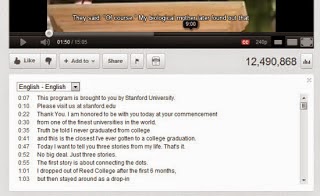
Transcripts and captions are a way to enhance the video-viewing experience for users. They supplement the audio to help viewers better understand what's being said. Similar to subtitles in a movie, you can add captions to a your YouTube videos which are not only played with the video, but can also be shown separately and made clickable. In this post, we'll talk about captioning your YouTube videos.


Why caption videos?


Captioning makes it easier for people to understand what's being said. This can be especially helpful for those with a hearing disability. But it doesn't just serve accessibility purposes. Non-native language speakers have a harder time understanding spoken words, and written text can increase comprehension.


Besides, captions make video text searchable by search engines, so you can increase your chances of getting found in search results.


How to caption a video?


Captions files are usually in Subtitle formats, such as .SUB or .SRT. They have time-stamps with the lines as well. A typical Captions file would look like this


0:00:03.490,0:00:07.430
This is the first line
0:00:07.430,0:00:11.600
This is another line
0:00:11.600,0:00:14.009
This is the last line
0:00:14.009,0:00:15.889
[pause]

You can manually add time-stamps for your video in a text file, and save it with a .SUB or .SRT extension.


You should have your captions ready before moving on. Log into your account on YouTube, and click on your username on the top-right corner of your screen. Then click on Video Manager to manage your uploads.


Adding transcripts


You can add transcripts to your existing videos, or you can upload new videos. Next your uploaded videos, you will see an Edit option, and an arrow next to it. Click on the arrow, and select the Captions and Subtitles options.


Next, you'll see the Add New Caption or Transcript option. You can now upload a transcript or caption file, which will automatically be integrated with your video once the initial processing is done. And that's it! You should now see a transcript button when you open your Videos' public link. Make sure before uploading the file whether you have selected the correct language, and whether it is a caption or transcript. Both work differently, so make sure you choose the appropriate option.


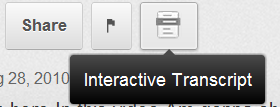
Interactive transcript


You can turn on captions for any Video (if provided). This could be a great help for non-native speakers of the video's language. So upload them now, and make your videos more accessible and get one step ahead in marketing your videos!

What is reCAPTCHA And How Is It Better For Your Site?


CAPTCHA is a way for websites to keep spam away. Users are asked to identify human-readable text. In theory, it is a perfect way of keeping away bots. But in reality, it's not user-friendly, and can be broken down by an algorithm easily. Google has begun rolling out a new API that simplifies the CAPTCHA experience. It is called the "No CAPTCHA reCAPTCHA", and it just requires one click from the user.


On websites using this new API, a significant number of users will be able to securely and easily verify they’re human without actually having to solve a CAPTCHA. Instead, with just a single click, they’ll confirm they are not a robot.


How does reCAPTCHA work?


While the new reCAPTCHA API may sound simple, there is a high degree of sophistication behind that modest checkbox. CAPTCHAs have long relied on the inability of robots to solve distorted text. However, research recently showed that today’s Artificial Intelligence technology can solve even the most difficult variant of distorted text at 99.8% accuracy. Thus distorted text, on its own, is no longer a dependable test.


To counter this, last year Google developed an Advanced Risk Analysis backend for reCAPTCHA that actively considers a user’s entire engagement with the CAPTCHA - before, during, and after - to determine whether that user is a human. This enables websites to rely less on typing distorted text and, in turn, offer a better experience for users.


The new API is the next step in this steady evolution. Now, humans can just check the box and in most cases, they’re through the challenge.


However, CAPTCHAs aren't going away just yet. In cases when the risk analysis engine can't confidently predict whether a user is a human or an abusive agent, it will prompt a CAPTCHA to elicit more cues, increasing the number of security checkpoints to confirm the user is valid.


Adapting the new API


As more websites adopt the new API, more people will see "No CAPTCHA reCAPTCHAs". Early adopters, like Snapchat, WordPress, Humble Bundle, and several others are already seeing great results with this new API. For example, in the last week, more than 60% of WordPress’ traffic and more than 80% of Humble Bundle’s traffic on reCAPTCHA encountered the No CAPTCHA experience - users got to these sites faster.


We will discuss the process for implementing this new API on your site in a future post. For now, stay tuned and ask us questions if you have any.

5 Cool CSS Tricks To Spice Up Your Website


CSS tricks

CSS is a basic part of any webpage, and is what gives the page its distinctive look. CSS can be simple yet complicated at the same time, from a simple typography rule to a complex animation. It can be used to create amazing things. Today, we'll share some CSS styles which you might useful, and may use on your website to spice things up a bit.


1. Blurry text


Blurry text has a certain appeal, and is often used to direct attention towards a specific piece of text. Not to mention it looks cool :) Here's the CSS for making some text blurry. The trick is to fist make the text transparent, then add a drop shadow like so;


.blurry-text {


   color: transparent;


   text-shadow: 0 0 5px rgba(0,0,0,0.5);


}


Here's a sample text that is really blurry.


2. Animated gradient


Sounds cool, right? Well it is. Strictly speaking, you cannot animate a gradient color unlike some of the other CSS properties. You can, however, move the background around to make it look like it's animated.


button {


    background-image: linear-gradient(#518712, #124555);


    background-size: auto 200%;


    background-position: 0 100%;


    transition: background-position 0.5s;


}


button:hover {


    background-position: 0 0;


}


3. Image Grayscale


Grayscale tones up an image and makes it look classy and cool. You can apply an SVG filter to an image to turn it into grayscale.


<svg xmlns="http://www.w3.org/2000/svg">


    <filter id="grayscale">


        <feColorMatrix type="matrix" values="0.3333 0.3333 0.3333 0 0 0.3333 0.3333 0.3333 0 0 0.3333 0.3333 0.3333 0 0 0 0 0 1 0"/>


    </filter>


</svg>


img {


    filter: url(filters.svg#grayscale); /* Firefox 3.5+ */


    filter: gray; /* IE6-9 */


    -webkit-filter: grayscale(1); /* Google Chrome, Safari 6+ & Opera 15+ */


4. Customizing link types


You can use CSS to customize how different types of links appear based on their file formats. You can set http:// links to appear a certain way, and mailto: and .pdf files to appear another. Here's the CSS;


a[href^="http://"]{


    padding-right: 20px;


    background: url(external.gif) no-repeat center right;


}


/* emails */


a[href^="mailto:"]{


    padding-right: 20px;


    background: url(email.png) no-repeat center right;


}


/* PDFs */


a[href$=".pdf"]{


    padding-right: 20px;


    background: url(pdf.png) no-repeat center right;


}


5. Vertical alignment


Vertically aligning something can be a real pain. There's no simple property you can apply to everything. Here is, however, a CSS3 transform style which you can use to vertically align anything.


.verticalcenter {


    position: relative;


    top: 50%;


    -webkit-transform: translateY(-50%);


    -o-transform: translateY(-50%);


    transform: translateY(-50%);


}


Got any more cool CSS tricks you want to share with us? Let us know in the comments section below! Cheers :)

Has Google Ever Penalized Itself Over Bad SEO?


Whenever Google rolls out updates to its algorithms that effect search result pages, many feel disillusioned, dismayed that they are being treated unfairly whereas the 'big fish' always seems to get away. Well, that isn't usually the case, and we're going to bust the myth today by demonstrating some instances where Google has been hit by its own penalty against bad SEO. Amusing as it may sound, it's actually true. No one is above the law, or their own law in this case :)


You might be saying to yourself; why would Google even make SEO mistakes, considering that it is itself defining SEO rules. The web search quality department is just one part of Google. It involves other departments as well, such as marketing, which might have made mistakes while promoting a Google product or service. Here are some instances where a Google department did bad SEO, and paid the price for it.


1. Cloaking on Google AdWords help pages


Happened back in 2005. Someone at Google had hidden content on Google AdWords help pages in a way meant to help those using Google’s own internal search tool. This amounts to cloaking, which is strongly discouraged. Cloaking is when you show some content to users, but show an entirely different version to search engines, or also when you hide something from plain view of the readers.


Of course, this was picked up by Google's search crawlers, and the first ever penalty on Google itself was imposed - by itself! As a result, the concerned pages were removed from Google.


2. Paid Links on Google Japan


In 2009, Google Japan admitted to buying links to help promote a Google widget. Buying links is strictly against Google's SEO guidelines. So when the Spam team at Google came to know about it, they dropped the page's PageRank from 9 to 5. Google Japan was able to recover after almost an year, when it rose to PageRank 8 again.


3. Cloaking on AdWords help pages (again)


Google caught AdWords Help pages doing the same mistake of cloaking content in 2010. As a consequence, Google penalized the AdWords help pages so they no longer ranked well for searches on topics like “AdWords help.”


4. Beat That Quote


Google acquired the financial service, 'Beat That Quote' in 2011. However, it was discovered that the service had been buying paid links, which is against Google's guidelines. When Google discovered the problem, a penalty was immediately imposed, which lasted two days. A day later, it was imposed again.


This effected the service so much, and it sank in rankings so low that it could not surface even for its own name. This is probably why you might never have heard of this service. Previous owners must be mighty glad the penalty wasn't imposed when they themselves were running the show.


5. Chrome Paid Links


One of Google’s big sins is when people buy links in hopes they’ll generate better Google rankings. However, Google found itself buying links in 2012 as part of a campaign to promote its Chrome browser. The links were obtained as part of a video campaign that was run involving two different promotion companies.


The companies and Google made apologies all around, saying the links were more accidental than intentionally sought. No matter: Google decided however it happened, it was a violation that required the Google page for Chrome to be penalized. It was knocked out of the top rankings for searches on “Google Chrome” for two months.


So there you have it. Five instances of Google punishing itself. If you have anything to add to this story, we'd love to hear it!

Facebook Popup Like Box Widget For Blogger

Facebook has become the leading social media service on the Internet playing host to over 1.3 billion users; of those, 800 million login to their dashboard feeds at least once a day. Thanks to the vast number of active users on services like Facebook, acquiring new readers as a blogger or content provider has become easier than ever.

In order to produce an effective digital campaign, you absolutely must take advantage of social media by doing things like integrating Facebook on Blogger. Email marketing can be useful, but it comes with restrictions that could limit your blog's potential. Perhaps the most significant problem is that emails don't come with a face or personality like Facebook does.

Think of a time when you received an email in you inbox from someone you didn't know. Where you inclined to open it or did you send it right to the junk folder? If it's your first introduction to new consumer, they simply don't know who you are, what you want, and how you got their email. This sets off an initial breakdown of any type of trust that might have developed. The reputation of email marketing is further deteriorated with a study done by Kaspersky Lab, an Internet research firm. They estimate that around 70% of all the emails sent in the world are spam.

Sharing site content using a Facebook Like Box is just one of many strategies that can generate a regular flow of traffic from a diverse demographic that might have been previously inaccessible. Adding a Facebook Like Box to your site helps to reduces your individual workload, and instead distributes that ability equally among your readers.

When someone reads your content and appreciates the kind of work that you produce, they'll be willing to share that information to their followers and fans, setting off a viral reaction. The first step necessary to making this a reality is to make this change to your site. These next few steps will provide you with a quick and easy guide on how to add a 'Like Box' to your Blogger site so that you can began taking advantage of these great opportunities.


Click here for a DEMO


How to Add the Facebook Popup Like Box Widget

1. Log into your Blogger account and select your blog > go to 'Layout' & click the 'Add a Gadget' link on the right side.
2. Once the popup window is open, select the HTML/JavaScript gadget from the list:


3. Copy and paste the following code inside the empty box:
<script src='http://ajax.googleapis.com/ajax/libs/jquery/1.7.2/jquery.min.js' type='text/javascript'></script>
<style type="text/css">
#fbox-background{display:none;background:rgba(0,0,0,0.8);width:100%;height:100%;position:fixed;top:0;left:0;z-index:99999}#fbox-close{width:100%;height:100%}#fbox-display{background:#eaeaea;border:5px solid #828282;width:340px;height:230px;position:absolute;top:32%;left:37%;-webkit-border-radius:5px;-moz-border-radius:5px;border-radius:5px}#fbox-button{float:right;cursor:pointer;position:absolute;right:0;top:0}#fbox-button:before{content:"CLOSE";padding:5px 8px;background:#828282;color:#eaeaea;font-weight:700;font-size:10px;font-family:Tahoma}#fbox-link,#fbox-link a.visited,#fbox-link a,#fbox-link a:hover{color:#aaa;font-size:9px;text-decoration:none;text-align:center;padding:5px}
</style>
<script type='text/javascript'>
//<![CDATA[
jQuery.cookie=function(a,b,c){if(arguments.length>1&&"[object Object]"!==String(b)){if(c=jQuery.extend({},c),null!==b&&void 0!==b||(c.expires=-1),"number"==typeof c.expires){var d=c.expires,e=c.expires=new Date;e.setDate(e.getDate()+d)}return b=String(b),document.cookie=[encodeURIComponent(a),"=",c.raw?b:encodeURIComponent(b),c.expires?"; expires="+c.expires.toUTCString():"",c.path?"; path="+c.path:"",c.domain?"; domain="+c.domain:"",c.secure?"; secure":""].join("")}c=b||{};var f,g=c.raw?function(a){return a}:decodeURIComponent;return(f=new RegExp("(?:^|; )"+encodeURIComponent(a)+"=([^;]*)").exec(document.cookie))?g(f[1]):null};
//]]>
</script>
<script type='text/javascript'>
jQuery(document).ready(function($){
if($.cookie('popup_facebook_box') != 'yes'){
$('#fbox-background').delay(5000).fadeIn('medium');
$('#fbox-button, #fbox-close').click(function(){
$('#fbox-background').stop().fadeOut('medium');
});
}
$.cookie('popup_facebook_box', 'yes', { path: '/', expires: 7 });
});
</script>
<div id='fbox-background'>
<div id='fbox-close'>
</div>
<div id='fbox-display'>
<div id='fbox-button'>
</div>
<iframe allowtransparency='true' frameborder='0' scrolling='no' src='//www.facebook.com/plugins/likebox.php?
href=https://www.facebook.com/pages/Helplogger/120574614736021&width=339&height=255&colorscheme=light&show_faces=true&show_border=false&stream=false&header=false'
style='border: none; overflow: hidden; background: #fff; width: 339px; height: 200px;'></iframe>
<div id="fbox-link">Powered by <a style="padding-left: 0px;" href="https://allbloggertrick4u.blogspot.com/2014/12/facebook-popup-like-box-blogger-widget.html" rel="nofollow">Helplogger</a></div>
</div>
</div>
4. Press the 'Save' button to add the widget to your blog. That's it!

Facebook Popup Like Box Customization

After adding the code, replace the address in blue https://www.facebook.com/pages/Helplogger/120574614736021 with your site's facebook page URL.

The widget will appear 5 seconds after the page finishes loading. If you want to change this delay, change the number 5000 to a greater or lesser number in this part:
.delay(5000)
By default, the like box only shows up the first time the user visits your page.  If you would like the Facebook box to popup every time the page loads, then remove this line of code:
$.cookie('popup_facebook_box', 'yes', { path: '/', expires: 7 });
If you want to display only when user visits your homepage, go to 'Template' > hit the 'Edit HTML' button on the right side and search by clicking anywhere inside the code area and pressing the CTRL + F keys for this tag:
</body>
Paste the facebook popup widget right above the body tag and make sure to include the conditional tags below:
<b:if cond='data:page.type == "index"'>ADD THE FACEBOOK WIDGET CODE HERE </b:if>
After saving this widget, you can test it out by returning to one of your old posts which should bring up a little popup widget asking if you'd like to join the site's Facebook page.

If you don't see the Facebook Like Box on the page, you may need to delete your cookies or check out the 'Customization' section above in order to display the widget every time a user visits your site. Once this widget is added to your site, all your hard work should start to translate into an increase in web traffic and number of Facebook fans.

Penguin 3.0 Is Still Rolling Out According To Google!


Google Penguin 3.0


If you are wondering why you have been observing unusual traffic states throughout the past few weeks, it might probably because of Google Penguin. Day 45 or so since the Penguin 3.0 first started rolling out, and it is still going on. This makes it a very significant update since the 2.0 iteration last year, although the exact toll on the total percentage of queries is still unclear.


The original filter was introduced in 2012 and it was designed to target sites deemed to be spammy, especially those violating Google's guidelines regarding link-building. Google has improved this filter and the Penguin 3.0 is said to be much more efficient.


What is Penguin?


The basic idea is to bring up quality content on SERPs (Search Engine Results Pages) rather than content that has good SEO. Penguin is conceptually focused on removing webspam and sites that use 'black hat' SEO techniques, such as cloaking, keyword stuffing, hidden texts, etc. Unethical tricks, in other words.


If you got hit by Penguin, then you are in trouble. It means Google doesn't like your site! And it's that serious. You seriously need to think over some things, because chances are, you are spamming or tricking users in some way even you might not realize. Don't worry though. While difficult, recovery is possible.


Why the long roll-out?


Google began the roll-out of Penguin 3.0 on October 17, 2014, which was 45 days ago, or over six-weeks ago. It is very unusual for it to be still rolling out. In addition, many sites that reported changes on Thanksgiving, only saw recoveries. Meaning, it looked like somewhat of a reversal of the Penguin 3.0 roll-out that happened in October.


The results for this roll-out, however are still unclear. The Penguin 3.0 roll-out initially impacted about 1% of queries.


One possible explanation for this is that Google has been working on the update constantly to cover up potential pitfalls, or they might have noticed some flaws in the algorithm that could have adversely impacted traffic for a lot of sites. Hence, they saw fit to carry on the update with tweaks to make it better.


Whatever the reason, it is unprecedented, and goes on to show how messy this whole affair could be for webmasters. But perhaps it is for the greater good.


If you have have been impacted by Penguin 3.0, do let us know what sort of impact have you noticed - positive or negative? Do you think Google should constantly keep rolling out search filters like this?